1. መግቢያ
ስለገዙ እናመሰግናለንasing the ZEBRONICS Zeb Vigor 100 Tower Speaker. This manual provides essential information for the safe and efficient operation of your device. Please read it thoroughly before use and retain it for future reference.
2. የደህንነት መመሪያዎች
- ድምጽ ማጉያውን ለውሃ ወይም እርጥበት አያጋልጡ.
- ተናጋሪውን አትክፈት ሐasinሰ; ሁሉንም አገልግሎቶች ብቁ ለሆኑ ሠራተኞች ያመልክቱ።
- ድምጽ ማጉያውን ከፀሐይ ብርሃን፣ ከሙቀት ምንጮች እና ከክፍት ነበልባል ያርቁ።
- ከመጠን በላይ ሙቀትን ለመከላከል በድምጽ ማጉያው ዙሪያ በቂ የአየር ዝውውርን ያረጋግጡ።
- ከመሳሪያው ጋር አብሮ የሚመጣውን የኃይል ገመድ ብቻ ይጠቀሙ።
- የመስማት ችግርን ለመከላከል በከፍተኛ ድምጽ ደረጃ ለረጅም ጊዜ ማዳመጥን ያስወግዱ።
3. የጥቅል ይዘቶች
ሁሉም እቃዎች በጥቅሉ ውስጥ መኖራቸውን ያረጋግጡ፡-
- Trolley DJ Speaker: 1 Unit
- የርቀት መቆጣጠሪያ: 1 ክፍል
- Wireless Microphone: 1 Unit
- የኃይል ገመድ: 1 ክፍል
- Input Cable (3.5mm): 1 Unit
- የQR ኮድ መመሪያ፡ 1 ክፍል
4. ምርት አብቅቷልview
The ZEBRONICS Zeb Vigor 100 is a versatile tower speaker designed for various audio applications, featuring multiple connectivity options and a robust sound output.
ቁልፍ ባህሪዎች
- Triple Full Range 20.32cm Drivers for comprehensive sound.
- 100W RMS Output for powerful audio delivery.
- TWS (True Wireless Stereo) Function for connecting two speakers.
- Karaoke & Mic Recording Function with included Wireless MIC.
- Multiconnectivity: Bluetooth v5.0, USB, mSD, AUX, FM.
- LED Display for easy navigation.
- ለተመቻቸ አሠራር የርቀት መቆጣጠሪያ.
- Carry Handle & Wheels for portability.
- RGB Lights for visual effects.
- Dual 6.3mm Microphone input.
- አብሮገነብ ዳግም ሊሞላ የሚችል ባትሪ።
- Dedicated Control Buttons for intuitive use.
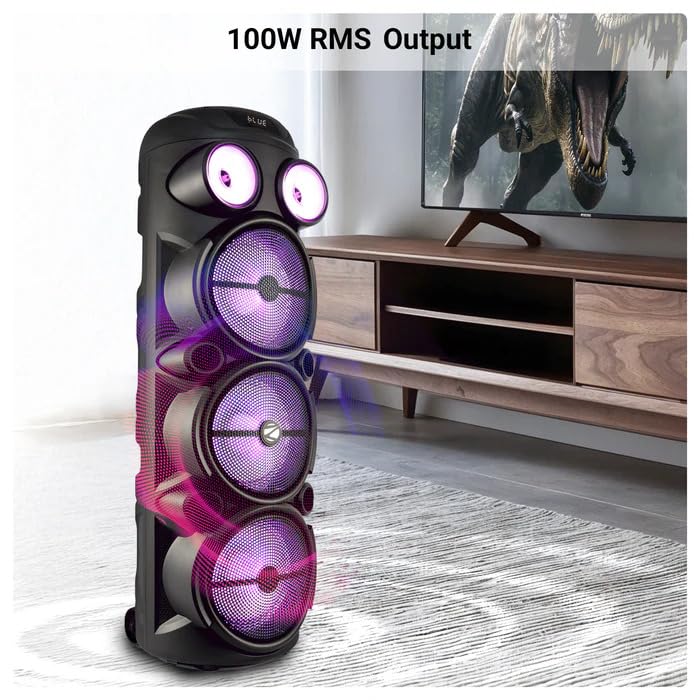
Image: The ZEBRONICS Zeb Vigor 100 Tower Speaker showcasing its 100W RMS output, positioned next to a television.
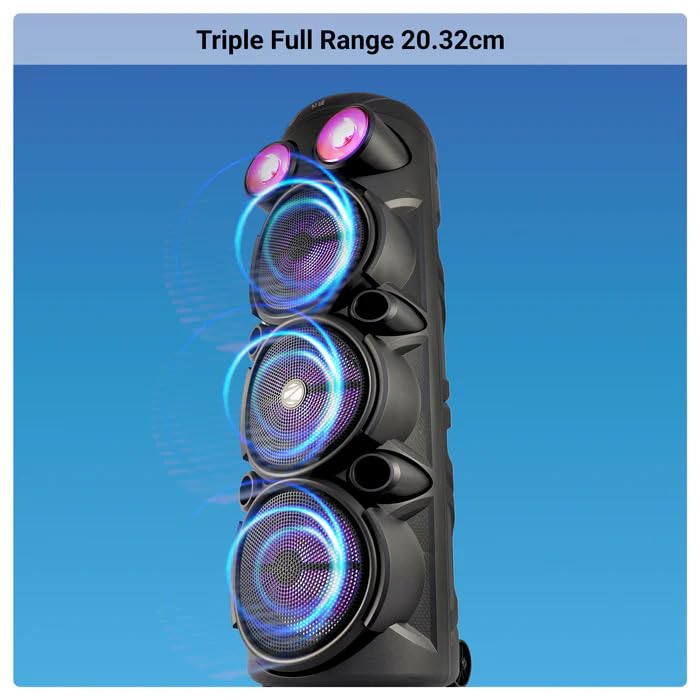
ምስል፡ መቀራረብ view of the ZEBRONICS Zeb Vigor 100 highlighting its triple full-range 20.32cm drivers.
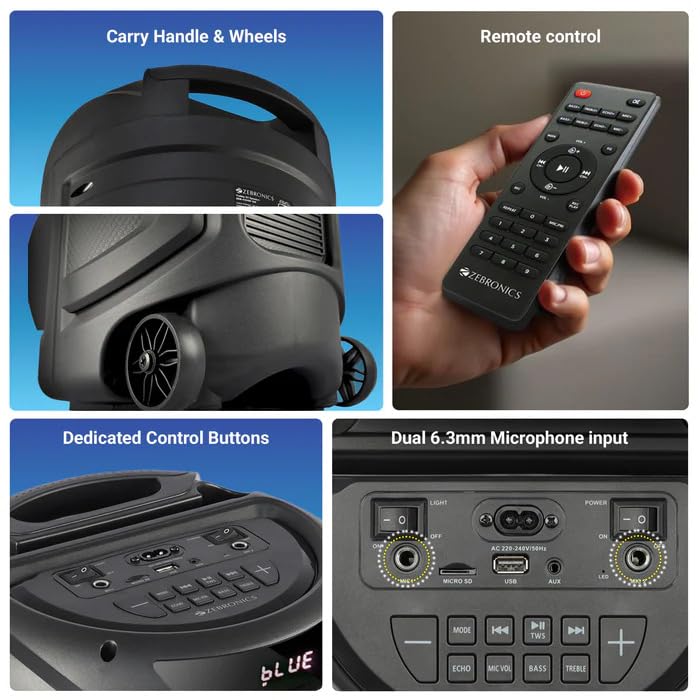
Image: A collage showing the speaker's carry handle and wheels for portability, the included remote control, the dedicated control buttons on the top panel, and the dual 6.3mm microphone inputs on the rear panel.
5. ማዋቀር
5.1 ድምጽ ማጉያውን መሙላት
Before initial use, fully charge the speaker. Connect the provided power cord to the speaker's AC input and a suitable power outlet. The charging time is approximately 9.8 hours. A full charge provides up to 5 hours of playback at 50% volume with LED lights off.
5.2 ማብራት / ማጥፋት
Locate the power switch on the speaker's control panel. Toggle the switch to the 'ON' position to power on the speaker. Toggle to 'OFF' to power off.
6. የአሠራር መመሪያዎች
6.1 Bluetooth Connection (BT v5.0)
- Power on the speaker. The speaker will automatically enter Bluetooth mode or you can select it using the 'MODE' button.
- በሞባይል መሳሪያዎ ወይም ኮምፒውተርዎ ላይ ብሉቱዝን ያንቁ።
- ፈልግ available devices and select "ZEB-VIGOR 100" from the list.
- Once paired, the speaker will indicate a successful connection, and you can begin playing audio.
6.2 USB/mSD Playback
- Insert a USB flash drive or mSD card (up to 32GB) containing MP3 audio fileወደ በሚመለከታቸው ወደብ s.
- The speaker will automatically detect the storage device and begin playback. If not, press the 'MODE' button to select USB or mSD mode.
- Use the control buttons or remote to play, pause, skip tracks, or adjust volume.
6.3 AUX ግቤት
- Connect one end of the 3.5mm input cable to the AUX port on the speaker.
- ሌላኛውን ጫፍ ከውጫዊ መሳሪያዎ የድምጽ ውፅዓት መሰኪያ ጋር ያገናኙ (ለምሳሌ፣ ስማርትፎን፣ MP3 ማጫወቻ)።
- Press the 'MODE' button to select AUX input.
- Control playback and volume from your external device or the speaker.
6.4 ኤፍኤም ሬዲዮ
- Press the 'MODE' button to select FM radio mode.
- Press the Play/Pause button to auto-scan and save available FM stations (frequency range 87.5 MHz - 108 MHz).
- በተቀመጡ ጣቢያዎች መካከል ለማሰስ የቀደመ/ቀጣይ ትራክ አዝራሮችን ይጠቀሙ።
6.5 Karaoke & Mic Recording Function
- Connect the wireless microphone or a wired microphone (not included) to one of the dual 6.3mm microphone inputs.
- Adjust the microphone volume and echo using the dedicated controls.
- To record, ensure a USB drive or mSD card is inserted. Press the 'REC' button (if available on the control panel/remote) to start recording. Press again to stop.
6.6 TWS (እውነተኛ ገመድ አልባ ስቴሪዮ) ተግባር
To connect two Zeb Vigor 100 speakers for a stereo experience:
- ሁለቱም ድምጽ ማጉያዎች መብራታቸውን እና በብሉቱዝ ሁነታ ላይ መሆናቸውን ያረጋግጡ።
- On one speaker (this will be the master), press and hold the 'TWS' button. The speaker will indicate it is searching for another TWS device.
- The two speakers will automatically pair. Once connected, they will function as a stereo pair.
- Connect your mobile device to the master speaker via Bluetooth as described in section 6.1.
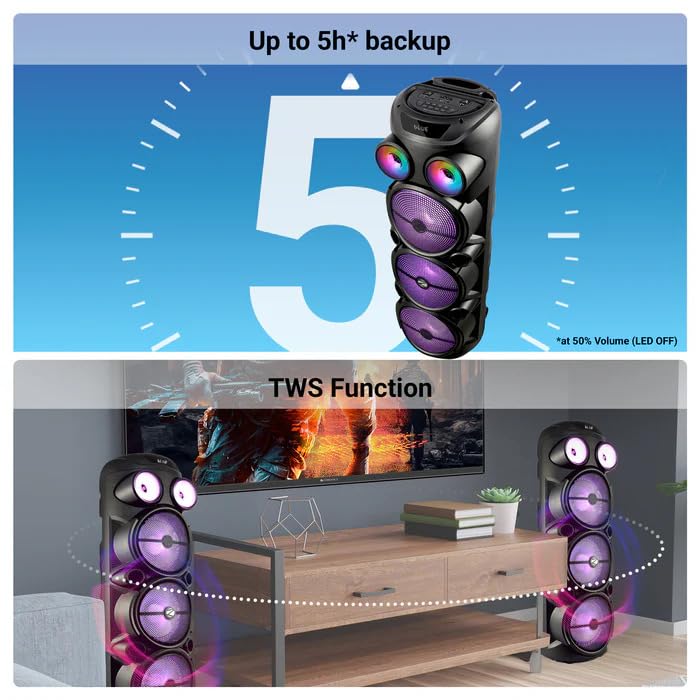
Image: The ZEBRONICS Zeb Vigor 100 speaker highlighting its up to 5-hour battery backup and the True Wireless Stereo (TWS) function, showing two speakers connected wirelessly.
6.7 RGB መብራቶች
The speaker features dynamic RGB lights. Use the dedicated 'LIGHT' switch or button on the control panel or remote to cycle through different light modes or turn them off.
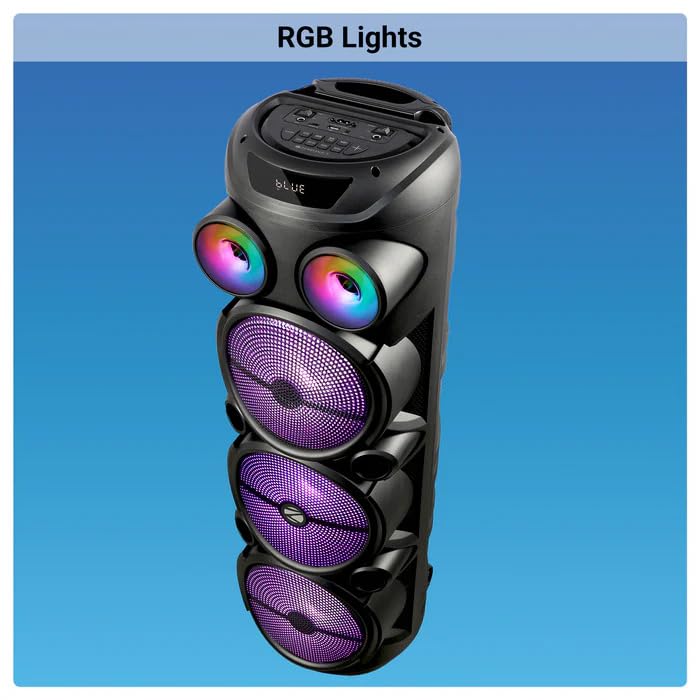
Image: The ZEBRONICS Zeb Vigor 100 Tower Speaker with its vibrant RGB lights illuminated.
6.8 የመቆጣጠሪያ ፓነል እና የርቀት መቆጣጠሪያ
The speaker features a top-mounted control panel with buttons for mode selection, playback control, volume adjustment, microphone controls, and light control. A remote control is also provided for convenient operation from a distance.
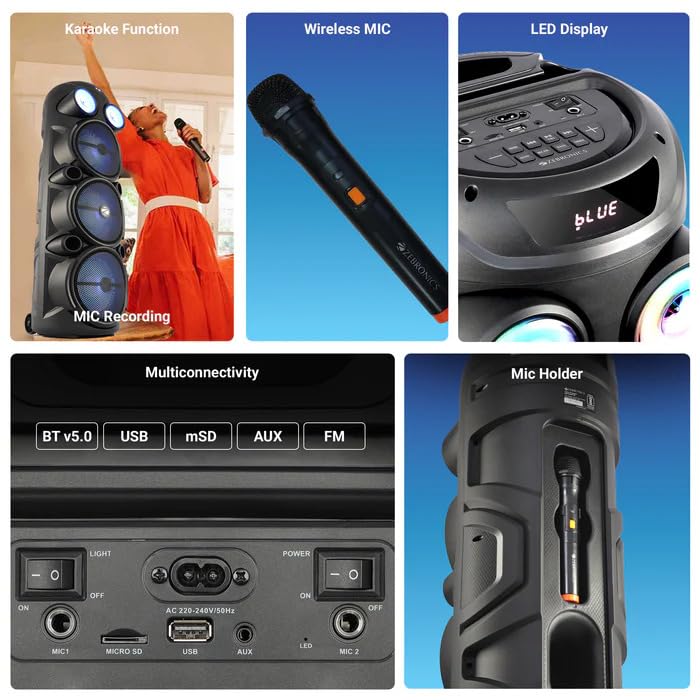
ምስል: ዝርዝር view of the ZEBRONICS Zeb Vigor 100's control panel, showing options for Bluetooth v5.0, USB, mSD, AUX, and FM connectivity, along with various control buttons.
7. ጥገና
- ማጽዳት፡ የድምጽ ማጉያውን ውጫዊ ክፍል ለማጽዳት ለስላሳ እና ደረቅ ጨርቅ ይጠቀሙ. ገላጭ ማጽጃዎችን ወይም ፈሳሾችን አይጠቀሙ.
- ማከማቻ፡ ረዘም ላለ ጊዜ ጥቅም ላይ በማይውልበት ጊዜ ድምጽ ማጉያውን በቀጥታ ከፀሀይ ብርሀን እና ከከፍተኛ ሙቀት ርቆ በቀዝቃዛና ደረቅ ቦታ ያከማቹ።
- የባትሪ እንክብካቤ የባትሪ ዕድሜን ለማራዘም በተደጋጋሚ ባትሪውን ሙሉ በሙሉ ከመሙላት ይቆጠቡ። በአገልግሎት ላይ ባይሆንም ተናጋሪውን በመደበኛነት ኃይል ይሙሉ።
8. መላ መፈለግ
| ችግር | ሊሆን የሚችል ምክንያት | መፍትሄ |
|---|---|---|
| ተናጋሪው አይበራም። | ባትሪው ተሟጧል ወይም የኃይል ገመዱ አልተገናኘም። | Charge the speaker or ensure the power cord is securely connected. |
| ምንም የድምፅ ውፅዓት የለም። | Volume is too low, incorrect mode selected, or device not properly connected. | Increase volume, select the correct input mode (BT, USB, AUX, FM), or re-establish connection. |
| የብሉቱዝ ማጣመር አልተሳካም። | Speaker is not in pairing mode, or device is too far. | Ensure speaker is in Bluetooth mode, move device closer, or clear previous pairings on your device. |
| ማይክሮፎን አይሰራም። | Microphone not powered on, or volume too low. | Ensure wireless mic has batteries and is powered on. Adjust mic volume. |
9. ዝርዝሮች
| ባህሪ | ዝርዝር መግለጫ |
|---|---|
| የውጤት ኃይል (RMS) | 100 ዋ |
| የአሽከርካሪ መጠን | Full range 20.32cm x 3, Tweeter 3.8cm |
| እክል | Full range 4Ω x 1, 8Ω x 2; Tweeter 8Ω |
| የድግግሞሽ ምላሽ | 65Hz-18kHz |
| S/N ሬሾ | ≥60 ዲቢቢ |
| File Format Support (USB/SD) | MP3 |
| የመስመር ግቤት | 3.5 ሚሜ |
| Max Supported USB/SD Memory Size | 32 ጊባ |
| የኤፍኤም ድግግሞሽ ክልል | 87.5 ሜኸ - 108 ሜኸ |
| የኃይል መሙያ ጊዜ | 9.8 ሰዓታት |
| የመልሶ ማጫወት ጊዜ | 5 hours* (at 50% Volume, LED OFF) |
| የብሉቱዝ ስም | ZEB-VIGOR 100 |
| የብሉቱዝ ስሪት | v5.0 |
| የምርት መጠን (ወ x D x H) | 28.6 x 28.5 x 90 ሴ.ሜ |
| የተጣራ ክብደት | 6.4 ኪ.ግ |
| የማገናኛ አይነት | አክስ፣ ዩኤስቢ |
| የሰርጦች ብዛት | 2 |
| የድምጽ ግቤት | Wired Microphone, Wireless Microphone, Line-Level Input |
| ቀለም | ጥቁር |
| ተስማሚ መሣሪያዎች | Audio Player, DJ Mixer, DVD Player, Drum, Guitar, Headphone, Headset, Karaoke System, Keyboard, Laptop, MP3 Player, Microphone, Piano, Smartphone, Tablet, Television |
10. ዋስትና እና ድጋፍ
10.1 የዋስትና መረጃ
The ZEBRONICS Zeb Vigor 100 Tower Speaker comes with a የ 1 ዓመት ዋስትና ከተገዛበት ቀን ጀምሮ። የግዢ ደረሰኝዎን ለዋስትና ጥያቄዎች ያስቀምጡ። ዋስትናው በመደበኛ የአጠቃቀም ሁኔታዎች ውስጥ የማምረቻ ጉድለቶችን ይሸፍናል።
10.2 አምራች
Zebronics India Pvt Ltd.
13/7 Smith Road, Royapettah, Chennai, Tamil Nadu - 600 002, India
10.3 የደንበኛ ድጋፍ
For technical assistance, service, or warranty inquiries, please contact Zebronics customer support through their official website or the contact information provided in the QR code guide included in your package.


