1. መግቢያ
The M-Vave SMK-37 Pro is a versatile musical instrument that combines the functionality of a modern MIDI controller with the sound capabilities of a classic FM synthesizer. Designed for both studio and mobile musicians, this device features 37 velocity-sensitive keys and a comprehensive set of controls, offering flexibility through wireless or USB connectivity.
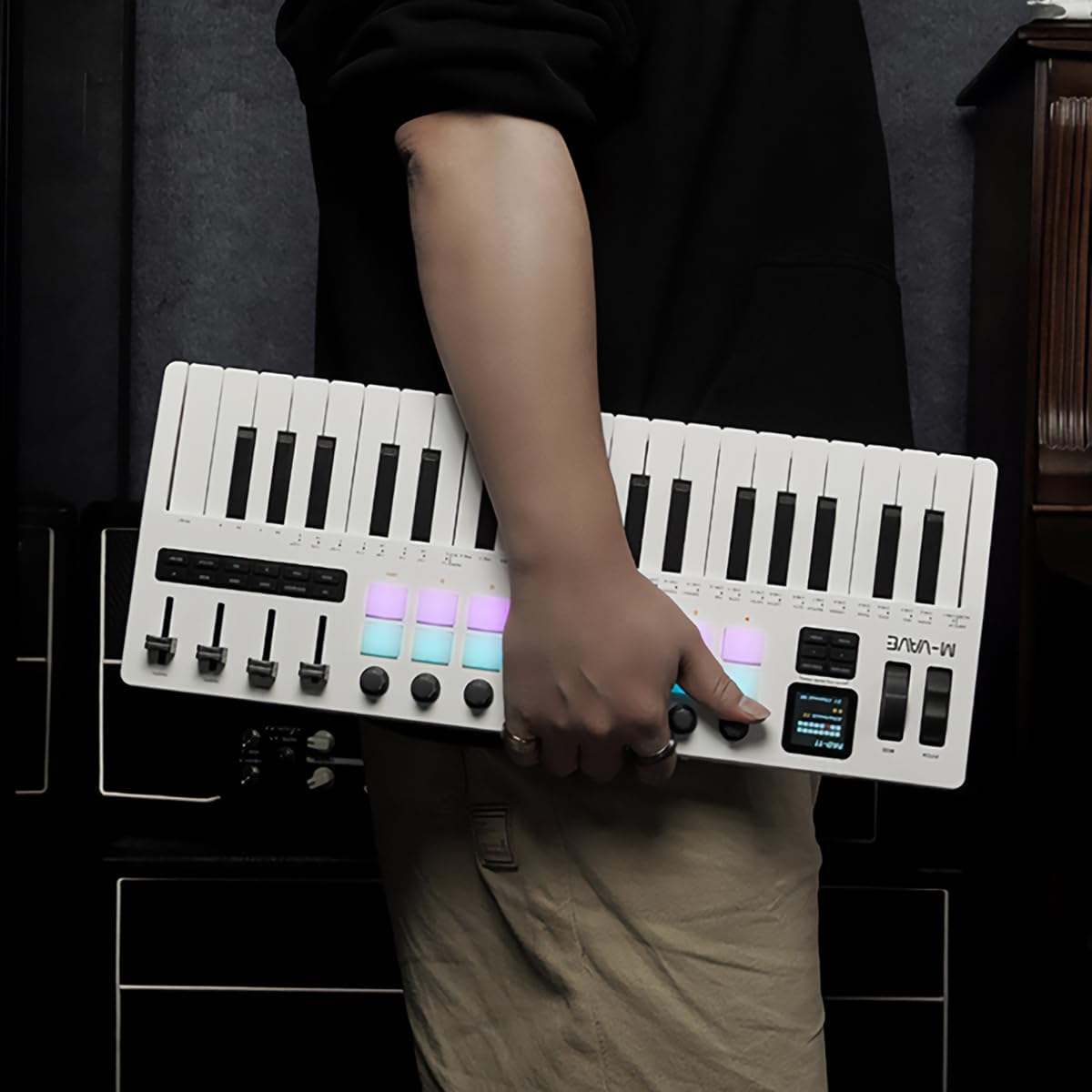
Figure 1.1: The M-Vave SMK-37 Pro is designed for portability, allowing musicians to create on the go.
2. ምርት አብቅቷልview
The SMK-37 Pro is engineered to provide extensive control and sound generation capabilities. Below is an overview of its key features and components.
2.1 ቁልፍ ባህሪያት
- 37 velocity-sensitive keys (3 octaves) for expressive play.
- Built-in FM synthesizer engine, inspired by the Yamaha DX7.
- 16 RGB illuminated drum pads for beat making and sample ቀስቅሴ.
- 8 assignable rotary knobs and 4 assignable faders for real-time control.
- USB-C connectivity for power and data, alongside Bluetooth 5.0 and 2.4G wireless MIDI.
- Integrated 2000mAh rechargeable battery for up to 8 hours of portable use.
- 1.54-inch color display for clear parameter feedback.
- Pitch bend and modulation wheels for dynamic performance.
- Octave transform and Smart Chord functions.
2.2 አካል መለየት

ምስል 2.1: የፊት view of the SMK-37 Pro, highlighting the keyboard, pads, and control surface.
- የቁልፍ ሰሌዳ፡ 37 velocity-sensitive keys.
- መንገዶች 16 RGB illuminated drum pads.
- አንጓዎች፡ 8 assignable rotary encoders.
- ፋደርስ፡ 4 assignable faders.
- ማሳያ፡- 1.54-inch color screen for parameter visualization.
- Pitch/Mod Wheels: For expressive control.

Figure 2.2: Rear panel of the SMK-37 Pro, showing connectivity options.
- ዩኤስቢ-ሲ ወደብ For charging and USB MIDI connection.
- የኃይል ቁልፍ፡- መሣሪያውን ለማብራት / ለማጥፋት.
- የድምጽ ውፅዓት፡- For monitoring the built-in FM synthesizer.
3. ማዋቀር
Follow these steps to set up your M-Vave SMK-37 Pro.
3.1 መሳሪያውን መሙላት
- Connect the included USB-C cable to the USB-C port on the rear of the SMK-37 Pro.
- የዩኤስቢ-ሲ ገመዱን ሌላኛውን ጫፍ ከተኳሃኝ የዩኤስቢ የኃይል አስማሚ (ያልተካተተ) ወይም ከኮምፒዩተር የዩኤስቢ ወደብ ጋር ያገናኙ።
- The device will begin charging. A full charge provides up to 8 hours of operation.
3.2 ማብራት / ማጥፋት
- To power on, press and hold the Power button on the rear panel until the display illuminates.
- ለማጥፋት፣ ማሳያው እስኪጠፋ ድረስ የኃይል አዝራሩን ተጭነው ይያዙት።
3.3 የግንኙነት አማራጮች
The SMK-37 Pro offers multiple ways to connect to your devices.
3.3.1 የዩኤስቢ MIDI ግንኙነት
- Connect the SMK-37 Pro to your computer using the USB-C cable.
- The device will be recognized as a standard MIDI input/output device by your operating system (Windows, macOS, iOS, Android).
- For Windows users, ensure you have Bluetooth 5.0 and an appropriate BLE MIDI driver installed for wireless functionality.
3.3.2 Wireless MIDI Connection (Bluetooth 5.0 / 2.4G)

Figure 3.1: Wireless connection guide for the SMK-37 Pro.
- Ensure the SMK-37 Pro is powered on.
- Activate Bluetooth on your Windows, macOS, iOS, or Android device.
- ፈልግ available Bluetooth devices and select "SMK-37 Pro" from the list.
- For 2.4G wireless MIDI, a compatible 2.4G receiver (sold separately) may be required. Refer to the receiver's instructions for pairing.
4. የአሠራር መመሪያዎች
This section details how to use the M-Vave SMK-37 Pro as both a MIDI controller and a standalone FM synthesizer.

Figure 4.1: The SMK-37 Pro in use, showcasing its interactive controls.
4.1 MIDI Controller Mode
The SMK-37 Pro functions as a universal MIDI controller, compatible with various Digital Audio Workstations (DAWs) and software instruments.
- Connecting to DAWs: Once connected via USB or wirelessly, select "SMK-37 Pro" as a MIDI input device in your DAW's preferences (e.g., Ableton Live, FL Studio, Logic Pro, GarageBand).
- Assigning Controls: The 16 RGB pads, 8 knobs, and 4 faders can be assigned to control parameters within your DAW or VST instruments. Refer to your DAW's manual for MIDI mapping instructions.
- Keys and Wheels: The 37 velocity-sensitive keys, pitch bend, and modulation wheels transmit standard MIDI messages for expressive performance.
4.2 Built-in FM Synthesizer Mode
The SMK-37 Pro features an integrated FM synthesizer engine, allowing you to create and play sounds directly from the device without external software.

Figure 4.2: The SMK-37 Pro's internal sound source can be monitored via headphones or external speakers.
- Sound Generation: The FM synth engine is inspired by the legendary Yamaha DX7, supporting DX7 patches.
- የልኬት ቁጥጥር፡ Use the onboard knobs and faders to edit synthesizer parameters such as algorithms, filters, envelopes, and effects. The 1.54-inch color display provides visual feedback on parameter values.
- ጠጋኝ አስተዳደር፡ Sounds can be played, edited, and stored directly on the device. Consult the on-screen menu for patch selection and saving procedures.
- የድምጽ ውፅዓት፡- Connect headphones or external speakers to the audio output jack on the rear panel to monitor the synthesizer's sound.
4.3 ማሳያ እና አሰሳ

Figure 4.3: The 1.54-inch display provides clear feedback on settings and parameters.
The 1.54-inch color display is your primary interface for navigating menus, adjusting parameters, and viewing patch information. Use the dedicated navigation buttons and rotary encoders near the display to browse options and confirm selections.
4.4 ልዩ ተግባራት
- Octave Transform: Use the dedicated octave buttons to shift the keyboard's range up or down.
- Smart Chord Function: This feature assists in playing chords with single key presses. Refer to the on-screen menu for activation and configuration.
- ገላጭ The built-in arpeggiator can generate rhythmic patterns from held notes. Settings for mode, octave, swing, tempo, and latch can be adjusted via the display.
5. ጥገና
Proper care will ensure the longevity and optimal performance of your SMK-37 Pro.
- ማጽዳት፡ የመሳሪያውን ወለል ለማጽዳት ለስላሳ እና ደረቅ ጨርቅ ይጠቀሙ። ለጠንካራ ቆሻሻ፣ ትንሽ ጠጣርamp ጨርቅ መጠቀም ይቻላል, ከዚያም ደረቅ. ገላጭ ማጽጃዎችን ወይም ፈሳሾችን ያስወግዱ።
- ማከማቻ፡ መሳሪያውን ከፀሐይ ብርሃን፣ ከፍተኛ ሙቀት እና ከፍተኛ እርጥበት ራቅ ባለ ቀዝቃዛና ደረቅ ቦታ ያስቀምጡ።
- አያያዝ፡ መሳሪያውን ከመጣል ወይም ለጠንካራ ተጽእኖዎች ከማድረግ ተቆጠብ። ከባድ ዕቃዎችን በላዩ ላይ አታስቀምጥ.
- የባትሪ እንክብካቤ For optimal battery life, avoid fully discharging the battery frequently. If storing for extended periods, charge the battery to approximately 50% every few months.
6. መላ መፈለግ
If you encounter issues with your M-Vave SMK-37 Pro, refer to the following common solutions.
| ችግር | ሊሆን የሚችል ምክንያት | መፍትሄ |
|---|---|---|
| መሣሪያው አይበራም። | ዝቅተኛ ባትሪ ወይም የኃይል ገመድ አልተገናኘም። | Charge the device using the USB-C cable. Ensure the power button is pressed and held correctly. |
| No sound from the built-in synth. | Volume too low, headphones/speakers not connected, or incorrect patch selected. | Check the volume level on the device and connected audio equipment. Ensure headphones or speakers are properly connected to the audio output. Select a different patch. |
| MIDI በኮምፒውተር/DAW አልታወቀም። | Incorrect connection, driver issues (Windows), or DAW settings. | Ensure USB-C cable is securely connected or Bluetooth is paired. For Windows, verify Bluetooth 5.0 and BLE MIDI driver installation. Check your DAW's MIDI input settings to ensure SMK-37 Pro is enabled. |
| የገመድ አልባ ግንኙነት ያልተረጋጋ። | ጣልቃ ገብነት፣ ርቀት ወይም ዝቅተኛ ባትሪ። | Move the device closer to your host device. Ensure no other wireless devices are causing interference. Charge the SMK-37 Pro. |
| ፓዶች ወይም ቁልፎች ምላሽ አይሰጡም። | Software issue or device malfunction. | Restart the device. If the issue persists, perform a factory reset (refer to advanced settings in the display menu). Contact support if the problem continues. |
7. ዝርዝሮች
Detailed technical specifications for the M-Vave SMK-37 Pro.
- የሞዴል ስም፡- M-Vave SMK-37 Midikeyboard w/built-in Synth
- የሞዴል ቁጥር፡- MVA-SMK37 Pro
- ቁልፎች፡- 37 velocity-sensitive keys (3 octaves)
- መንገዶች 16 RGB illuminated drum pads
- መቆጣጠሪያዎች፡- 8 rotary knobs, 4 faders, Pitch bend, Modulation wheel
- ማሳያ፡- ባለ 1.54 ኢንች የቀለም ማሳያ
- ግንኙነት፡ USB-C, Bluetooth 5.0, 2.4G wireless MIDI
- ባትሪ፡ አብሮ የተሰራ 2000mAh ዳግም ሊሞላ የሚችል ባትሪ
- የባትሪ ህይወት፡ እስከ 8 ሰዓታት (ግምታዊ)
- Synthesizer: Built-in FM synthesizer (DX7-based)
- ተኳኋኝነት ዊንዶውስ ፣ ማክሮስ ፣ አይኦኤስ ፣ አንድሮይድ
- የሚደገፍ ሶፍትዌር፡ Ableton Live, FL Studio, Logic Pro, GarageBand, Carl Martin Studio (and other DAWs)
- የተካተቱ አካላት፡- የዩኤስቢ ገመድ
- የእቃው ክብደት፡ 1 ኪሎ ግራም
8. ዋስትና እና ድጋፍ
For warranty information and technical support, please contact M-VAVE customer service through their official webድህረ ገጽ ወይም ቸርቻሪዎን። የግዢ ደረሰኝዎን እንደ ግዢ ማረጋገጫ ያስቀምጡ።
- የመስመር ላይ ድጋፍ Visit the M-VAVE official webለተደጋጋሚ ጥያቄዎች፣ ለአሽከርካሪዎች የሚወርዱ ውርዶች እና የእውቂያ መረጃ ጣቢያ።
- የምርት ምዝገባ ዝማኔዎችን እና ድጋፍን ለመቀበል ምርትዎን በመስመር ላይ ያስመዝግቡ።


