መግቢያ
The FEELWORLD FW759PRO is a 7-inch full HD IPS touchscreen camera monitor designed to enhance your video production workflow. It features a 1280x800 resolution, 1000:1 contrast ratio, and a 178° ultra-wide viewing angle, providing a clear and detailed display for precise monitoring. This manual will guide you through the setup, operation, and maintenance of your FW759PRO monitor.
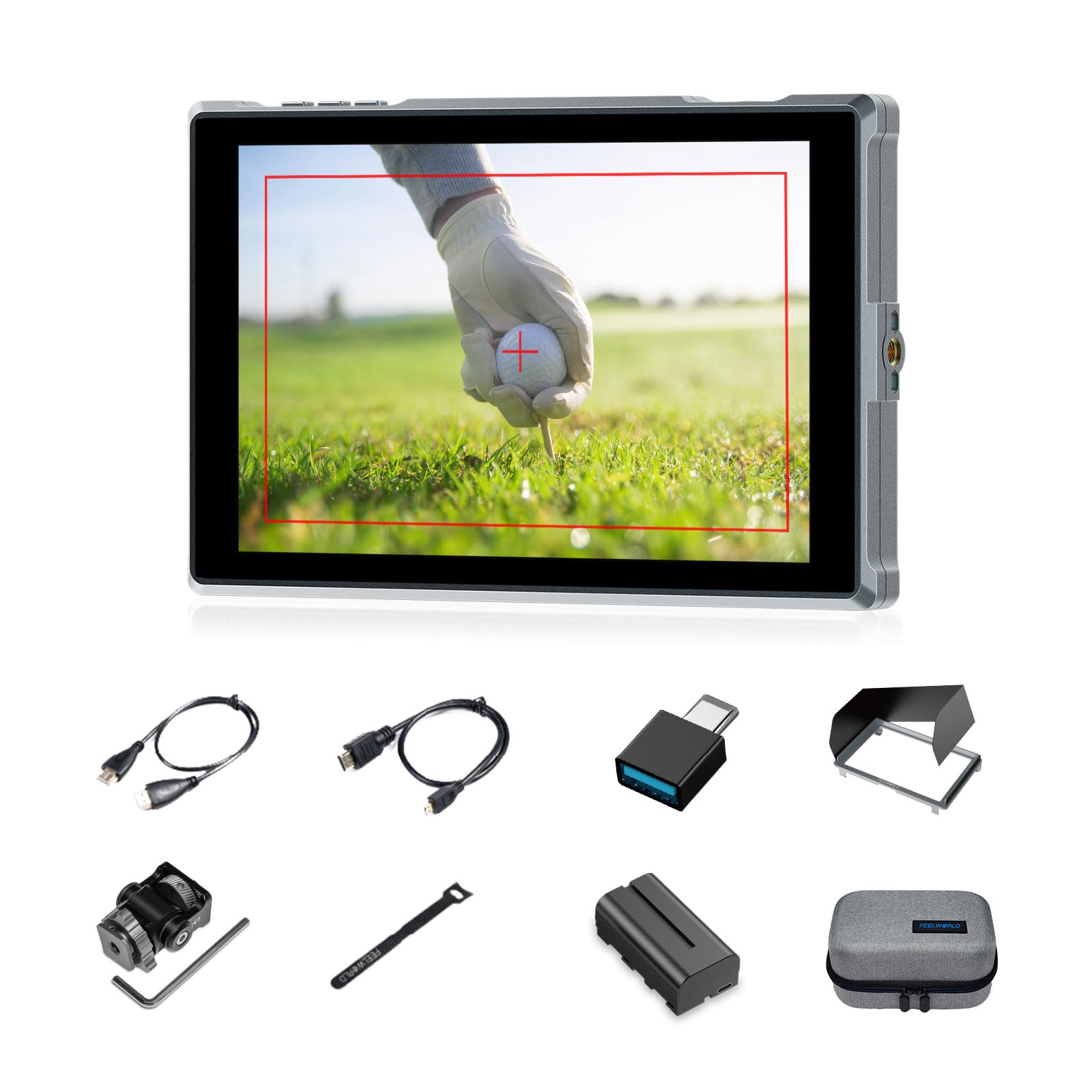
Figure 1: FEELWORLD FW759PRO Monitor Overview
ቁልፍ ባህሪዎች
- 7-inch Full HD IPS Touchscreen (1280x800 resolution)
- 4K HDMI Input & Output (up to 4K30Hz) and AV Input
- Slim and Lightweight Design (22mm thickness, 300g weight)
- Multiple Power Options: NP-F series battery, 12V DC IN, 5V Type-C
- Advanced Monitoring Functions: Histogram, Embedded Audio, False Colors, Peaking Filter, etc.
- Customizable Features: 4 groups of menu settings, 9:16 vertical screen marker
ማዋቀር
1. የጥቅል ይዘቶች
ሁሉም እቃዎች በጥቅሉ ውስጥ መኖራቸውን ያረጋግጡ፡-
- 1 x FW759PRO Monitor
- 1 x HDMI ገመድ
- 1 x ማይክሮ ኤችዲኤምአይ ገመድ
- 1 x Mini Hot Shoe Mount + Hex Wrench
- 1 x ዩኤስቢ-ኤ ወደ ዩኤስቢ-ሲ አስማሚ
- 1 x Sun Shade + Frame
- 1 x Cable Management Tie
- 1 x ፈጣን ጅምር መመሪያ
- 1 x F550 Battery
- 1 x ቦርሳ

ምስል 2: የተካተቱ መለዋወጫዎች
2. ሞኒተሩን ማብቃት
The FW759PRO offers three power options:
- NP-F Series Battery: Attach a compatible NP-F series battery to the battery plate on the rear of the monitor.
- 12V ዲሲ ውስጥ፡ Connect a 12V DC power adapter (not included, suitable for 1A, DC 5.5*2.1mm plug) to the "DC IN 12V" port.
- 5V Type-C: Connect a 5V/2A (or higher) Type-C power source to the "TYPE-C 5V" port.

ምስል 3: የኃይል ግቤት አማራጮች
3. ተቆጣጣሪውን መትከል
The monitor features two 1/4"-20 mounting ports on its sides for versatile attachment to camera rigs, arms, or tripods. Use the included mini hot shoe mount to attach it to your camera's hot shoe or cold shoe mount.

Figure 4: 1/4 Inch Mounting Ports
4. Connecting to a Camera/Device
The FW759PRO supports 4K HDMI and AV inputs:
- የኤችዲኤምአይ ግቤት Connect your camera or video source using an HDMI cable to the HDMI port. The monitor supports up to 4K30Hz signals.
- የኤቪ ግቤት፡ For specialized or legacy devices, use the AV input port.

ምስል 5፡ የግንኙነት ወደቦች
የአሠራር መመሪያዎች
1. ማብራት / ማጥፋት
ለማንቃት ወይም ለማጥፋት በሞኒተሩ የላይኛው ጠርዝ ላይ ያለውን የኃይል ቁልፍ ተጭነው ይያዙት።
2. የንክኪ ማያ ገጽ አሠራር
The FW759PRO features an intuitive touchscreen interface for menu navigation and function control.
- የጀርባ ብርሃን አስተካክል; Swipe up/down on the left half of the screen.
- የድምጽ መጠን አስተካክል; Swipe up/down on the right half of the screen.
- Access Shortcut Menu: Swipe up/down on the bottom of the screen.

ምስል 6፡ የንክኪ ማያ ገጽ ምልክቶች
3. Menu Navigation and Custom Buttons
Access the main menu by tapping the screen. Navigate through options using touch. The monitor also features customizable function buttons (F1, F2, F3) on the top edge, allowing quick access to frequently used features.

Figure 7: Menu and Custom Buttons
4. Advanced Monitoring Functions
The FW759PRO includes several tools for precise exposure and focus control:
- ሂስቶግራም Displays the tonal distribution of your image.
- ከፍተኛ ጥራት ያለው ማጣሪያ; ትኩረትን ለማጎልበት የሚረዱ ሹል ጠርዞችን ያጎላል።
- የተከተተ ኦዲዮ፡ የድምፅ ደረጃዎችን ይቆጣጠራል።
- የውሸት ቀለሞች: Helps set exposure by displaying different exposure levels as distinct colors.
- የማጣሪያ መስክ፡ Assists in calibrating the monitor.
- ዘጠኝ ፍርግርግ፦ Aids in composition.
- Screen Marker: Various aspect ratio markers for framing.
- የመሃል ምልክት ማድረጊያ ፦ Marks the center of the screen.
- የሬሾ ምልክት ማድረጊያ፦ Provides different aspect ratio guides.
- ቅኝት Adjusts the display area.
- አናሞርፊክ ሁነታ፡ አናሞርፊክ ፉን ጨመቀtage (1.33x, 1.6x, 2.0x, or custom).
- የምስል ተንሸራታች ምስሉን በአግድም ወይም በአቀባዊ ይገለብጠዋል።
- የምስል እሰር Freezes the current frame.
- አጉላ፡ ለዝርዝር ምርመራ የምስሉን የተወሰነ ክፍል ያጎላል።
- ከፒክስል ወደ ፒክስል፦ ምስሉን ሳይለካ በመነሻ ጥራቱ ያሳያል።

Figure 8: Auxiliary Functions Overview

Figure 9: False Color Function

Figure 10: Anamorphic Mode
5. New Feature Upgrades
- 9:16 Vertical Screen Marker: Ideal for content creators producing vertical video for platforms like TikTok and YouTube Shorts.
- 4 Groups Menu Setting Saving: Save up to four custom menu configurations for quick recall. Once settings are adjusted, they save automatically and can be called directly.

Figure 11: 9:16 Vertical Screen Marker
ጥገና
1. ተቆጣጣሪውን ማጽዳት
- የማሳያውን ስክሪን እና አካል በቀስታ ለማጽዳት ለስላሳ፣ ከላጣ ነፃ የሆነ ጨርቅ ይጠቀሙ።
- ለግትር ማጭበርበሮች በትንሹ መampጨርቁን በውሃ ወይም በስክሪን ላይ ደህንነቱ የተጠበቀ የጽዳት መፍትሄ ያድርቁት።
- Avoid using harsh chemicals, solvents, or abrasive materials, as these can damage the screen or finish.
2. የባትሪ እንክብካቤ
- ጥቅም ላይ በማይውልበት ጊዜ ባትሪዎችን በቀዝቃዛና ደረቅ ቦታ ያከማቹ.
- Avoid fully discharging lithium-ion batteries frequently to prolong their lifespan.
- ረዘም ላለ ጊዜ የሚከማች ከሆነ ባትሪዎችን በግምት ከ50-60% አቅም ይሙሉ።
መላ መፈለግ
No Signal Displayed
- የኬብል ግንኙነቶችን ይፈትሹ; Ensure HDMI or AV cables are securely connected to both the monitor and the camera/source.
- የግቤት ምንጭ ያረጋግጡ፡- Confirm that the correct input source (HDMI or AV) is selected on the monitor.
- Camera Output Settings: Check your camera's video output settings to ensure it is sending a signal and that the resolution/frame rate is compatible with the monitor (up to 4K30Hz).
- Test with Another Cable/Device: If possible, try a different HDMI/AV cable or connect the monitor to another video source to isolate the issue.
Monitor Does Not Power On
- ባትሪ ይፈትሹ፡ Ensure the NP-F battery is charged and correctly installed.
- የኃይል አስማሚን ያረጋግጡ፡ If using DC IN or Type-C, confirm the power adapter is connected and providing sufficient power (12V DC IN, 5V/2A Type-C).
- የኃይል ቁልፍ፡- Ensure the power button is pressed and held for a few seconds to initiate power-on.
የማያ ንክኪ ምላሽ የማይሰጥ
- Restart Monitor: Power off and then power on the monitor.
- ንጹህ ማያ ገጽ; ስክሪኑ ንፁህ እና የንክኪ ግቤትን ሊያደናቅፉ ከሚችሉ ፍርስራሾች ወይም እርጥበት የጸዳ መሆኑን ያረጋግጡ።
ዝርዝሮች
| ባህሪ | ዝርዝር |
|---|---|
| የምርት ስም | ስሜት |
| የሞዴል ስም | FW759PRO |
| የስክሪን መጠን | 7 ኢንች |
| ጥራት | 1280x800 |
| ምጥጥነ ገጽታ | 16፡10 |
| የንፅፅር ሬሾ | 1000፡1 |
| የማሳያ ዓይነት | አይፒኤስ |
| Viewማእዘን | 178 ዲግሪዎች |
| የግንኙነት ቴክኖሎጂ | ረዳት፣ ኤችዲኤምአይ |
| የሃርድዌር ግንኙነት | HDMI |
| ተጨማሪ ባህሪያት | Touchscreen, Portable |
| የምላሽ ጊዜ | 2 ሚሊሰከንዶች |
| Total Number of HDMI Ports | 2 |
| አምራች | LAIZESKE |
ዋስትና እና ድጋፍ
የዋስትና መረጃ
The FEELWORLD FW759PRO monitor comes with a የ 1 ዓመት ዋስትና ከተገዛበት ቀን ጀምሮ. ይህ ዋስትና በመደበኛ አጠቃቀም ላይ የምርት ጉድለቶችን እና ጉድለቶችን ይሸፍናል። ለዋስትና ጥያቄዎች እባክዎ የግዢ ማረጋገጫዎን ያቆዩ።
For detailed warranty terms and conditions, please refer to the official FEELWORLD webጣቢያ ወይም የደንበኛ ድጋፍን ያግኙ።
የደንበኛ ድጋፍ
If you encounter any issues not covered in this manual or require further assistance, please contact FEELWORLD customer support. Contact information can typically be found on the official FEELWORLD webጣቢያ ወይም ከምርትዎ ጋር በተካተተው ፈጣን ጅምር መመሪያ ውስጥ።


