1. መግቢያ
This manual provides instructions for the safe and efficient operation of your vretti Bluetooth Thermal Label Printer, model B0FNW9FCS5. Please read this manual thoroughly before using the device and retain it for future reference.
2. የደህንነት መረጃ
- Ensure the printer is connected to a power source with the correct voltage.
- አታሚውን ለውሃ ወይም ከመጠን በላይ እርጥበት አያጋልጡት።
- ማተሚያውን በቀጥታ የፀሐይ ብርሃን ውስጥ ወይም በሙቀት ምንጮች አጠገብ ከማስቀመጥ ይቆጠቡ.
- አታሚውን እራስዎ ለመበተን ወይም ለመጠገን አይሞክሩ። ብቃት ያላቸውን የአገልግሎት ባለሙያዎችን ያነጋግሩ።
- ልጆች በማይደርሱበት ቦታ ያስቀምጡ.
- Use only vretti approved accessories and power adapters.
3. የጥቅል ይዘቶች
ሁሉም እቃዎች በጥቅሉ ውስጥ መኖራቸውን ያረጋግጡ፡-
- vretti Bluetooth Thermal Label Printer (Model B0FNW9FCS5)
- የኃይል አስማሚ
- የዩኤስቢ ገመድ
- ፈጣን ጅምር መመሪያ
- Sample Labels (50 premium labels)
4. ማዋቀር
4.1 አካላዊ ግንኙነት
- የኃይል አስማሚውን ከአታሚው ጋር እና ከዚያም ከኃይል መውጫ ጋር ያገናኙ።
- የዩኤስቢ ገመዱን ከአታሚው ወደ ኮምፒውተርዎ ያገናኙ (የዩኤስቢ ግንኙነት የሚጠቀሙ ከሆነ)።
- የኃይል ማብሪያ / ማጥፊያውን በመጠቀም ማተሚያውን ያብሩ.
4.2 መለያዎችን መጫን
The printer features an integrated paper bin designed for easy label loading.
- የአታሚውን የላይኛው ሽፋን ይክፈቱ.
- Place the roll of thermal labels into the integrated paper bin. Ensure the labels feed from the bottom of the roll and the printable side faces upwards.
- Adjust the guide rails to fit the width of your labels snugly, without creasing them. The printer supports label widths from 0.78 inches (19mm) to 4.6 inches (116mm).
- Feed the first label through the print mechanism until it is positioned correctly.
- የላይኛውን ሽፋን ይዝጉ.

ምስል 4.2.1፡ Label loading into the integrated paper bin. The visualization window allows monitoring label supply. Adjustable guide rails ensure proper label alignment for various sizes like 2"x3", 3"x3", and 4"x6".
4.3 የአሽከርካሪ እና የሶፍትዌር ጭነት
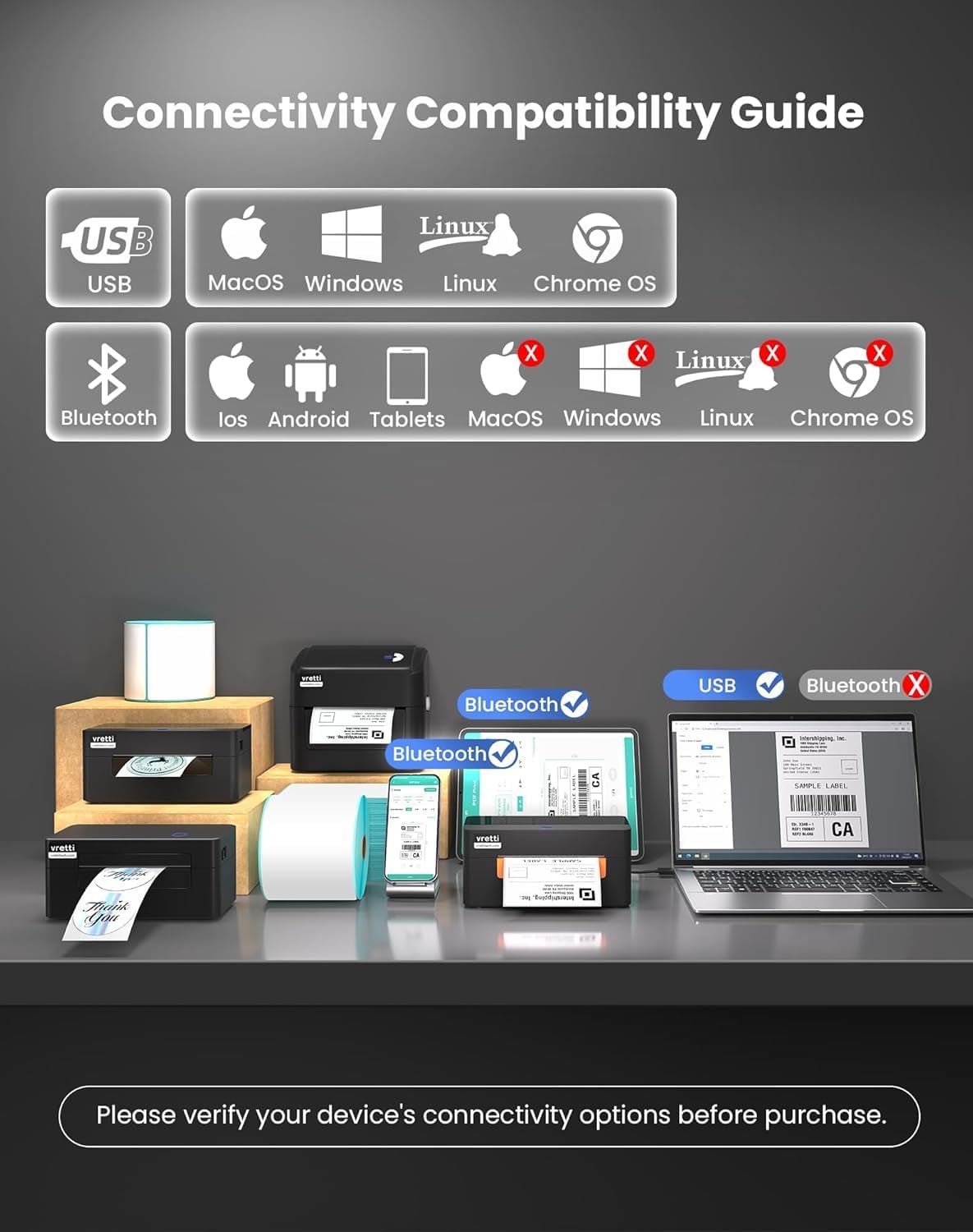
The vretti printer offers dual connectivity options: USB and Bluetooth.

ምስል 4.3.1፡ Connectivity Compatibility Guide. USB connection is compatible with MacOS, Windows, Linux, and Chrome OS. Bluetooth connection is compatible with iOS, Android, and Tablets. Bluetooth is not supported for MacOS, Windows, Linux, or Chrome OS.
4.3.1 USB Connection (Windows/Mac/Linux/ChromeOS)
For most operating systems, the printer is designed for "Plug & Play" functionality. Connect the USB cable, and your system should automatically detect and install the necessary drivers within approximately 60 seconds. If drivers do not install automatically, refer to the included Quick Start Guide or the manufacturer's website for manual driver installation instructions.
ምስል 4.3.2፡ The vretti label printer is designed for quick deployment, allowing users to master its operation rapidly, often within 2 minutes for basic setup.
4.3.2 Bluetooth Connection (iOS/Android/Tablets)
- Ensure Bluetooth is enabled on your mobile device or tablet.
- Turn on the vretti printer.
- On your device, search for available Bluetooth devices and select the vretti printer (e.g., "vretti Printer" or similar).
- የማጣመሪያ ሂደቱን ለማጠናቀቅ ማንኛውንም የስክሪን ላይ ጥያቄዎችን ይከተሉ።
- Install the vretti printing application from your device's app store (e.g., Apple App Store, Google Play Store) to manage print jobs.
5. የአሠራር መመሪያዎች
5.1 የህትመት መለያዎች
The vretti thermal label printer uses direct thermal printing technology, eliminating the need for toner or ink. It is optimized for 4x6 inch shipping labels and barcodes.
- Ensure labels are properly loaded (refer to Section 4.2).
- ለማተም የሚፈልጉትን ሰነድ ወይም መተግበሪያ ይክፈቱ።
- ከመተግበሪያው ምናሌ ውስጥ "አትም" የሚለውን ይምረጡ.
- Choose the vretti printer from the list of available printers.
- Adjust print settings as needed, such as label size (e.g., 4x6 inches) and orientation.
- የህትመት ስራውን ይጀምሩ.

ምስል 5.1.1፡ The printer delivers 203 dpi resolution, ensuring clear and scannable barcodes with a 99.99% recognition rate for labels such as DHL 4x6 shipping labels and QR codes.

ምስል 5.1.2፡ The vretti printer offers a print speed of 152 mm/s, capable of producing 72 labels per minute. Its direct thermal technology eliminates ink/toner, leading to significant cost savings and a print head lifespan three times longer than standard printers.
6. ጥገና
6.1 የህትመት ጭንቅላትን ማጽዳት
The printer features automatic cleaning functionality. However, if print quality degrades, manual cleaning may be necessary.
- ማተሚያውን ያጥፉ እና ከኃይል ምንጭ ያላቅቁት.
- የላይኛውን ሽፋን ይክፈቱ.
- የህትመት ጭንቅላቱን በሊንት-አልባ ጨርቅ በቀስታ ይጥረጉampበ isopropyl አልኮሆል የተስተካከለ።
- ሽፋኑን ከመዝጋት እና አታሚውን ከማብራትዎ በፊት የህትመት ጭንቅላቱ ሙሉ በሙሉ እንዲደርቅ ይፍቀዱለት።
6.2 አጠቃላይ ጽዳት
የአታሚውን ውጫዊ ክፍል ለስላሳና ደረቅ ጨርቅ ይጥረጉ። የማጽጃ ማጽጃዎችን ወይም ማሟሟቶችን አይጠቀሙ።
7. መላ መፈለግ
| ችግር | ሊሆን የሚችል ምክንያት | መፍትሄ |
|---|---|---|
| አታሚ አልበራም። | No power, faulty power adapter | የኃይል ግንኙነቶችን ይፈትሹ፣ የተለየ መውጫ ይሞክሩ። |
| ደካማ የህትመት ጥራት | Dirty print head, incorrect label type, low-quality labels | Clean the print head (Section 6.1). Ensure you are using thermal labels. Try new labels. |
| መለያዎች በትክክል አይመገቡም። | Labels improperly loaded, guide rails not adjusted | Reload labels, adjust guide rails (Section 4.2). |
| በብሉቱዝ መገናኘት አልተቻለም | Bluetooth not enabled, incorrect pairing, device incompatibility | Ensure Bluetooth is on. Re-pair the device. Confirm your device is compatible (iOS/Android/Tablets only). |
| Printer not recognized by computer (USB) | Driver issue, faulty USB cable, incorrect port | Try a different USB port or cable. Reinstall drivers if necessary. |
8. ዝርዝሮች
| ባህሪ | ዝርዝር |
|---|---|
| የምርት ስም | vretti |
| የሞዴል ቁጥር | B0FNW9FCS5 |
| የህትመት ቴክኖሎጂ | ቀጥተኛ የሙቀት |
| የህትመት ጥራት | 203 ዲፒአይ |
| የህትመት ፍጥነት | Up to 152 mm/s (72 labels/min) |
| መለያ ስፋት | 0.78" - 4.6" (19 ሚሜ - 116 ሚሜ) |
| ግንኙነት | USB (Windows/Mac/Linux/ChromeOS), Bluetooth 5.0 (iOS/Android/Tablets) |
| ከፍተኛው የሉህ አቅም | 500 labels (integrated bin) |
| ልኬቶች (L x W x H) | 29.5 x 20.5 x 18.8 ሴሜ (በግምት) |
| የኃይል ምንጭ | ውጫዊ የኃይል አስማሚ |
9. ዋስትና እና ድጋፍ
vretti products are manufactured to high-quality standards. For warranty information and technical support, please refer to the warranty card included with your product or visit the official vretti website. Please have your model number (B0FNW9FCS5) and purchase date available when contacting support.


