1. ምርት አብቅቷልview
The Keychron M6 Silent Wireless Gaming Mouse is designed for optimal comfort and performance across various tasks, from gaming to productivity. It features a lightweight, ergonomic design, versatile connectivity options, and a high-precision optical sensor. This manual provides detailed instructions for setup, operation, and maintenance.

Image: Keychron M6 Silent Wireless Gaming Mouse, showcasing its ergonomic shape and main buttons.
2. ቁልፍ ባህሪያት
- Ultra-Ergonomic & Lightweight Design: The M6 mouse combines a compact, ergonomic shape with a lightweight 86g body for extended comfort. It includes over ten customizable buttons and an infinite metal scroll wheel.
- Stable Wireless with Ultra-Low Latency: Experience reliable 2.4GHz wireless performance with a 1000Hz polling rate. The M6 also supports Bluetooth 5.3 for multi-device use and flexible switching.
- High-Precision PixArt 3395 Sensor: Equipped with the advanced PixArt 3395 optical sensor, the M6 provides up to 26,000 DPI, 650 IPS tracking speed, and pinpoint accuracy.
- Infinite Scroll & Premium Metal Wheel: Features dual scrolling modes: smooth, infinite scroll for fast navigation and tactile mode for precision. The solid metal wheel offers a quiet, premium feel.
- Fully Programmable via Keychron Engine Software: Customize every button with Keychron Engine software on macOS and Windows. Create shortcuts, set macros, adjust DPI, polling rate, and LOD.
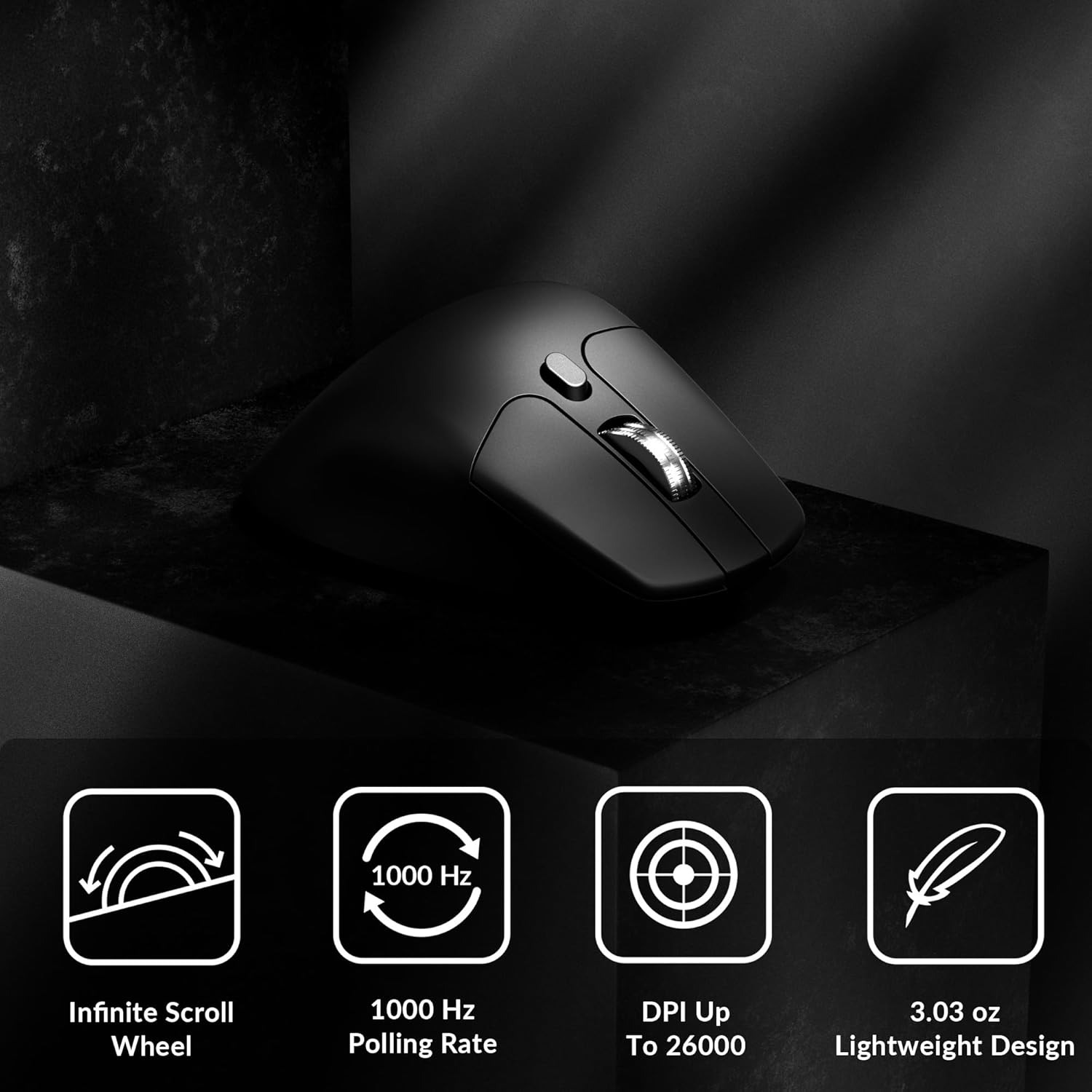
Image: Icons illustrating key features: Infinite Scroll Wheel, 1000 Hz Polling Rate, DPI Up To 26000, and Lightweight Design.
3. ማዋቀር
3.1 የጥቅል ይዘቶች
ሁሉም እቃዎች በጥቅሉ ውስጥ መኖራቸውን ያረጋግጡ፡-
- 1x Keychron M6 Mouse
- 1 x ዓይነት-C ወደ ዓይነት-C ገመድ
- 1x አይነት-A ወደ አይነት-C አስማሚ
- 1x የኤክስቴንሽን አስማሚ ለተቀባይ
- 1 x ዓይነት-C 2.4 GHz ተቀባይ
- 1x አይነት-A 2.4 GHz ተቀባይ
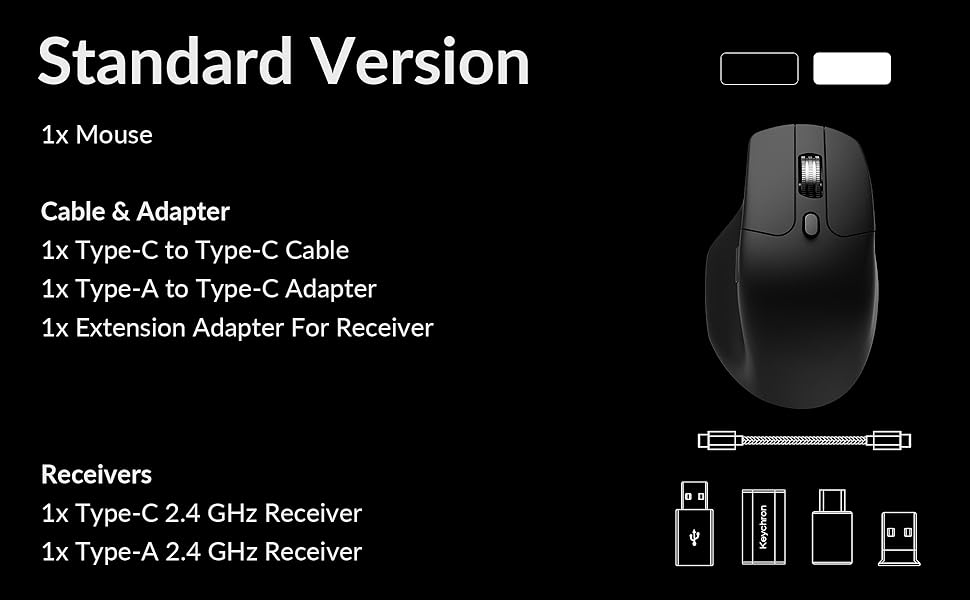
Image: Diagram showing the contents of the Keychron M6 mouse package.
3.2 የመጀመሪያ ደረጃ መሙላት
Before first use, it is recommended to fully charge the mouse. Connect the mouse to your computer using the provided Type-C cable. The LED indicator will show charging status.
3.3 አይጤን በማገናኘት ላይ
The Keychron M6 supports three connection modes: 2.4GHz wireless, Bluetooth 5.3, and wired.
- 2.4GHz ገመድ አልባ: Insert the 2.4GHz receiver (Type-A or Type-C) into your computer's USB port. Switch the mode switch on the bottom of the mouse to 'G' (Gaming) mode. The mouse should connect automatically.
- ብሉቱዝ 5.3: Switch the mode switch on the bottom of the mouse to 'B' (Bluetooth) mode. On your computer, search for Bluetooth devices and select 'Keychron M6' to pair.
- ባለገመድ: Connect the mouse directly to your computer using the provided Type-C cable. The mouse will function in wired mode and charge simultaneously.

Image: Keychron M6 mouse connected to a laptop via 2.4GHz receiver, with Bluetooth 5.3 icon.
4. የአሠራር መመሪያዎች
4.1 መሰረታዊ ተግባራት
- ግራ/ቀኝ ጠቅ አድርግ፡- መደበኛ የመዳፊት አዝራር ተግባራት።
- የማሽከርከር ጎማ፡ Used for vertical scrolling.
- የጎን ቁልፎች; Default to Forward/Backward navigation. Customizable via software.
- የአውራ ጣት ጎማ፡ Located on the side, used for horizontal scrolling.
4.2 የዲፒአይ ማስተካከያ
The DPI (Dots Per Inch) button on the bottom of the mouse allows you to cycle through preset sensitivity levels. Each level is indicated by a specific LED color. You can customize these DPI levels using the Keychron Engine software.
4.3 የሕዝብ አስተያየት መስጫ መጠን ማስተካከያ
The polling rate button on the bottom of the mouse allows you to switch between different polling rates (125Hz, 500Hz, 1000Hz). A higher polling rate provides more responsive tracking, ideal for gaming. The LED indicator will change color to reflect the current polling rate.

Image: Close-up of the polling rate switch and indicator light on the mouse's underside.
4.4 Infinite Scroll Mode
The M6 features a button near the main scroll wheel to toggle between infinite scroll mode and tactile (notched) scroll mode. Infinite scroll allows for rapid navigation through long documents or web ገጾች.

Image: Diagram showing the infinite scroll button and the horizontal scrolling function of the thumb wheel.
5. Customization with Keychron Engine Software
The Keychron Engine software allows for comprehensive customization of your M6 mouse. It is compatible with macOS and Windows and can be accessed online, eliminating the need for a download.
- የአዝራር ምደባ; Remap any of the mouse buttons to perform different functions, including keyboard shortcuts, multimedia keys, or macros.
- ማክሮ ፈጠራ፡- ውስብስብ የትዕዛዞችን ቅደም ተከተሎች በአንድ አዝራር ላይ ይቅረጹ እና ይመድቡ።
- DPI/Polling Rate/LOD Adjustment: Fine-tune sensor settings to match your preferences.
ኦፊሴላዊውን Keychron ይጎብኙ website to access the Keychron Engine software.

Image: Screenshot of the Keychron Engine software interface, showing button customization options for the M6 mouse.
6. የግንኙነት ሁነታዎች
The M6 mouse offers flexible connectivity to suit various setups:
- 2.4GHz ገመድ አልባ: Provides a stable, low-latency connection with a 1000Hz polling rate, ideal for gaming and demanding tasks. Uses a dedicated USB receiver.
- ብሉቱዝ 5.3: Offers seamless connection to multiple devices, allowing for quick switching between systems. Suitable for general use and productivity.
- ባለገመድ (USB-C): Connects directly via the USB-C cable, providing a reliable connection and simultaneously charging the mouse.
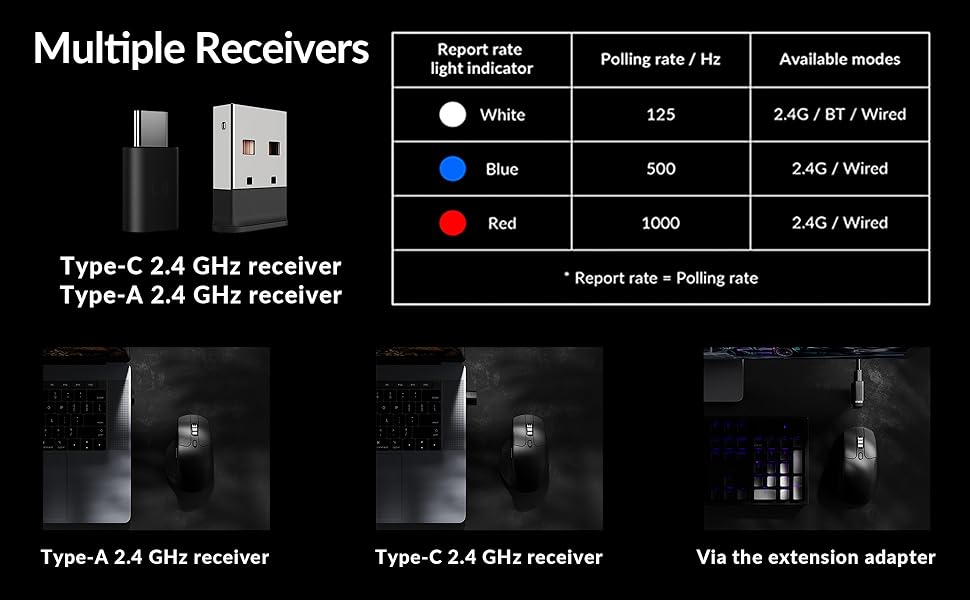
Image: Illustration of the Type-C and Type-A 2.4 GHz receivers, along with a table detailing polling rates and available modes.
7. ዝርዝሮች
| የሞዴል ቁጥር | M6S |
| ዳሳሽ | PixArt 3395 የጨረር ዳሳሽ |
| ዲፒአይ | እስከ 26,000 |
| የአይፒኤስ የመከታተያ ፍጥነት | 650 |
| የድምጽ መስጫ ደረጃ | 1000Hz (2.4GHz/Wired), 125Hz (Bluetooth) |
| ግንኙነት | 2.4GHz ገመድ አልባ፣ ብሉቱዝ 5.3፣ ዩኤስቢ-ሲ ሽቦ |
| ክብደት | 86 ግ (3.03 አውንስ) |
| ባትሪ | 800 mAh (Up to 80 hours) |
| መቀየሪያዎች | Huano 20M Silent Micro Switch |
| ተኳኋኝነት | ዊንዶውስ ፣ ማክሮስ ፣ ሊኑክስ |
| መጠኖች | 4.82 x 2.97 x 1.97 ኢንች (122.5 x 75.4 x 50 ሚሜ) |
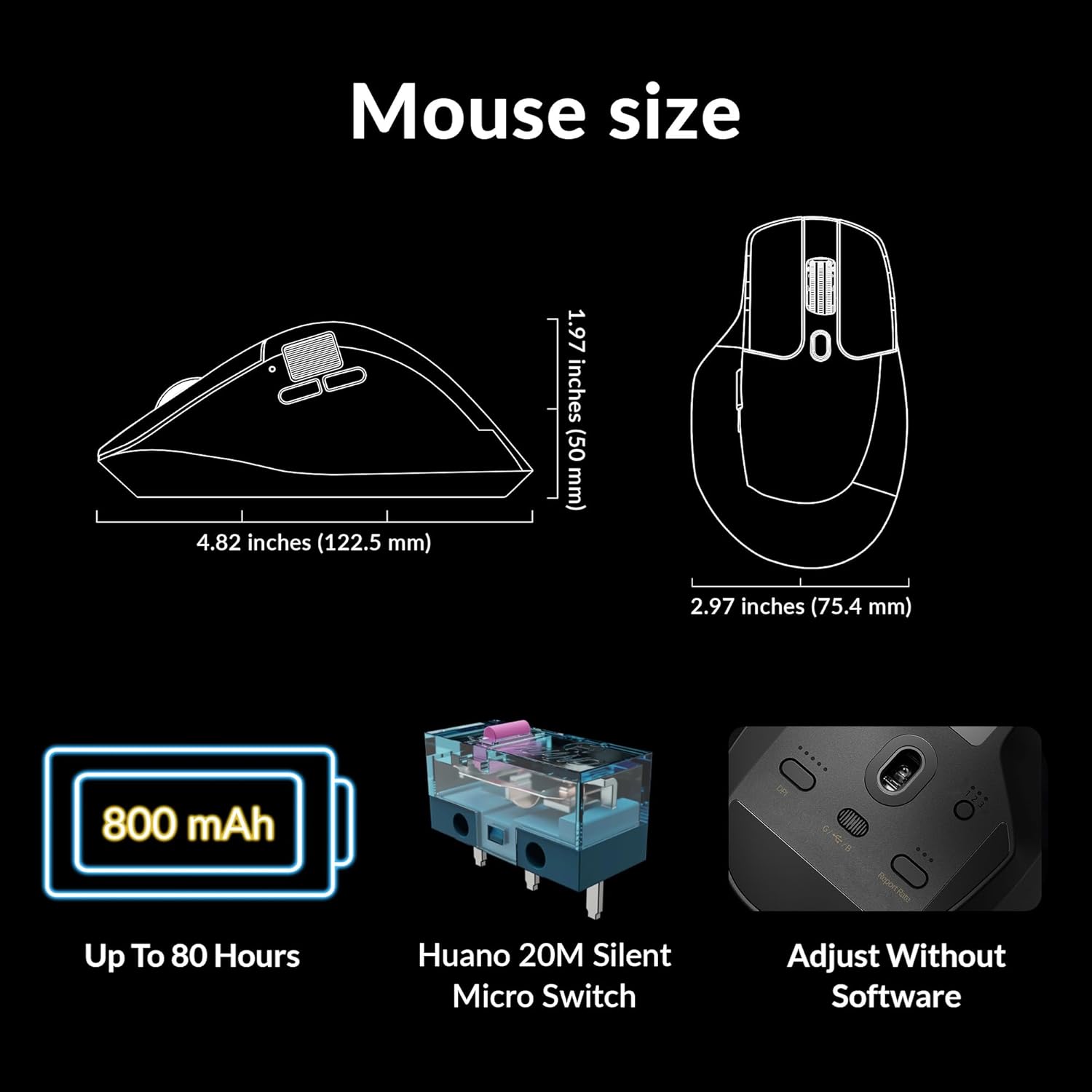
Image: Diagram showing the dimensions of the Keychron M6 mouse, its 800 mAh battery, and Huano 20M Silent Micro Switches.
8. ጥገና
የ Keychron M6 መዳፊትዎ ረጅም ዕድሜ እና ጥሩ አፈጻጸም ለማረጋገጥ የሚከተሉትን የጥገና መመሪያዎች ይከተሉ፡
- ማጽዳት፡ የመዳፊት ገጽን ለማጽዳት ለስላሳ እና ደረቅ ጨርቅ ይጠቀሙ። ለግትር ቆሻሻ፣ በትንሹ መampበጨርቁ ላይ በውሃ ወይም ለስላሳ የጽዳት መፍትሄ. ኃይለኛ ኬሚካሎችን ያስወግዱ.
- የዳሳሽ እንክብካቤ ትክክለኛ ክትትልን ለማረጋገጥ በመዳፊት ግርጌ ላይ ያለውን የጨረር ዳሳሽ ንፁህ እና ከአቧራ ወይም ከቆሻሻ ነጻ ያቆዩት።
- የባትሪ እንክብካቤ ባትሪውን በተደጋጋሚ ሙሉ በሙሉ ከመሙላት ይቆጠቡ። ለረጅም ጊዜ ማከማቻ፣ መዳፊቱን እስከ 50% ድረስ ይሙሉት እና ቀዝቃዛና ደረቅ ቦታ ያስቀምጡት።
- ማከማቻ፡ ጥቅም ላይ በማይውልበት ጊዜ፣ አካላዊ ጉዳትን ለመከላከል መዳፊቱን ደህንነቱ በተጠበቀ ቦታ ያስቀምጡት።
9. መላ መፈለግ
If you encounter issues with your Keychron M6 mouse, refer to the following common solutions:
- አይጥ ምላሽ የማይሰጥ፡
- አይጥ መሙላቱን ያረጋግጡ።
- Check the connection mode switch (2.4GHz, Bluetooth, Wired) is set correctly.
- For 2.4GHz, ensure the receiver is properly inserted and try a different USB port.
- For Bluetooth, re-pair the device in your computer's Bluetooth settings.
- የገመድ አልባ ችግሮችን ለማስወገድ በዩኤስቢ-ሲ ገመድ በኩል ለመገናኘት ይሞክሩ።
- ወጥነት የሌለው ክትትል፦
- በመዳፊት ግርጌ ላይ ያለውን የኦፕቲካል ዳሳሽ ያጽዱ.
- አይጤውን ተስማሚ በሆነ ገጽ ላይ እየተጠቀሙ መሆንዎን ያረጋግጡ (ለምሳሌ የመዳፊት ፓድ)።
- Adjust the DPI settings to a comfortable level.
- የማይሰሩ አዝራሮች;
- Check Keychron Engine software for custom button assignments that might be interfering.
- የመዳፊት firmware ወቅታዊ መሆኑን ያረጋግጡ።
- Scroll Wheel Issues:
- Toggle the infinite scroll button to ensure it's in the desired mode.
- በማሸብለያ ጎማ ዙሪያ ያሉትን ማንኛውንም ፍርስራሾች ያጽዱ።
10. ይፋዊ የምርት ቪዲዮ
ቪዲዮ፡ አንድ ባለሥልጣን አብቅቷል።view of the Keychron M6 Silent Wireless Optical Gaming Mouse, highlighting its features and design.
11. ዋስትና እና ድጋፍ
Keychron products come with a limited warranty. For detailed warranty information, technical support, and frequently asked questions, please visit the official Keychron webጣቢያ ወይም የደንበኛ አገልግሎታቸውን ያነጋግሩ። ለዋስትና ጥያቄዎች የግዢ ማረጋገጫዎን ያስቀምጡ።


