1. መግቢያ
This manual provides essential instructions for the safe and efficient operation of your Minuteman EN450G 450VA Standby Uninterruptible Power Supply (UPS). The EN450G is designed to provide reliable backup power and surge protection for various electronic devices, including gaming consoles, desktop PCs, home office equipment, and network devices. Please read this manual thoroughly before installation and use, and retain it for future reference.
2. ጠቃሚ የደህንነት መመሪያዎች
WARNING: To reduce the risk of electric shock, fire, or injury to persons, read all instructions before using this product.
- ይህ UPS አደገኛ መጠን ይዟልtages. Do not attempt to disassemble the unit. Servicing should be performed by qualified service personnel only.
- ከኮምፒዩተር ጋር ያልተያያዙ እንደ የህክምና መሳሪያዎች፣ የህይወት ድጋፍ መሳሪያዎች፣ ማይክሮዌቭ መጋገሪያዎች ወይም የቫኩም ማጽጃዎች ከ UPS ጋር አያገናኙ።
- የአየር ማናፈሻ ክፍተቶችን አይዝጉ። በመሳሪያው ዙሪያ በቂ የአየር ዝውውር ያረጋግጡ።
- Do not install the UPS in direct sunlight, near heat sources, or in areas with excessive dust, moisture, or flammable liquids.
- Connect the UPS to a properly grounded AC power outlet.
- The battery is hot-swappable. Exercise caution when replacing the battery. Refer to the Maintenance section for instructions.
- In case of emergency, press the power button to turn off the UPS and disconnect the power cord from the AC power outlet.
3. ምርት አብቅቷልview
The Minuteman EN450G UPS provides comprehensive power protection. Familiarize yourself with its components:
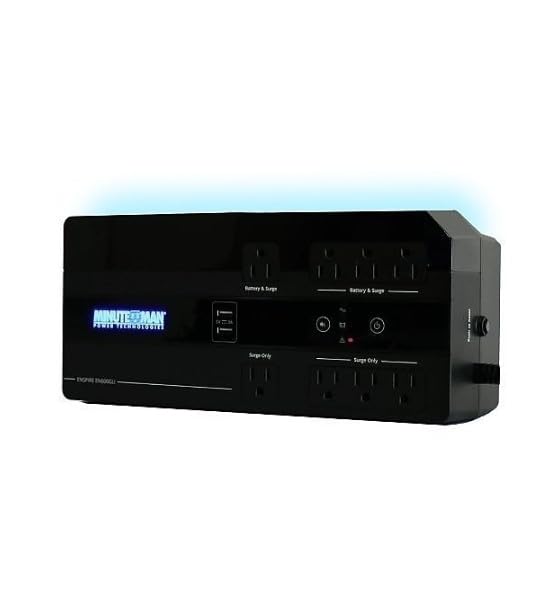
ምስል 1፡ Minuteman EN450G UPS Unit. This image displays the Minuteman EN450G UPS unit. The front panel features the 'Minuteman Power Technologies' logo, two USB charging ports, and control buttons. The top surface shows four 'Battery & Surge' protected outlets and four 'Surge Only' outlets, clearly labeled. The unit is black and designed for compact placement.
3.1 የፊት ፓነል ባህሪያት
- የኃይል ቁልፍ፡- ዩፒኤስን ያበራል ወይም ያጠፋል።
- የዩኤስቢ ኃይል መሙያ ወደቦች; Two ports for charging mobile devices.
- የሁኔታ አመላካቾች- LEDs indicating power status, battery status, and fault conditions.
3.2 የኋላ ፓነል ባህሪዎች
- Battery & Surge Outlets (x4): Provide battery backup power and surge protection for critical devices.
- Surge Only Outlets (x4): Provide surge protection only for non-critical devices.
- የኤሲ ግቤት፡- ዩፒኤስን ከግድግዳው የኃይል መውጫ ጋር ያገናኛል።
- ቆጣሪ: ዳግም ሊጀመር የሚችል ከመጠን በላይ ጭነት መከላከያ።
4. ማዋቀር እና መጫን
4.1 ማሸግ
Carefully unpack the UPS and inspect it for any shipping damage. If damage is found, do not operate the unit and contact your dealer.
4.2 አቀማመጥ
The EN450G is designed for versatile placement:
- ዴስክቶፕ: ክፍሉን በተረጋጋ, ጠፍጣፋ መሬት ላይ ያስቀምጡት.
- ወለል፡ Position on the floor, ensuring ventilation is not obstructed.
- የግድግዳ ተራራ The unit can be mounted on a wall using appropriate hardware (not included). Ensure the mounting surface can support the weight of the UPS.
Ensure the installation area is clean, dry, and has adequate ventilation. Avoid placing the UPS near heat-emitting appliances or in direct sunlight.
4.3 ከኃይል ጋር መገናኘት
- ዩፒኤስ መጥፋቱን ያረጋግጡ።
- Plug the UPS power cord into a grounded 120V AC wall outlet.
- Allow the UPS to charge for at least 8 hours before initial use to ensure optimal battery runtime.
4.4 ማገናኛ መሳሪያዎች
- Battery & Surge Protected Outlets: Connect critical devices such as your computer, monitor, router, or other essential electronics that require continuous power during outagኢ.
- የ Surge ብቻ መውጫዎች; Connect non-critical devices like printers, scanners, or desk lamps that only require surge protection.
CAUTION: Do not connect laser printers or shredders to the battery backup outlets, as their high power draw can overload the UPS.
5. ኦፕሬሽን
5.1 UPS ን ማብራት/ማጥፋት
- ለማብራት፡- Press and hold the power button for approximately 2 seconds until you hear a beep and the power indicator illuminates.
- ለማጥፋት Press and hold the power button for approximately 2 seconds until you hear a beep and the power indicator turns off.
5.2 የሁኔታ አመልካቾች
The front panel LEDs provide information about the UPS status:
- አረንጓዴ ኤልኢዲ (ጠንካራ): UPS is operating normally, providing AC power.
- Green LED (Flashing) & Audible Alarm: UPS is operating on battery power during an outage.
- Red LED (Solid) & Audible Alarm: Battery low or fault condition. Refer to Troubleshooting.
5.3 የባትሪ አሂድ ጊዜ
The EN450G provides approximately 3 minutes of runtime at full load (450VA/255W) and 11 minutes at half load. Actual runtime may vary based on connected equipment and battery age.
6. ጥገና
6.1 የባትሪ መተካት
The EN450G features a hot-swappable Sealed Lead Acid (SLA) battery, allowing replacement without interrupting power to connected devices. Batteries typically last 3-5 years depending on usage and environmental conditions. A flashing red LED or continuous alarm may indicate a need for battery replacement.
- Ensure the UPS is connected to AC power and operating normally.
- Locate the battery access panel (refer to product diagram if available).
- Carefully slide out the old battery pack.
- Insert the new, fully charged replacement battery pack, ensuring correct orientation.
- Secure the battery access panel.
- Allow the new battery to charge for 8-12 hours to reach full capacity.
WARNING: Use only approved replacement batteries. Improper battery replacement can result in fire or explosion. Dispose of old batteries properly at a recycling facility.
6.2 ጽዳት
Periodically clean the exterior of the UPS with a soft, dry cloth. Do not use liquid or aerosol cleaners. Ensure ventilation openings remain clear of dust and debris.
7. መላ መፈለግ
This section addresses common issues you may encounter with the EN450G UPS. If a problem persists after attempting the solutions below, contact technical support.
| ችግር | ሊሆን የሚችል ምክንያት | መፍትሄ |
|---|---|---|
| UPS አይበራም። | ባትሪው አልተገናኘም ወይም አልተለቀቀም። የኃይል ገመድ አልተገናኘም። | Ensure battery is properly connected and charged. Verify power cord is securely plugged into wall outlet and UPS. |
| UPS beeps continuously or red LED is solid. | የባትሪው ዝቅተኛ ወይም የችግር ሁኔታ። Overload on battery outlets. | Allow battery to charge. If problem persists, battery may need replacement. Disconnect non-essential devices from battery outlets. Check circuit breaker. |
| UPS operates on battery frequently. | Unstable incoming AC power. UPS sensitivity setting (if applicable, though not specified for this model). | Check the quality of your incoming AC power. Consider connecting to a different outlet. |
| No power from surge-only outlets. | የወረዳ ተላላፊ ተቋረጠ። | Press the circuit breaker reset button on the rear panel. Reduce load if necessary. |
8. ዝርዝሮች
| ባህሪ | ዝርዝር |
|---|---|
| ሞዴል | EN450G |
| አቅም | 450 ቪኤ / 255 ዋ |
| ግቤት/ውፅዓት ቁtage | 120 ቪ ኤሲ |
| የውጤት ሞገድ ቅርጽ | አስመሳይ ሳይን ሞገድ |
| መሸጫዎች | 4 x Battery & Surge Protected, 4 x Surge Only |
| የባትሪ ዓይነት | Sealed Lead Acid (SLA), Hot-Swappable |
| Typical Runtime (Full Load) | እስከ 3 ደቂቃዎች ድረስ |
| የተለመደው የሩጫ ጊዜ (ግማሽ ጭነት) | እስከ 11 ደቂቃዎች ድረስ |
| ልኬቶች (D x W x H) | 12.8 x 5.7 x 4.1 ኢንች (32.5 x 14.5 x 10.4 ሴሜ) |
| ክብደት | 4.4 ፓውንድ (2 ኪ.ግ) |
| የመጫኛ አማራጮች | Desktop, Floor, Wall Mount |
9. የዋስትና መረጃ
Please refer to the warranty card included with your product or visit the manufacturer's webለዝርዝር የዋስትና ውሎች እና ሁኔታዎች ጣቢያ። ለዋስትና ጥያቄዎች የግዢ ማረጋገጫዎን ያስቀምጡ።
10. የቴክኒክ ድጋፍ
If you require technical assistance or have questions regarding your Minuteman EN450G UPS, please contact your dealer or the manufacturer's customer support. Have your model number (EN450G) and serial number ready when contacting support.
For more information, you may visit the official Minuteman webጣቢያ.


