1. በሳጥኑ ውስጥ ያለው
Verify all components are present before proceeding with installation.
- 4K Front Dash Camera (Main Unit)
- 1080P የኋላ ካሜራ
- የመኪና መሙያ አስማሚ
- ዓይነት-C ገመድ
- የማጣበቂያ ንጣፎች
- የመኪና ሽቦ መቁረጫ መሣሪያ
- 19.6 ጫማ የኋላ ካሜራ ገመድ
- ኤሌክትሮስታቲክ ተለጣፊ (x2)
- 64GB ማህደረ ትውስታ ካርድ
- የተጠቃሚ መመሪያ

Image: All included components of the dash cam system.
2. ምርት አብቅቷልview
The HUPEJOS V100-2CH dash cam features a main front unit with a 4-inch touch screen and a separate rear camera. Key ports and controls are located on the main unit for easy access.
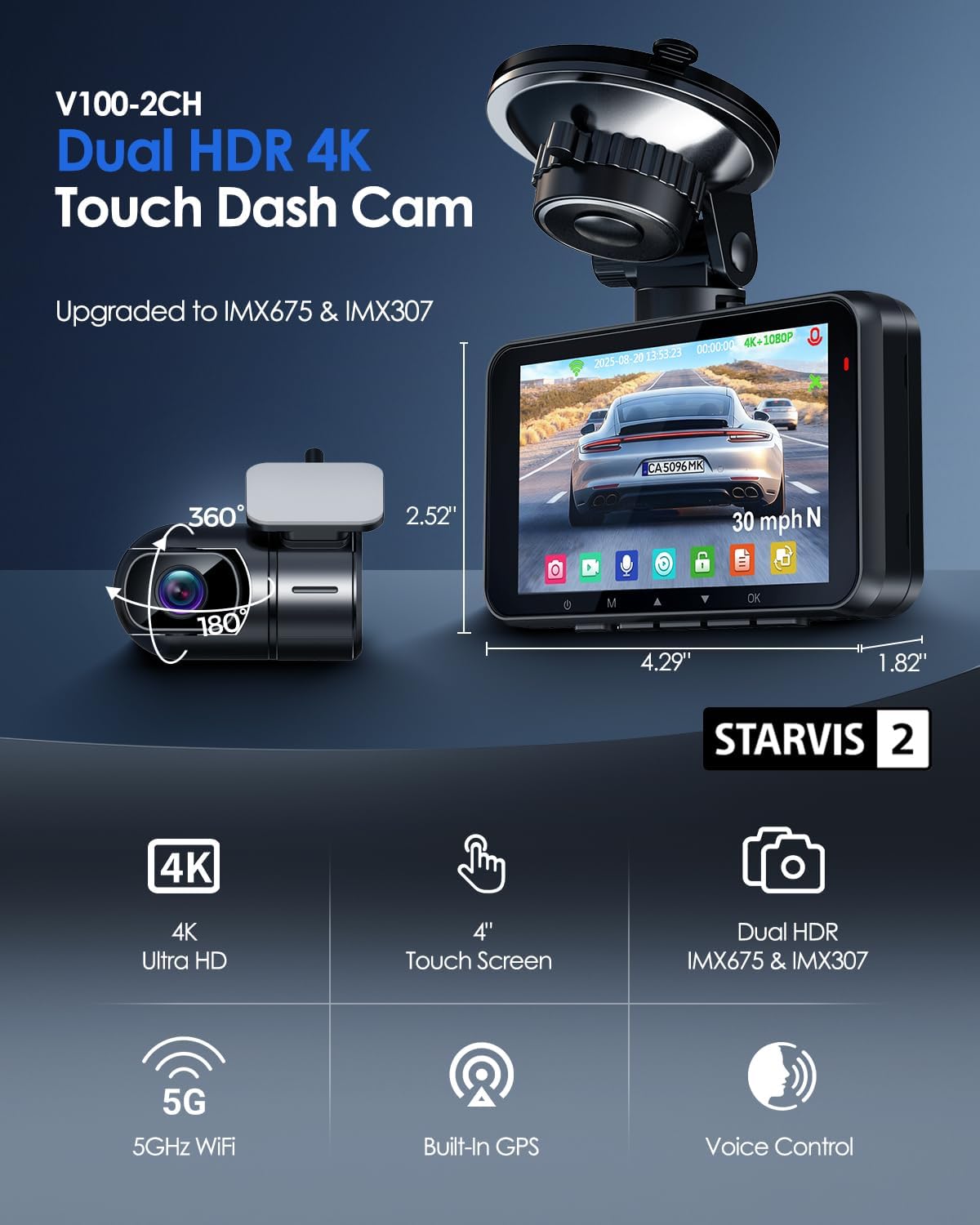
Image: Main dash cam unit and rear camera with dimensions.

ምስል፡ ዝርዝር view of the main unit's ports and slots.
3. ማዋቀር እና መጫን
Follow these steps for proper installation and initial setup of your dash cam.
- የንፋስ መከላከያውን ያዘጋጁ: Clean the chosen area on your windshield thoroughly. Apply an electrostatic sticker to the desired mounting spot to protect your windshield and ensure easy removal.
- ዋናውን ክፍል ይጫኑ; Attach the suction cup mount to the electrostatic sticker. Secure the main dash cam unit to the mount. Adjust the camera angle as needed.
- የኋላ ካሜራ ይጫኑ፦ Mount the rear camera on the rear windshield using an electrostatic sticker and adhesive pad. Ensure the camera has a clear view.
- የኋላ ካሜራ ያገናኙ፦ Connect the 19.6ft rear camera cable to the 'REAR' port on the main unit and route the cable discreetly along the vehicle's interior trim using the provided trim tool.
- የኃይል ግንኙነት; Insert the 64GB memory card into the SD card slot. Connect the car charger adapter to your vehicle's 12V power outlet and the Type-C cable to the 'POWER' port on the main unit. Route the power cable neatly.
- Initial Power On & Format SD Card: Once powered, the dash cam will turn on. Navigate to the settings menu via the touch screen and format the SD card before first use.

Image: Visual guide for dash cam installation steps.
Video: A seller-provided guide demonstrating the unboxing and basic setup of the V100 dash cam, including menu navigation.
4. የአሠራር መመሪያዎች
4.1. 4" Touch Screen Operation
The 4-inch IPS touch screen provides intuitive control over the dash cam's functions. Tap icons to access menus, adjust settings, and review footagሠ በቀጥታ በመሳሪያው ላይ.

Image: Touch screen interface for easy navigation.
4.2. የድምጽ መቆጣጠሪያ
Control your dash cam hands-free using simple voice commands. This feature enhances safety by allowing you to manage recording without taking your hands off the wheel.
- "ፎቶ አንሳ"
- "የቪዲዮ ማቆሚያ"
- "ዋይፋይን አንቃ"
- "የቪዲዮ ጅማሬ"
- "ማያ ገጹን አብራ"
- "የፊት ካሜራ አሳይ"

Image: Voice control commands for hands-free operation.
4.3. 5G WiFi & App Control
Connect your dash cam to your smartphone via built-in 5G WiFi for seamless footage transfer and management using the dedicated app. The Wi-Fi range is 6-7 meters.
- View ኑ footage
- Download recorded videos
- የካሜራ ቅንብሮችን ያስተካክሉ
- ፉ አጋራtagኢ ወዲያውኑ

Image: Smartphone app interface for 5G WiFi control.
4.4. የጂፒኤስ ክትትል
The integrated GPS module accurately records your vehicle's location, speed, and route data, providing crucial evidence for accident documentation and insurance claims. You can view GPS data on Google Maps via the app or the free GXPlayer on PC (Windows and Mac).

Image: Built-in GPS tracking visualization.
4.5. Loop Recording & G-Sensor
The dash cam features intelligent loop recording, which automatically overwrites the oldest unlocked files when the memory card is full, ensuring continuous recording. The built-in G-sensor detects sudden impacts or collisions, automatically locking and saving the current footagእንዳይገለበጥ ለመከላከል።

Image: G-Sensor and Loop Recording functionality.
4.6. 24H Parking Surveillance Mode
For round-the-clock vehicle security, the 24-hour parking surveillance mode activates automatically upon detecting motion or impact. This feature requires a separate hardwire kit (ASIN: B0DBVDDT73) for continuous power supply.

Image: 24/7 Parking Surveillance Mode options.
5. Night Vision Capabilities
Equipped with STARVIS 2 sensors (IMX675 front, IMX307 rear) and Dual HDR technology, the dash cam delivers superior night vision, capturing clear and detailed footage even in low-light conditions for reliable evidence.

Image: Night vision comparison with STARVIS 2 and HDR.
6. ዝርዝሮች
| ባህሪ | ዝርዝር |
|---|---|
| የሞዴል ስም | V100-2CH |
| የቪዲዮ ቀረጻ ጥራት | 4 ኬ የፊት + 1080 ፒ የኋላ |
| የፊት ካሜራ ዳሳሽ | IMX675 (STARVIS 2) |
| የኋላ ካሜራ ዳሳሽ | IMX307 |
| ማሳያ | 4" የንክኪ ማያ ገጽ |
| የግንኙነት ቴክኖሎጂ | Wireless USB (5GHz WiFi) |
| ጂፒኤስ | Built-in Location Capture |
| ልዩ ባህሪያት | 4K UHD Recording, Dual HDR, APP Control, G-Sensor Lock, Loop Recording, 24/7 Radar Parking Mode, WDR, Super Night Vision, F1.6 Aperture, 6-Layer Optics, Voice Control, Audio Recording |
| የተካተተው የማህደረ ትውስታ ካርድ | 64 ጊባ ኤስዲ ካርድ |
| ከፍተኛ የኤስዲ ካርድ ድጋፍ | 512 ጊባ |
| የመጫኛ አይነት | የንፋስ መከላከያ ማውንት (የመምጠጥ ዋንጫ) |
| መስክ View | 150 ዲግሪዎች |
| የምርት ልኬቶች | 1.82 x 4.29 x 2.52 ኢንች |
| የእቃው ክብደት | 4.5 አውንስ |
7. ጥገና
To ensure the longevity and optimal performance of your dash cam, regular maintenance is recommended:
- ንጹህ ሌንሶች; Regularly clean the front and rear camera lenses with a soft, lint-free cloth to prevent blurry footage.
- የ SD ካርድ ቅርጸት Format the SD card monthly to maintain optimal recording performance and prevent data corruption. This can be done through the dash cam's settings menu.
- ግንኙነቶችን ይፈትሹ፡ Periodically ensure all cables and mounts are securely connected.
8. መላ መፈለግ
ማንኛቸውም ችግሮች ካጋጠሙዎት, የሚከተሉትን ደረጃዎች ይሞክሩ:
- ዳሽ ካም አልበራም፦ Check the car charger connection and ensure the vehicle's power outlet is functioning.
- የመቅዳት ጉዳዮች፡- Ensure the SD card is properly inserted and formatted. If issues persist, try a different compatible SD card.
- ደካማ የቪዲዮ ጥራት፡ Clean the camera lenses. Ensure the camera is securely mounted and not vibrating.
- የWi-Fi ግንኙነት ችግሮች፡- Ensure Wi-Fi is enabled on the dash cam and your smartphone. Check the Wi-Fi range (6-7 meters).
- የጂፒኤስ ክትትል አላደረገም፦ የዳሽ ካም ግልጽ መሆኑን ያረጋግጡ view የሰማይ ለሳተላይት አቀባበል።
- የስርዓት መቀዝቀዝ/ምላሽ የማይሰጥ፡ Use a thin object (like a paperclip) to press the reset button located on the main unit.
9. ዋስትና እና ድጋፍ
Your HUPEJOS 4K Dual Dash Cam V100-2CH comes with an 18-month guarantee. For any questions, technical support, or warranty claims, please contact HUPEJOS customer support.
- ኢሜይል፡- support@hupejos.com
- Webጣቢያ፡ www.hupejos.com


