መግቢያ
This manual provides essential information for the proper setup, operation, and maintenance of your Blaupunkt Smart TV 24HCG4000S. Please read these instructions carefully before using your television and retain them for future reference. This 24-inch HD Ready LED TV features Google TV, Wi-Fi, Bluetooth 5.0, multiple HDMI and USB ports, and integrated Chromecast, offering a comprehensive entertainment experience.
በሣጥኑ ውስጥ ያለው
ሳጥኑን በጥንቃቄ ይንቀሉት እና ሁሉም የሚከተሉት ዕቃዎች መኖራቸውን ያረጋግጡ።
- Blaupunkt Smart TV 24HCG4000S
- የርቀት መቆጣጠሪያ
- የኃይል ገመድ
- መቆሚያ (2 ቁርጥራጮች)
- የተጠቃሚ መመሪያ (ይህ ሰነድ)
Note: A 12V adapter for vehicle compatibility is not included and must be purchased separately.
ምርት አልቋልview
The Blaupunkt 24HCG4000S Smart TV is designed for versatile use, offering clear visuals and smart functionalities in a compact form factor.
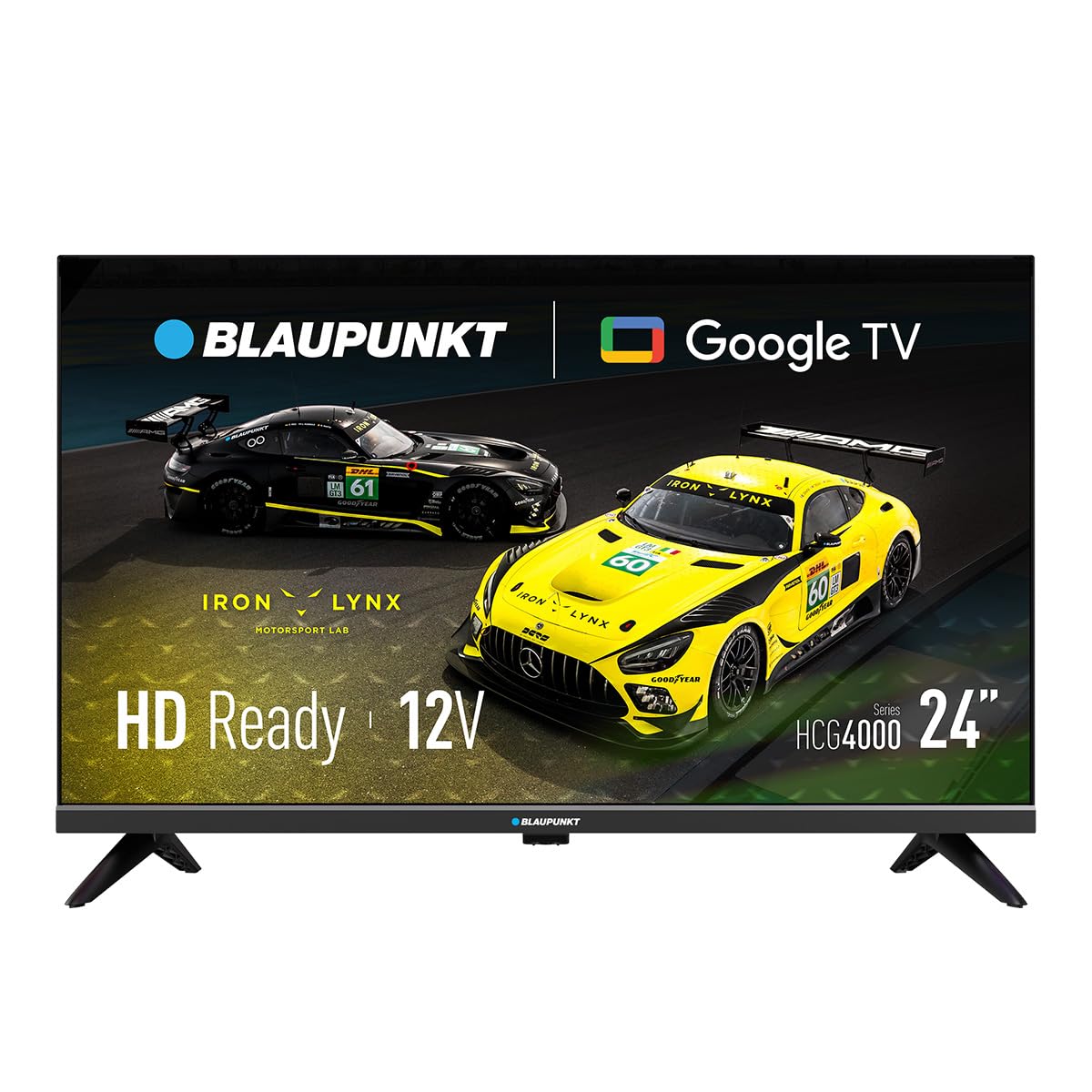
ምስል 1: የፊት view of the Blaupunkt 24HCG4000S Smart TV.
ቁልፍ ባህሪያት የሚከተሉትን ያካትታሉ:
- ማሳያ፡- 24-inch HD Ready LED screen (1366 x 768 pixels) with vivid colors and a 178° viewአንግል።
- ብልህ ባህሪዎች Integrated Google TV platform providing access to popular streaming services like Netflix, YouTube, Disney+, Prime Video, and thousands of other applications.
- ኦዲዮ፡ Dolby Audio with 12W output for enhanced sound quality.
- የድምጽ ቁጥጥር፡- Google Assistant for convenient voice commands.
- በመውሰድ ላይ፡ Built-in Chromecast for easy content sharing from mobile devices.
- ግንኙነት፡ Advanced options including WiFi 2T2R, Bluetooth 5.0, 3 HDMI ports, 2 USB ports, RJ45 Ethernet, CI+ slot, and a headphone output.
- ንድፍ፡ Compact and lightweight (2.25 kg) with VESA 200x200 mm support for wall mounting.
- የኃይል ቅልጥፍና; Low power consumption of 17W.

ምስል 2: የኋላ view of the TV, highlighting the port layout.

ምስል 3: ጎን view of the TV, showing accessible ports.
ማዋቀር
1. መቆሚያውን በማያያዝ
- ጉዳት እንዳይደርስ ለመከላከል የቴሌቪዥኑን ማያ ገጽ ለስላሳ እና ጠፍጣፋ መሬት ላይ ያድርጉት።
- የማቆሚያ ክፍሎችን በቴሌቪዥኑ ግርጌ ላይ ከሚገኙት ተጓዳኝ ክፍተቶች ጋር ያስተካክሉ.
- Secure the stand pieces using the provided screws. Do not overtighten.
2. የማገናኘት ኃይል
Connect the power cable to the TV's power input and then to a wall outlet. The TV is compatible with 12V power sources, but a specific 12V adapter is required and sold separately.
3. የመጀመሪያ ደረጃ ማዋቀር
Upon first power-on, the TV will guide you through the initial setup process, including language selection, network connection (Wi-Fi or Ethernet), and Google TV account setup. Follow the on-screen instructions.
ቴሌቪዥኑን በመስራት ላይ
ኃይል አብራ/ አጥፋ
የሚለውን ይጫኑ ኃይል button on the remote control or on the TV to turn the unit on or off.
የግቤት ምርጫ
የሚለውን ተጠቀም ግቤት button on the remote to cycle through available input sources (HDMI 1, HDMI 2, HDMI 3, USB, AV, etc.).
ጎግል ቲቪ በይነገጽ
Navigate the Google TV interface using the remote control's directional pad and OK button. Access apps, settings, and content recommendations from the home screen.
የድምጽ ረዳት
የሚለውን ይጫኑ ጎግል ረዳት button on your remote control and speak into the microphone to search for content, control smart home devices, or get information.
ግንኙነት
Your Blaupunkt Smart TV offers a range of connectivity options:
- Wi-Fi (2T2R): የኢንተርኔት መዳረሻ እና ስማርት ባህሪያትን ለማግኘት ከቤትዎ ገመድ አልባ አውታረ መረብ ጋር ይገናኙ።
- ብሉቱዝ 5.0: እንደ የጆሮ ማዳመጫዎች፣ የድምጽ አሞሌዎች ወይም የጨዋታ መቆጣጠሪያዎች ካሉ ተኳሃኝ የብሉቱዝ መሳሪያዎች ጋር ያጣምሩ።
- HDMI (x3): Connect external devices like gaming consoles, Blu-ray players, or set-top boxes. One HDMI port supports ARC (Audio Return Channel).
- ዩኤስቢ (x2)፦ ሚዲያ አጫውት files from USB storage devices or power compatible accessories.
- RJ45 (ኢተርኔት)፡- ለተረጋጋ የበይነመረብ ግንኙነት።
- CI+ ማስገቢያ፡ For conditional access modules (CAM) to decrypt encrypted digital TV channels.
- የጆሮ ማዳመጫ ውፅዓት ለግል ማዳመጥ የጆሮ ማዳመጫዎችን ያገናኙ።
- S/PDIF (Optical Audio Output): ከውጭ የኦዲዮ ስርዓቶች ጋር ለመገናኘት.
ቪዲዮ 1፡ አልቋልview of a 24-inch television, demonstrating its features and connectivity options. This video provides a visual guide to the product's design and functionality.
ጥገና
ማያ ገጹን ማጽዳት
ስክሪኑን በቀስታ ለስላሳ እና ከተሸፈነ ጨርቅ ይጥረጉ። ለግትር ምልክቶች፣ በትንሹ መampጨርቁን በውሃ ወይም በልዩ ማያ ገጽ ማጽጃ። ፈሳሹን በቀጥታ ወደ ማያ ገጹ ላይ በጭራሽ አይረጩ።
ካቢኔን ማጽዳት
የቲቪ ካቢኔን ለስላሳ እና ደረቅ ጨርቅ ይጥረጉ. ገላጭ ማጽጃዎችን ወይም ፈሳሾችን ከመጠቀም ይቆጠቡ።
የአየር ማናፈሻ
በቴሌቪዥኑ ዙሪያ በቂ የአየር ዝውውር እንዲኖር ያድርጉ። በቴሌቪዥኑ ጀርባ ወይም ጎን ላይ ያሉትን የአየር ማናፈሻ ክፍተቶች አይዝጉ። ለአየር ዝውውር በቂ ቦታ ይፍቀዱ።
መላ መፈለግ
በቲቪዎ ላይ ችግሮች ካጋጠሙዎት የሚከተሉትን የተለመዱ መፍትሄዎች ይመልከቱ፡
- ኃይል የለም፡ የኃይል ገመዱ ከቴሌቪዥኑ እና ከግድግዳው መውጫው ጋር ደህንነቱ በተጠበቀ ሁኔታ መገናኘቱን ያረጋግጡ። መውጫው እየሰራ መሆኑን ያረጋግጡ።
- ምንም ምስል/ድምጽ የለም፡ ትክክለኛው የግቤት ምንጭ መመረጡን ያረጋግጡ። ሁሉንም የኬብል ግንኙነቶች (HDMI፣ AV፣ ወዘተ) ልቅነት ያረጋግጡ።
- የርቀት መቆጣጠሪያ አይሰራም; በርቀት መቆጣጠሪያው ውስጥ ያሉትን ባትሪዎች ይተኩ. በርቀት መቆጣጠሪያው እና በቴሌቪዥኑ IR ዳሳሽ መካከል ምንም እንቅፋቶች አለመኖራቸውን ያረጋግጡ።
- የWi-Fi ግንኙነት ችግሮች፡- Restart your router and the TV. Check your Wi-Fi password. Ensure the TV is within range of your Wi-Fi network.
- Smart App Problems: Try restarting the app or clearing its cache in the TV settings. Ensure your TV's software is up to date.
If the problem persists, consult the Blaupunkt support webጣቢያ ወይም የደንበኛ አገልግሎትን ያነጋግሩ።
ዝርዝሮች
| ባህሪ | ዝርዝር መግለጫ |
|---|---|
| የምርት ስም | Blaupunkt |
| የሞዴል ስም | 24HCG4000S |
| የማሳያ መጠን | 24 ኢንች |
| የማሳያ ቴክኖሎጂ | LED |
| ጥራት | HD ዝግጁ (1366 x 768 ፒክስል) |
| የማደስ ደረጃ | 60 Hz |
| ስርዓተ ክወና | ጎግል ቲቪ |
| የድምጽ ውፅዓት | 12W (Dolby Audio) |
| ግንኙነት | WiFi 2T2R, Bluetooth 5.0, 3x HDMI, 2x USB, RJ45, CI+ |
| ልዩ ባህሪያት | Built-in Speaker, Chromecast, Parental Control, Game Mode |
| የመጫኛ ተኳኋኝነት | VESA 200x200 mm |
| የምርት ልኬቶች | 15.6 x 53.6 x 36 ሴ.ሜ |
| የምርት ክብደት | 2.25 ኪ.ግ |
| የኃይል ፍጆታ | 17 ዋ |
| 12V Compatibility | አዎ (አስማሚ አልተካተተም) |
ዋስትና እና ድጋፍ
Your Blaupunkt Smart TV 24HCG4000S comes with a standard manufacturer's warranty. Please refer to the warranty card included in your product packaging for specific terms and conditions, including the warranty period and coverage details.
For technical support, troubleshooting assistance, or warranty claims, please visit the official Blaupunkt support webጣቢያ ወይም የደንበኞች አገልግሎት ክፍልን ያነጋግሩ። የእውቂያ መረጃ በተለምዶ በአምራቹ ላይ ሊገኝ ይችላል። webጣቢያ ወይም በምርቱ ሰነድ ውስጥ.
Always ensure you have your product model number (24HCG4000S) and serial number ready when contacting support.


