1. መግቢያ
Welcome to the OnePlus 15 user manual. This guide provides essential information for setting up, operating, maintaining, and troubleshooting your new smartphone. The OnePlus 15 is designed for high performance and extended battery life, featuring a Snapdragon 8 Elite Gen 5 processor, a 7300mAh battery, and a triple 50 MP camera system. Please read this manual thoroughly to ensure optimal use of your device.

ምስል 1: የፊት view of the OnePlus 15 smartphone.
2. በሳጥኑ ውስጥ ያለው
ሁሉም እቃዎች በምርት ማሸጊያዎ ውስጥ መኖራቸውን ያረጋግጡ፡-
- OnePlus 15 Smartphone (x1)
- ባትሪ መሙያ (x1)
- USB Data Cable (x1)
- SIM Ejector Tool (x1)
- ፈጣን መመሪያ (x1)
- Safety Guide (x1)

Figure 2: Included items in the OnePlus 15 package.
3. ማዋቀር
3.1. የሲም ካርድ ጭነት
The OnePlus 15 supports Dual-SIM functionality. To install your SIM card(s):
- የሲም ካርዱን ትሪ ከመሳሪያው ጎን ያግኙት።
- የሲም ማስወጫ መሳሪያውን ከጣፋዩ ቀጥሎ ባለው ትንሽ ቀዳዳ ውስጥ ያስገቡ እና ትሪው ብቅ እስኪል ድረስ በጥብቅ ይጫኑ።
- የወርቅ ንክኪዎችዎን ወደ ታች እያዩ የናኖ-ሲም ካርድ(ዎች)ን ወደ ትሪው ውስጥ ያስቀምጡ። በትክክል መቀመጡን ያረጋግጡ።
- የሲም ካርዱን ትሪ በጥንቃቄ ወደ ስልኩ አስገባ።

ምስል 3: ጎን view of the OnePlus 15, highlighting the SIM card tray.
3.2. የመነሻ ኃይል ማብራት እና ማዋቀር
መሣሪያዎን ለመጀመሪያ ጊዜ ለማብራት፡-
- Press and hold the Power button (located on the right side) until the OnePlus logo appears.
- የቋንቋ ምርጫን፣ የWi-Fi ግንኙነትን፣ የGoogle መለያ መግቢያን እና የደህንነት ቅንብሮችን ጨምሮ የመጀመሪያውን ማዋቀር ለማጠናቀቅ የማያ ገጽ ላይ ጥያቄዎችን ይከተሉ።
3.3. ባትሪውን በመሙላት ላይ
The OnePlus 15 is equipped with a 7300mAh battery. To charge your device:
- ባለገመድ መሙላት; Connect the provided USB Data Cable to the Type-C port on the bottom of the phone and the other end to the charger. Plug the charger into a power outlet.
- ገመድ አልባ ባትሪ መሙላት; Place the phone on a compatible wireless charging pad. Ensure the phone is centered on the pad for efficient charging.
A full charge provides approximately 68.7 hours of talk time.

Figure 4: Illustration of the 7300mAh battery capacity.
4. መሳሪያዎን ማስኬድ
4.1. ማሳያ
The OnePlus 15 features a 6.78-inch AMOLED display with a 2772x1272 resolution and a 165 Hz refresh rate. This provides smooth visuals and vibrant colors. Adjust display settings such as brightness, color mode, and refresh rate in the device settings menu.
4.2. አፈጻጸም
Powered by the Snapdragon 8 Elite Gen 5 processor and 16GB of RAM, the OnePlus 15 delivers fast and efficient performance for multitasking, gaming, and demanding applications. The Tri-Chip System, combining the Snapdragon 8 Elite Gen 5 with a dedicated Wi-Fi chip and CPU scheduler, optimizes for speed, connectivity, and power efficiency.
ቪዲዮ 1፡ አልቋልview of the OnePlus 15's performance capabilities and user experience.
4.3. የካሜራ ስርዓት
The device is equipped with a Triple 50 MP camera system, offering wide, ultra-wide, and telephoto lenses for versatile photography. The DetailMax Engine enhances photo quality in various lighting conditions, including day, night, and motion shots. Both front and rear cameras are available for capturing images and videos.

ምስል 5: የኋላ view of the OnePlus 15, showcasing the triple camera system.
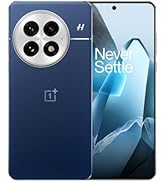
Figure 6: DetailMax Engine for stunning photos.
4.4. ግንኙነት
The OnePlus 15 supports a range of connectivity options:
- ገመድ አልባ፡ Wi-Fi, Bluetooth, NFC, Infrared.
- ባለገመድ: የዩኤስቢ ዓይነት-ሲ.
- አሰሳ፡ Dual-band GPS (L1+L5) and Galileo (E1+E5a).
- ሲም፡ Dual SIM support for managing multiple networks.
4.5. ስርዓተ ክወና
The device runs on Android 16 with OxygenOS 16, providing a fast and smooth user experience. Regular software updates will be provided to enhance features and security.
5. ጥገና
5.1. ዘላቂነት እና ጥበቃ
The OnePlus 15 is built with IP66/IP68/IP69 and IP19K ratings, offering resistance against dust and water. While designed to be durable, avoid exposing the device to extreme conditions or prolonged submersion in water.

Figure 7: OnePlus 15 demonstrating water resistance.
5.2. መሳሪያዎን ማጽዳት
Use a soft, lint-free cloth to clean the screen and body of your phone. Avoid using abrasive materials or harsh chemicals, which can damage the display or finish.
5.3. የሶፍትዌር ዝመናዎች
Periodically check for software updates in the device settings. Keeping your software up-to-date ensures you have the latest features, security patches, and performance improvements.
6. መላ መፈለግ
This section addresses common issues you might encounter with your OnePlus 15.
6.1. መሳሪያ አይበራም።
- ባትሪው መሙላቱን ያረጋግጡ። ስልኩን ከኃይል መሙያው ጋር ያገናኙ እና እንደገና ለማብራት ከመሞከርዎ በፊት ጥቂት ደቂቃዎችን ይጠብቁ።
- ዳግም እንዲጀመር ለማስገደድ ቢያንስ ለ10-15 ሰከንድ የኃይል ቁልፉን ተጭነው ይቆዩ።
6.2. ደካማ የአውታረ መረብ ግንኙነት
- ሲም ካርድዎ በትክክል መጫኑን ያረጋግጡ።
- Verify that airplane mode is not enabled.
- መሣሪያውን እንደገና ያስጀምሩ.
- ችግሮች ከቀጠሉ የአውታረ መረብ አቅራቢዎን ያነጋግሩ።
6.3. መተግበሪያዎች እየተበላሹ ወይም እየቀዘቀዙ
- ዝጋ እና መተግበሪያውን እንደገና ይክፈቱ።
- Clear the app's cache and data in device settings.
- መተግበሪያው ወደ የቅርብ ጊዜው ስሪት መዘመኑን ያረጋግጡ።
- If the issue is widespread, consider restarting the phone.
6.4. ባትሪ በፍጥነት ማፍሰስ
- የማያ ገጹን ብሩህነት እና የማያ ገጹን የማብቂያ ጊዜ ቀንስ።
- እንደ Wi-Fi፣ ብሉቱዝ ወይም ጂፒኤስ ያሉ ጥቅም ላይ ያልዋሉ ባህሪያትን ሳያስፈልግ ያሰናክሉ።
- Identify and close power-intensive applications running in the background.
- Check for recent software updates, as they often include battery optimizations.
7. ዝርዝሮች
Detailed technical specifications for the OnePlus 15 (Model: CPH2749).
| ባህሪ | ዝርዝር |
|---|---|
| የሞዴል ስም | OnePlus 15 |
| የንጥል ሞዴል ቁጥር | ሲፒኤች2749 |
| የምርት ልኬቶች | 6.36 x 3.02 x 0.32 ኢንች |
| የእቃው ክብደት | 1.28 ፓውንድ |
| ስርዓተ ክወና | አንድሮይድ 16 |
| የሲፒዩ ሞዴል | Snapdragon 8 Elite Gen 5 |
| የሲፒዩ ፍጥነት | 4.61 ጊኸ |
| RAM ማህደረ ትውስታ የተጫነ መጠን | 16 ጊባ |
| የማህደረ ትውስታ ማከማቻ አቅም | 512 ጊባ |
| የቋሚ ማያ ገጽ ማሳያ መጠን | 6.78 ኢንች |
| ጥራት | 2772*1272 |
| የማደስ ደረጃ | 165 Hz |
| የባትሪ አቅም | 7300 ሚሊamp ሰዓቶች (7300mAh) |
| የስልክ ንግግር ጊዜ | 68.7 ሰዓታት |
| የግንኙነት ቴክኖሎጂዎች | Infrared, NFC, USB, Wi-Fi, Bluetooth |
| ጂፒኤስ | Dual band: GPS(L1+L5) Galileo(E1+E5a) |
| ልዩ ባህሪያት | Dual SIM, Wireless Charging |
| ኦዲዮ ጃክ | Type-C headphones: supported Type-C digital headphones & Type-C analog headphones |
| ሌሎች የካሜራ ባህሪዎች | Front, Rear (Triple 50 MP Camera System) |
| የአይፒ ደረጃ አሰጣጥ | IP66/IP68/IP69 and IP19K rated |
| ቀለም | Sand Storm |
8. የዋስትና መረጃ
Your OnePlus 15 device is covered by a limited manufacturer's warranty. Please refer to the included Safety Guide or visit the official OnePlus website for detailed warranty terms and conditions, including coverage duration and service procedures. Keep your proof of purchase for warranty claims.
9. ድጋፍ
For further assistance, technical support, or to access additional resources, please visit the official OnePlus support website or contact customer service. You can find contact details and FAQs on the OnePlus webጣቢያ.
የመስመር ላይ መርጃዎች፡- www.oneplus.com/support


