መግቢያ
This manual provides essential information for the safe and efficient operation of your AOC XL2-211 Smart Projector. Please read it thoroughly before using the device and retain it for future reference.
The AOC XL2-211 is a portable 1080P Full HD smart projector featuring Android 12.0, Wi-Fi 6, Bluetooth 5.0, and a fully enclosed optical engine for dust protection. It offers a large projection screen size from 40 to 250 inches, integrated stereo speakers, and versatile connectivity options.
የደህንነት መረጃ
በፕሮጀክተሩ ላይ ጉዳት እንዳይደርስ ለመከላከል እና የተጠቃሚውን ደህንነት ለማረጋገጥ የሚከተሉትን የደህንነት ጥንቃቄዎች ያክብሩ።
- l ጊዜ በቀጥታ ወደ ፕሮጀክተር ሌንስን አይመልከቱamp በርቷል ።
- ከመጠን በላይ ሙቀትን ለመከላከል ትክክለኛ የአየር ዝውውርን ያረጋግጡ. የአየር ማናፈሻ ክፍተቶችን አያግዱ.
- ከፕሮጀክተሩ ጋር የቀረበውን የኃይል አስማሚ ብቻ ይጠቀሙ።
- ፕሮጀክተሩን ከውሃ ወይም ከሌሎች ፈሳሾች ያርቁ።
- ፕሮጀክተሩን እራስዎ ለመበተን ወይም ለመጠገን አይሞክሩ። ብቃት ያላቸውን የአገልግሎት ባለሙያዎችን ያነጋግሩ።
- ፕሮጀክተሩን በተረጋጋና ደረጃ ላይ ያድርጉት።
የጥቅል ይዘቶች
ሁሉም እቃዎች በጥቅሉ ውስጥ መኖራቸውን ያረጋግጡ፡-
- AOC XL2-211 Smart Projector
- የኃይል ገመድ
- HDMI ገመድ
- የርቀት መቆጣጠሪያ
- የተጠቃሚ መመሪያ (ይህ ሰነድ)

Image: The AOC XL2-211 Smart Projector and its included accessories, including the power cable, HDMI cable, and remote control.
ምርት አልቋልview
የፕሮጀክት አካላት
የፕሮጀክተርዎን ዋና ዋና ክፍሎች እራስዎን ይወቁ-
- የፕሮጀክሽን ሌንስ፡ ምስሉን ያወጣል።
- የኃይል ቁልፍ፡- ፕሮጀክተሩን ያበራል/ያጠፋል።
- የትኩረት ዳሳሽ፦ ለራስ-ሰር የትኩረት ማስተካከያ ጥቅም ላይ ይውላል።
- የአየር ማናፈሻ ግሪልስ; ለማቀዝቀዝ ትክክለኛውን የአየር ዝውውር ያረጋግጡ።
- የግቤት ወደቦች HDMI, USB, Audio Out (3.5mm jack).
- የኃይል ግቤት፡ ከኃይል ገመድ ጋር ይገናኛል።

ምስል: የኋላ view of the AOC XL2-211 projector, highlighting the HDMI, USB, and power input ports.
ማዋቀር
1. የኃይል ግንኙነት
- የኃይል ገመዱን ከፕሮጀክተሩ የኃይል ግብዓት ወደብ ጋር ያገናኙ።
- የኃይል ገመዱን ሌላኛውን ጫፍ ወደ ግድግዳ መውጫ ይሰኩት.
2. የመጀመሪያ አቀማመጥ
- Place the projector on a stable surface or mount it on a tripod (not included).
- የፕሮጀክቱ ወለል ጠፍጣፋ እና ከጉዳቶች የጸዳ መሆኑን ያረጋግጡ።
- The projector supports flexible placement, including tabletop and tripod mounting.
3. ማብራት / ማጥፋት
- እሱን ለማብራት በፕሮጀክተሩ ላይ ያለውን የኃይል አዝራሩን ወይም የርቀት መቆጣጠሪያውን ይጫኑ።
- ለማጥፋት የኃይል አዝራሩን ተጭነው ይያዙት።
4. የትኩረት እና የኪስቶን እርማት
The projector features automatic focus and keystone correction for a clear, rectangular image.
- ራስ-አተኩሩ: The projector will automatically adjust the focus upon startup or movement. You can enable/disable this in the settings.
- ራስ-ሰር የቁልፍ ድንጋይ ማረም; The projector automatically corrects image distortion caused by angled projection. This can also be adjusted in settings.
- በእጅ ማስተካከያ; For fine-tuning, manual focus and keystone correction options are available in the Projection Settings menu.

Image: The AOC XL2-211 projector displaying its intelligent auto-focus and keystone correction capabilities, ensuring a clear image from various angles.
የአሠራር መመሪያዎች
1. አሰሳ እና በይነገጽ
The projector runs on Android 12.0, providing a user-friendly interface. Use the remote control to navigate through menus and select options.
- መነሻ ስክሪን፡ Access installed applications, settings, and media sources.
- የቅንብሮች ምናሌ Adjust network, Bluetooth, projection, language, and other system settings.
2. የግንኙነት አማራጮች
The projector offers multiple ways to connect and display content:
Wireless Connectivity (Wi-Fi 6 & Bluetooth 5.0)
- ዋይ ፋይ፡ Connect to your home network for internet access and streaming. Navigate to ቅንብሮች > ሽቦ አልባ ለመገናኘት.
- ስክሪን ማንጸባረቅ፡ Wirelessly cast content from your smartphone (iPhone, Android) or tablet. Ensure both devices are on the same Wi-Fi network.
- ብሉቱዝ፡ Connect external Bluetooth speakers or headphones for enhanced audio. Go to ቅንብሮች > ብሉቱዝ to pair devices.

Image: The AOC XL2-211 projector displaying content mirrored from a smartphone, illustrating seamless wireless sharing.
ባለገመድ ግንኙነት
- ኤችዲኤምአይ: Connect devices like laptops, gaming consoles, or TV decoders using an HDMI cable.
- ዩኤስቢ፡ ሚዲያ ለማጫወት የዩኤስቢ ድራይቮችን ይሰኩ files በቀጥታ.
- የድምጽ መውጫ (3.5ሚሜ ጃክ): ባለገመድ የጆሮ ማዳመጫዎችን ወይም የውጭ ድምጽ ማጉያዎችን ያገናኙ።
ምስል: ዝርዝር view of the AOC XL2-211 projector's input panel, showing HDMI, USB, and audio ports for versatile connections.
3. የሚዲያ መልሶ ማጫወት
The projector supports various media formats and streaming applications.
- የዥረት መተግበሪያዎች፡- Access pre-installed apps like Netflix, Hulu, Disney+, Prime Video, and YouTube.
- የአካባቢ ሚዲያዎች፡ Play videos, photos, and music from a connected USB drive.
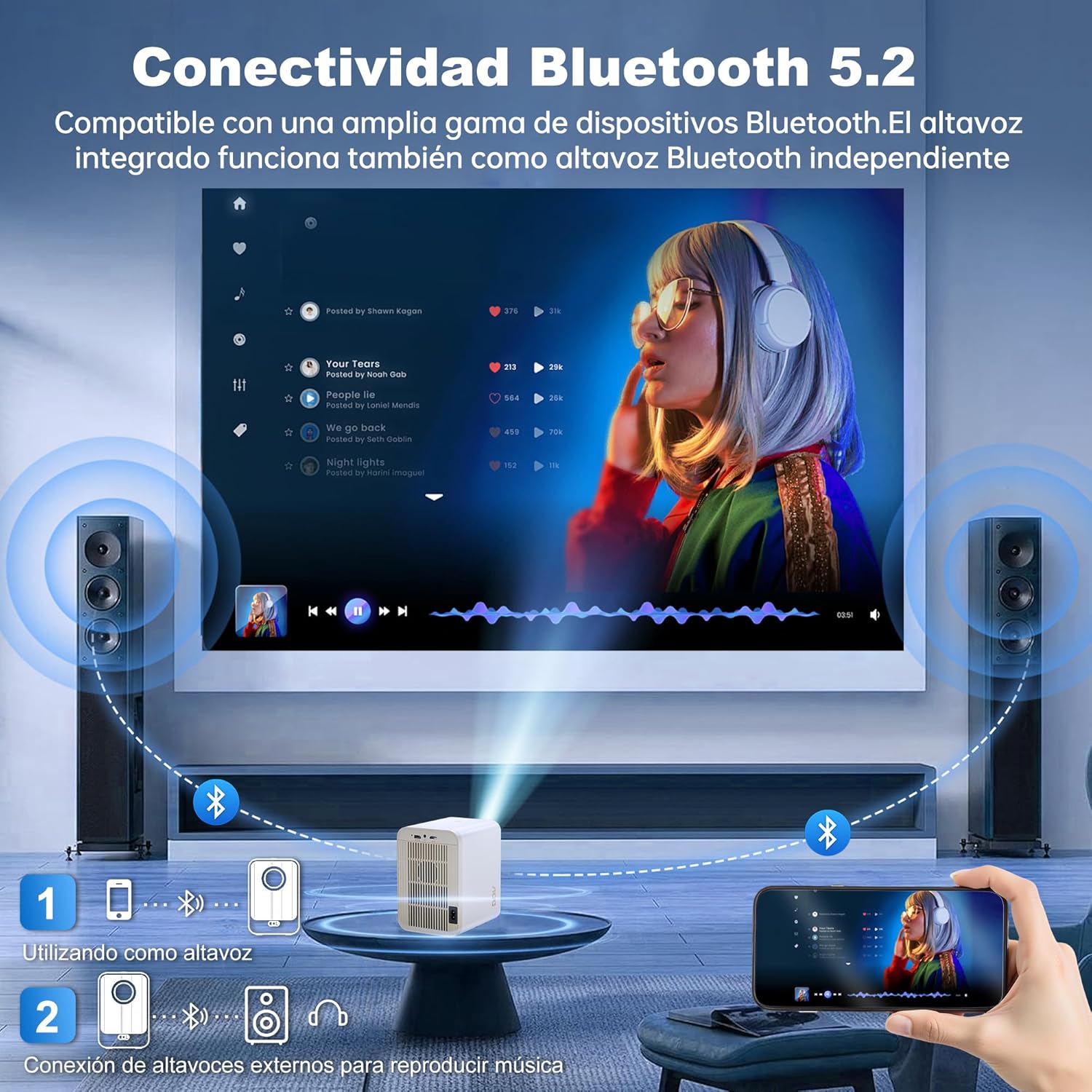
Image: The AOC XL2-211 projector displaying its smart interface with various streaming applications, ready for entertainment.
4. የኦዲዮ ውፅዓት
The projector includes built-in 2x12W stereo speakers. For alternative audio experiences:
- Connect Bluetooth speakers or headphones via ቅንብሮች > ብሉቱዝ.
- Use the 3.5mm audio jack for wired external speakers or headphones.

Image: The AOC XL2-211 projector wirelessly connected to external Bluetooth speakers, demonstrating enhanced audio capabilities.
ጥገና
1. ፕሮጀክተሩን ማጽዳት
- Ensure the projector is turned off and unplugged before cleaning.
- የፕሮጀክተሩን ውጫዊ ክፍል ለማጽዳት ለስላሳ እና ደረቅ ጨርቅ ይጠቀሙ።
- For the lens, use a lens cleaning cloth and specialized lens cleaning solution. Do not use abrasive materials.
- The fully enclosed optical engine minimizes dust accumulation, but regular external cleaning is recommended.
2. ማከማቻ
- ፕሮጀክተሩን ከፀሐይ ብርሃን እና ከፍተኛ የሙቀት መጠን ራቅ ባለ ቀዝቃዛና ደረቅ ቦታ ያስቀምጡት።
- If storing for an extended period, place it back in its original packaging or a protective case.
መላ መፈለግ
| ችግር | ሊሆን የሚችል ምክንያት | መፍትሄ |
|---|---|---|
| ምንም ምስል አልታየም። | Power cable disconnected, incorrect input source, lens cap on. | Check power connection, select correct input source (HDMI/USB), remove lens cap. |
| ምስሉ ደብዛዛ ነው | Out of focus, incorrect keystone correction. | Allow auto-focus to adjust, or manually adjust focus/keystone in Projection Settings. |
| ድምጽ የለም። | Volume too low, external audio device not connected/paired, internal speakers disabled. | Increase volume, ensure Bluetooth device is paired or wired audio is connected, check audio settings. |
| ከWi-Fi/ብሉቱዝ ጋር መገናኘት አልተቻለም | የተሳሳተ የይለፍ ቃል፣ መሳሪያ በጣም ሩቅ፣ ጣልቃ ገብነት። | Verify password, move device closer to router/projector, restart devices. |
| የርቀት መቆጣጠሪያ አይሰራም | Low batteries, obstruction. | Replace batteries, ensure no obstruction between remote and projector. |
ዝርዝሮች
| ባህሪ | ዝርዝር |
|---|---|
| የምርት ስም | አኦሲ |
| የሞዴል ቁጥር | XL2-211 |
| ቤተኛ ውሳኔ | 1280 x 800 ፒክስል |
| የሚደገፍ ውሳኔ | 1920 x 1080 ፒክስል (ሙሉ ኤችዲ) |
| ብሩህነት | 12000 Lumens (300 ANSI) |
| የንፅፅር ሬሾ | 12000፡1 |
| ስርዓተ ክወና | አንድሮይድ 12.0 |
| ራም | 1 ጊባ |
| ROM | 8 ጊባ |
| የገመድ አልባ ግንኙነት | Wi-Fi 6 (2.4G/5G), Bluetooth 5.0 |
| የግቤት ወደቦች | HDMI, USB, Audio (3.5mm jack), TF Card |
| የውጤት ወደቦች | Audio (3.5mm jack) |
| ተናጋሪ | Built-in 2x12W Stereo Speakers |
| የፕሮጀክሽን መጠን | 40-250 ኢንች |
| የቅጽ ምክንያት | ተንቀሳቃሽ |
| የምርት ልኬቶች | 19 x 21 x 26 ሴ.ሜ |
| የእቃው ክብደት | 750 ግራም |
| የኃይል ፍጆታ | 40 ዋት |
ዋስትና እና ድጋፍ
የዋስትና መረጃ
Your AOC XL2-211 Smart Projector comes with a የአንድ ዓመት ዋስትና ከተገዛበት ቀን ጀምሮ የማምረቻ ጉድለቶችን ይሸፍናል. ለዋስትና ጥያቄዎች እባክዎ የግዢ ማረጋገጫዎን ያቆዩ።
የደንበኛ ድጋፍ
For technical assistance, troubleshooting, or warranty inquiries, please contact AOC customer support. Refer to the official AOC webበጣም ወቅታዊ የእውቂያ መረጃ ለማግኘት ጣቢያ.
የመስመር ላይ መርጃዎች፡- ን ይጎብኙ AOC Brand Store ለተጨማሪ የምርት መረጃ እና ተደጋጋሚ ጥያቄዎች።
የቪዲዮ ማሳያ
Watch this official video for a visual guide on setting up and using your AOC XL2-211 Smart Projector, including unboxing, connectivity, and key features.
Video: An official demonstration of the AOC XL2-211 Smart Projector, showcasing its unboxing, setup, and various functionalities.


