1. መግቢያ
Thank you for choosing the Thomson 24-inch HD LED Smart TV, model 24HT2S15. This manual provides essential information to help you set up, operate, and maintain your new television. Please read it thoroughly before use and retain it for future reference.

ምስል፡ ፊት ለፊት view of the Thomson 24-inch HD LED Smart TV, showcasing its frameless design and key features like HD resolution and Dolby Audio.
ቁልፍ ባህሪዎች
- TiVo OS with Voice Control: Intuitive interface combining live TV and streaming apps, personalized recommendations, and voice commands.
- የገመድ አልባ ማሳያ; Mirror your smartphone, tablet, or laptop screen to the TV.
- ዶልቢ ኦዲዮ፡ Enhanced sound experience with improved dialogue, detail, and surround effects.
- HDR10፡ Sharper contrast and realistic colors for an immersive viewልምድ.
- የኋላ ብርሃን የርቀት መቆጣጠሪያ፡- Easy navigation in low light with direct access buttons for popular streaming services.
- Adjustable Side Feet: Flexible positioning options for the TV.
- ባለሶስት መቃኛ፡ Integrated tuners for cable, satellite, and antenna reception.
2. በሳጥኑ ውስጥ ያለው
ማሸጊያውን ሲከፍቱ፣እባክዎ የሚከተሉት እቃዎች መኖራቸውን ያረጋግጡ፡-
- Thomson 24-inch HD LED Smart TV (Model 24HT2S15)
- የርቀት መቆጣጠሪያ
- የኃይል አስማሚ
- የተጠቃሚ መመሪያ
- የዋስትና ካርድ
- Adjustable Side Feet (2x)
If any items are missing or damaged, please contact your retailer or Thomson customer support.
3. ማዋቀር
3.1 ማሸግ እና አቀማመጥ
Carefully remove the TV from its packaging. It is recommended to have two people for this process. Place the TV on a stable, flat surface or mount it on a wall using a compatible VESA mount (not included).
በቴሌቪዥኑ ዙሪያ በቂ የአየር ዝውውርን ያረጋግጡ። የአየር ማናፈሻ ክፍተቶችን አያግዱ.
3.2 መቆሚያውን ማያያዝ
If you are not wall-mounting the TV, attach the included side feet:
- ስክሪኑ እንዳይጎዳ ለመከላከል ቴሌቪዥኑን ለስላሳ እና ንጹህ ጨርቅ ላይ ያድርጉት።
- እያንዳንዱን መቆሚያ በቴሌቪዥኑ ግርጌ ላይ ካሉት የሾላ ቀዳዳዎች ጋር ያስተካክሉ።
- Secure the stands using the provided screws. The feet are adjustable from 30 cm to 60 cm distance.

Image: The Thomson 24-inch Smart TV showing its dimensions, including a screen diagonal of 60 cm (24 inches), width of 53 cm, and height of 37 cm with the stand. The adjustable stand feet are also illustrated.
3.3 ማገናኛ ፔሪፈራል
Connect your external devices to the TV's ports. Refer to the diagram below for port locations.

ምስል: ዝርዝር view of the rear connection panel of the Thomson 24-inch Smart TV, illustrating various ports including 2x USB 2.0, Antenna input, Satellite input, 3x HDMI 1.4 (one with ARC), Service port, Headphone jack, AV IN, Digital Optical Audio Out, and LAN port.
- ኃይል፡- Connect the power adapter to the TV and then to a wall outlet.
- አንቴና/ሳተላይት፡ Connect your antenna or satellite cable to the respective input.
- ኤችዲኤምአይ: Use HDMI cables to connect devices like Blu-ray players, game consoles, or set-top boxes. HDMI 1.4/ARC supports Audio Return Channel.
- ዩኤስቢ፡ የሚዲያ መልሶ ማጫወት ወይም የሶፍትዌር ዝመናዎችን ለማድረግ የዩኤስቢ ድራይቭዎችን ያስገቡ።
- ላንኛ ለገመድ የበይነመረብ ግንኙነት የኤተርኔት ገመድ ያገናኙ።
- AV ውስጥ ፦ የተቀናበረ ቪዲዮ እና ስቴሪዮ ኦዲዮን ለሚጠቀሙ የቆዩ መሣሪያዎች።
- የጆሮ ማዳመጫ: ለግል ማዳመጥ የጆሮ ማዳመጫዎችን ያገናኙ።
- ዲጂታል ኦፕቲካል ኦዲዮ ውጪ፡ ለዲጂታል ኦዲዮ ከውጭ የድምፅ ስርዓት ጋር ይገናኙ።
3.4 የመነሻ ኃይል ማብራት እና የመጀመሪያ ጊዜ ማዋቀር
- ቴሌቪዥኑን ወደ የኃይል መውጫ ይሰኩ።
- በርቀት መቆጣጠሪያው ወይም በቴሌቪዥኑ ላይ የኃይል አዝራሩን ይጫኑ።
- Follow the on-screen instructions to select your language, country, and perform channel scanning for your triple tuner (cable/satellite/antenna).
- ከዝርዝሩ ውስጥ በመምረጥ እና የይለፍ ቃሉን በማስገባት ከ Wi-Fi አውታረ መረብዎ ጋር ይገናኙ።
- Complete the TiVo OS setup, including signing in or creating an account.
4. ቴሌቪዥንዎን ሥራ ላይ ማዋል
4.1 የርቀት መቆጣጠሪያ ተግባራት
The backlit remote control provides easy access to all TV functions, even in dim lighting. It includes dedicated buttons for popular streaming services.

Image: The Thomson Smart TV remote control, highlighting its backlit buttons, voice control microphone, and direct access buttons for Netflix, YouTube, Prime Video, Disney+, and Canal+.
- የኃይል ቁልፍ፡- ቴሌቪዥኑን ያበራል/ያጠፋል።
- የቁጥር አዝራሮች፡- ቻናሎችን በቀጥታ ይምረጡ።
- የማውጫ ቁልፎች (ላይ/ታች/ግራ/ቀኝ/እሺ)፡ ምናሌዎቹን ያስሱ እና አማራጮችን ይምረጡ።
- ተመለስ/ውጣ፡ ወደ ቀዳሚው ማያ ገጽ ይመለሱ ወይም ከምናሌው ይውጡ።
- ድምጽ ወደ ላይ/ወደታች፡ የድምጽ ደረጃውን ያስተካክሉ.
- ቻናል ወደ ላይ/ታች፡ የቲቪ ጣቢያዎችን ቀይር።
- ድምጸ-ከል አድርግ፡ ድምጹን ድምጸ-ከል ያድርጉ ወይም ያንሱ።
- ቤት፡ Access the TiVo OS home screen.
- የድምጽ መቆጣጠሪያ አዝራር፡- Activate voice commands (microphone icon).
- የቀጥታ መዳረሻ አዝራሮች፡ Launch Netflix, YouTube, Prime Video, Disney+, Canal+ instantly.
4.2 TiVo OS and Smart Features
The TiVo OS provides a unified platform for live TV and streaming content. Explore personalized recommendations and access your favorite apps.

Image: The Thomson Smart TV screen showing various streaming application icons like Netflix, YouTube, Disney+, Prime Video, Plex, DAZN, Canal+, and Pluto TV, indicating integrated smart TV capabilities.
- የመተግበሪያ መዳረሻ Navigate to the home screen to find and launch pre-installed apps or download new ones from the app store.
- የድምጽ ቁጥጥር፡- Press the voice control button on your remote and speak commands to search for content, launch apps, or control TV functions.
- የገመድ አልባ ማሳያ; Use the Wireless Display feature to mirror content from your compatible smartphone, tablet, or laptop directly to your TV screen.

Image: An illustration demonstrating the voice control feature of the Thomson Smart TV, showing a remote control with a microphone icon and examples of voice commands like "Open Netflix" or "Play movies with Tom Hanks."

Image: The Thomson Smart TV displaying content mirrored from a smartphone, illustrating the Wireless Display and Google Cast features for seamless content sharing.
4.3 የምስል እና የድምጽ ማሻሻያዎች
- HDR10፡ Experience improved contrast, brightness, and color accuracy with HDR10 content. This technology enhances both bright and dark scenes for a more dynamic picture.
- ዶልቢ ኦዲዮ፡ Enjoy rich, clear, and powerful sound. Dolby Audio optimizes dialogue, enhances detail, and provides an immersive surround sound experience.

Image: A side-by-side comparison of picture quality, demonstrating the enhanced contrast and color vibrancy of HDR10 on the right compared to standard SDR on the left, with a building and landscape scene.

Image: An illustration depicting sound waves emanating from a TV screen, with the Dolby Audio logo prominently displayed, signifying enhanced audio quality for an immersive viewልምድ.
5. ጥገና
5.1 የእርስዎን ቲቪ ማጽዳት
- ስክሪን፡ ስክሪኑን በቀስታ ለስላሳ እና ከተሸፈነ ጨርቅ ይጥረጉ። ለግትር ምልክቶች፣ በትንሹ መampጨርቁን በውሃ ወይም በልዩ ማያ ገጽ ማጽጃ። ፈሳሹን በቀጥታ ወደ ማያ ገጹ ላይ በጭራሽ አይረጩ።
- ካቢኔ የቴሌቭዥን ካቢኔን ያጽዱ እና ለስላሳ እና ደረቅ ጨርቅ ይቁሙ.
- የርቀት መቆጣጠሪያ፡- የርቀት መቆጣጠሪያውን ለስላሳ እና ደረቅ ጨርቅ ያጽዱ.
ጥንቃቄ፡-
- ከማጽዳትዎ በፊት ሁልጊዜ ቴሌቪዥኑን ይንቀሉ.
- ሻካራ ማጽጃዎችን፣ ሰምዎችን ወይም ፈሳሾችን አይጠቀሙ።
5.2 የሶፍትዌር ዝመናዎች
Your Smart TV may receive software updates to improve performance and add new features. It is recommended to enable automatic updates or check for updates periodically through the TV's settings menu to ensure optimal functionality and security.
6. መላ መፈለግ
በቲቪዎ ላይ ችግሮች ካጋጠሙዎት የሚከተሉትን የተለመዱ ችግሮች እና መፍትሄዎች ይመልከቱ፡
| ችግር | ሊሆን የሚችል ምክንያት | መፍትሄ |
|---|---|---|
| ኃይል የለም | የኃይል ገመድ ተለያይቷል፤ የኃይል መውጫ ችግር | የኃይል ገመድ ደህንነቱ በተጠበቀ ሁኔታ መገናኘቱን ያረጋግጡ። መውጫውን በሌላ መሳሪያ ይሞክሩት። |
| ምንም ምስል የለም, ግን ድምጽ አለ | የተሳሳተ የግቤት ምንጭ፤ የተሳሳተ ገመድ | Check the input source (e.g., HDMI 1, Antenna). Ensure cables are connected correctly. |
| ምንም ድምጽ የለም, ግን ምስል አለ | የድምጽ መጠኑ ተዘግቷል ወይም በጣም ዝቅተኛ ነው፤ ውጫዊ የድምጽ ስርዓት ችግር | Unmute the TV or increase volume. Check audio settings and external audio connections. |
| የርቀት መቆጣጠሪያ አይሰራም | የሞተ ባትሪ፤ እንቅፋት፤ የርቀት መቆጣጠሪያ አልተጣመረም | Replace batteries. Remove any obstructions. Re-pair the remote if necessary (refer to TV settings). |
| ከWi-Fi ጋር መገናኘት አልተቻለም | የተሳሳተ የይለፍ ቃል፤ የራውተር ችግር፤ ቴሌቪዥን ከራውተሩ በጣም ርቋል | Verify Wi-Fi password. Restart your router. Move TV closer or use a wired LAN connection. |
| Smart features not responding | Network issue; temporary software glitch | Check internet connection. Restart the TV by unplugging it for a minute and plugging it back in. |
If the problem persists after trying these solutions, please contact Thomson customer support.
7. ዝርዝሮች
Detailed technical specifications for the Thomson 24HT2S15 Smart TV:
| ባህሪ | ዝርዝር |
|---|---|
| የምርት ስም | ቶምሰን |
| የሞዴል ቁጥር | 24HT2S15 |
| የስክሪን መጠን | 24 ኢንች (60 ሴሜ) |
| የማሳያ ቴክኖሎጂ | LED |
| ጥራት | 768 ፒ (1366 x 768 ፒክስል) |
| የማደስ ደረጃ | 60 Hz |
| ምጥጥነ ገጽታ | 16፡9 |
| የግንኙነት ቴክኖሎጂ | ኢተርኔት፣ HDMI፣ USB፣ Wi-Fi |
| ልዩ ባህሪያት | Parental Controls, TiVo OS, Voice Control, HDR10, Dolby Audio |
| የምርት ልኬቶች (ከቆመበት ጋር) | 8P x 53l x 37H cm (approx. 8 x 53 x 37 cm) |
| ክብደት | 3.33 ኪ.ግ |
| የተካተቱ አካላት | Power Adapter, User Manual, Warranty Card, Remote Control |
| ቋንቋዎች ይደገፋሉ | ፈረንሳይኛ፣ እንግሊዝኛ፣ ጣሊያንኛ፣ ስፓኒሽ፣ ጀርመንኛ |
| የኢነርጂ ውጤታማነት ክፍል | E |
| EPREL የምርት መረጃ | https://eprel.ec.europa.eu/qr/1969520 |
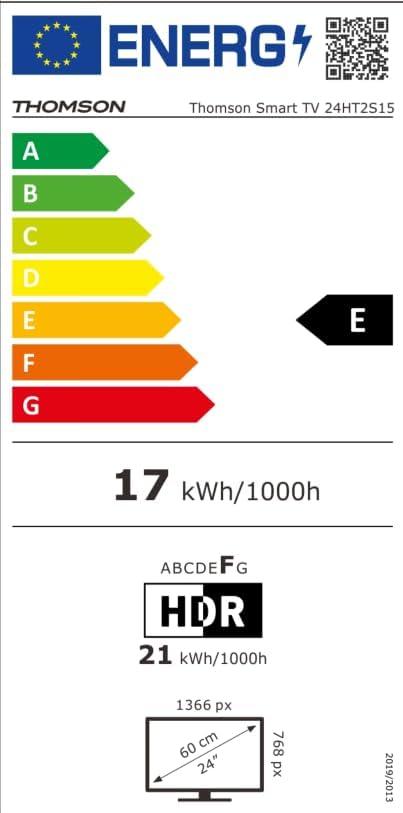
Image: The EU Energy Label for the Thomson Smart TV 24HT2S15, showing an energy efficiency class of E and energy consumption of 17 kWh/1000h for SDR and 21 kWh/1000h for HDR.
8. ዋስትና እና ድጋፍ
8.1 የዋስትና መረጃ
Thomson products are covered by a 3-year warranty. For detailed information regarding warranty claims, returns, or defective products, please refer to the warranty card included in your package or visit the Thomson support webጣቢያ.
For specific information on purchases made via Amazon, consult Amazon's help pages regarding returns and defective products.
8.2 የደንበኛ ድጋፍ
If you require further assistance or have questions not covered in this manual, please contact Thomson customer support:
- አምራች፡ ዥረትview GmbH
- ኢሜይል፡- contact@streamview.com
- Webጣቢያ፡ www.ዥረትview.com
- ስልክ፡ +4318900066
Please have your model number (24HT2S15) and purchase details ready when contacting support.