መግቢያ
Thank you for choosing the vretti PB821 Portable Thermal Printer. This compact and versatile device is designed for convenient, inkless printing from various devices, including smartphones, tablets, and laptops. Its portability makes it ideal for business, office, home, and travel use. This manual provides essential information on setting up, operating, maintaining, and troubleshooting your printer to ensure optimal performance.
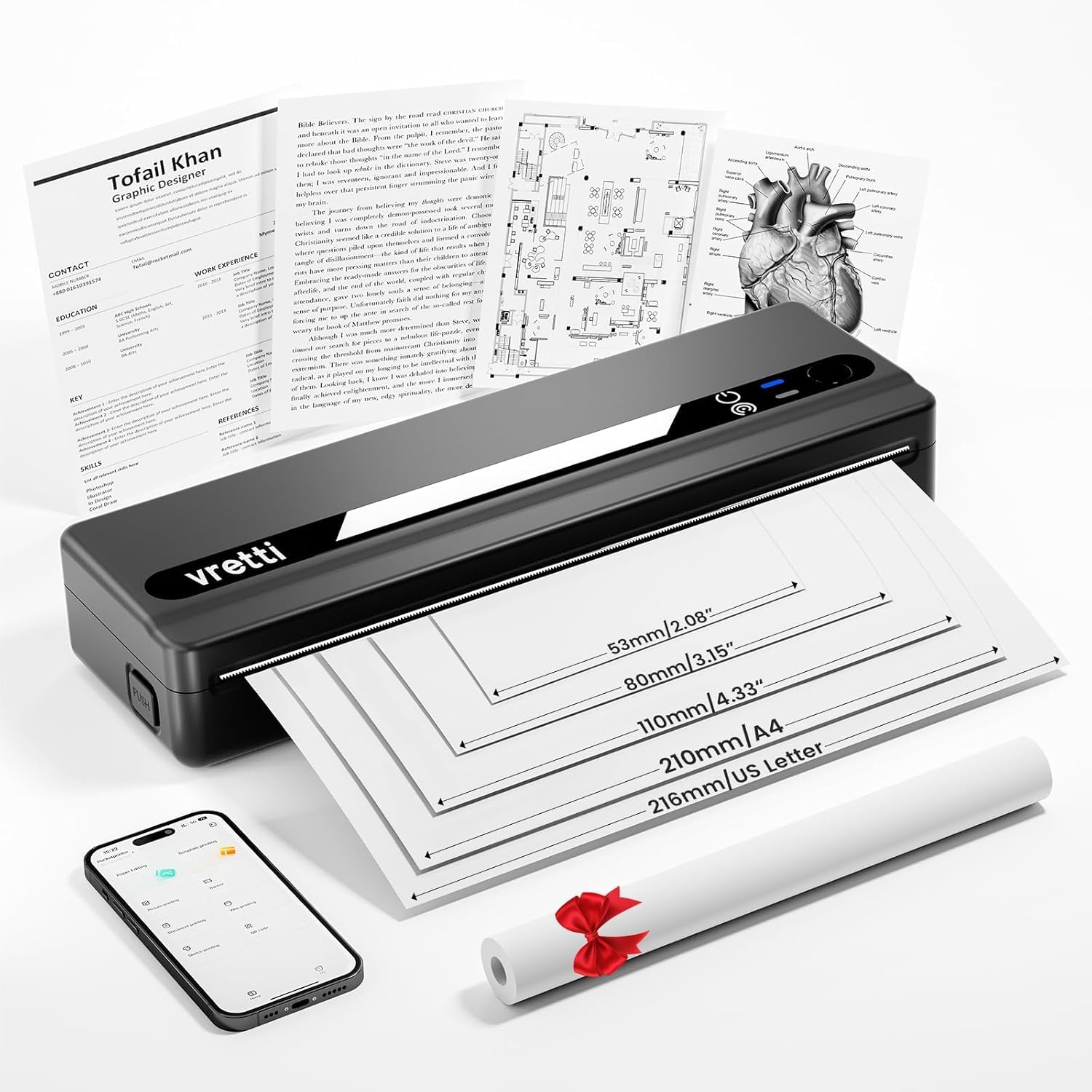
Image: The vretti PB821 Portable Thermal Printer, a sleek black device, ready for use.
የጥቅል ይዘቶች
ሁሉም እቃዎች መኖራቸውን ለማረጋገጥ እባክዎን ቦክስ ሲወጡ የጥቅል ይዘቱን ያረጋግጡ፡-
- vretti PB821 Portable Thermal Printer
- 1 Roll of Thermal Paper
- የዩኤስቢ-ሲ ኃይል መሙያ ገመድ
- የተጠቃሚ መመሪያ
ምርት አልቋልview
ቁልፍ ባህሪያት
- ገመድ አልባ ብሉቱዝ ማተም; Connects wirelessly to phones and tablets via the "XLifePro" app.
- ተንቀሳቃሽ እና የታመቀ; Small and lightweight design for easy transport.
- Cost-effective Inkless Printing: Utilizes advanced thermal printing technology, eliminating the need for ink, toner, or ribbons.
- High-quality Printing: Delivers clear prints with a 203 DPI resolution.
- ለረጅም ጊዜ የሚቆይ ባትሪ; Built-in 1500mAh rechargeable battery supports printing up to 223 A4 sheets on a full charge.
- Multi-size Paper Support: Compatible with A5, A4, Letter, and 2-4 inch labels.
የግንኙነት አማራጮች

Image: The vretti PB821 printer supports both Bluetooth and USB connections for versatile use with Android, iOS, iPad, Windows, Mac OS, Linux, and Chromebook devices.
The vretti PB821 printer offers flexible connectivity, allowing you to print wirelessly via Bluetooth from mobile devices or directly via USB from computers. This ensures compatibility across various operating systems and devices.
ተንቀሳቃሽ ንድፍ

Image: A visual comparison highlighting the compact and portable design of the vretti PB821 printer against a larger, traditional printer, emphasizing its convenience.
The PB821 is designed for maximum portability, making it easy to carry in a backpack or bag. Its compact form factor does not compromise on functionality, offering easy setup and smooth, inkless printing.
ማዋቀር
1. የመነሻ ኃይል መሙላት
Before first use, fully charge the printer using the provided USB-C cable. Connect the cable to the printer's USB-C port and a compatible power adapter (not included) or computer USB port. The charging indicator light will show the charging status.

Image: Visual representation of the printer's 1500mAh battery capacity, USB-C charging, and its ability to print up to 223 A4 sheets on a single charge.
2. የሙቀት ወረቀት መጫን
The vretti PB821 supports various thermal paper types. To load paper:
- የአታሚውን የወረቀት ሽፋን ይክፈቱ።
- የሙቀት ወረቀቱን የሚታተምበት ጎን ወደ ላይ እያሳየ ያስገቡ። ወረቀቱ በመመሪያዎቹ ውስጥ በትክክል መስተካከሉን ያረጋግጡ።
- የወረቀት ሽፋኑን በጥንቃቄ ይዝጉ.

Image: The vretti PB821 printer showcasing its compatibility with different thermal paper types, including folding thermal paper and roll paper, along with various paper sizes.
3. በብሉቱዝ (ሞባይል መሳሪያዎች) መገናኘት
To print wirelessly from your smartphone or tablet:
- Download the "XLifePro" app from the App Store (iOS) or Google Play Store (Android).
- Turn on the vretti PB821 printer. The Bluetooth indicator light will blink.
- Open the XLifePro app, navigate to the device connection settings, and select the PB821 printer from the list of available Bluetooth devices.
- ከተገናኘ በኋላ የብሉቱዝ አመልካች መብራቱ ጠንካራ ይሆናል።

Image: Step-by-step guide on connecting the vretti PB821 printer via Bluetooth, including downloading the XLifePro app and pairing the device.
4. Connecting via USB (Computers)
To print from your Windows, Mac OS, or Linux computer:
- Download the appropriate printer driver from the official vretti webጣቢያ፡ vrettitech.com/pages/p83-support.
- Install the driver on your computer following the on-screen instructions.
- Connect the vretti PB821 printer to your computer using the provided USB-C cable.
- The computer should recognize the printer, and you can now select it as your printing device.

Image: Instructions for USB connection, detailing driver download from the vretti website and connecting the PB821 printer to a laptop.
የአሠራር መመሪያዎች
Printing from Mobile Devices
በብሉቱዝ አንዴ ከተገናኘ በኋላ፡-
- ሰነዱን፣ ምስሉን ወይም file you wish to print within the XLifePro app. The app supports various formats including TXT, PDF, Excel, and Word documents.
- Select the print option within the app.
- Confirm print settings such as paper size and quantity.
- Initiate printing.
Printing from Computers
Once connected via USB and drivers are installed:
- ሰነዱን ይክፈቱ ወይም file በኮምፒተርዎ ላይ ማተም ይፈልጋሉ።
- ከመተግበሪያዎ የህትመት አማራጩን ይምረጡ (ለምሳሌ፣ File > ማተም)።
- Choose "vretti PB821" from the list of available printers.
- የህትመት ቅንብሮችን እንደ አስፈላጊነቱ ያስተካክሉ (ለምሳሌ፣ የወረቀት መጠን፣ አቀማመጥ)።
- "አትም" ን ጠቅ ያድርጉ.
Supported Paper Types and Sizes
The PB821 printer is compatible with various thermal paper types and sizes, including:
- A4 (210 ሚሜ)
- Letter (8.5" x 11" / 216mm)
- A5 (148 ሚሜ)
- B5 (175mm)
- 2-inch (53mm) labels
- 3-inch (80mm) labels
- 4-inch (110mm) labels

Image: The vretti PB821 printer demonstrating its support for multiple paper sizes, including standard document sizes and various label sizes.
Using the XLifePro App
The XLifePro app provides additional functionalities beyond basic printing, including:
- Access to multiple templates for creative printing.
- Options for document printing, picture printing, and more.
- Customization features for various printing needs.

Image: Screenshots of the XLifePro app interface, illustrating its diverse range of templates and printing options.
ጥገና
ማተሚያውን ማጽዳት
To maintain print quality and prolong the printer's lifespan:
- Ensure the printer is turned off and disconnected from power before cleaning.
- ለስላሳ፣ ከቆሸሸ ነፃ የሆነ ጨርቅ በትንሹ ተጠቀምampened with water or isopropyl alcohol to gently wipe the print head and paper path.
- ገላጭ ማጽጃዎችን ወይም ፈሳሾችን አይጠቀሙ.
- Allow the printer to dry completely before turning it on.
የባትሪ እንክብካቤ
የባትሪ ዕድሜን ለማመቻቸት፡-
- በተደጋጋሚ ባትሪውን ሙሉ በሙሉ ከመሙላት ይቆጠቡ።
- አታሚውን ለረጅም ጊዜ ጥቅም ላይ በማይውልበት ጊዜ ቀዝቃዛና ደረቅ ቦታ ያስቀምጡት።
- Charge the printer regularly, even if not in frequent use, to prevent deep discharge.
መላ መፈለግ
| ጉዳይ | ሊሆን የሚችል ምክንያት | መፍትሄ |
|---|---|---|
| አታሚ አልበራም። | ዝቅተኛ ባትሪ; የኃይል ቁልፉ በትክክል አልተጫነም። | Charge the printer; Press and hold the power button for a few seconds |
| በብሉቱዝ በኩል መገናኘት አልተቻለም | ብሉቱዝ በመሳሪያው ላይ ጠፍቷል፤ አታሚ በማጣመር ሁነታ ላይ አይደለም፤ የመተግበሪያ ችግር | Ensure Bluetooth is enabled; Restart printer; Reinstall XLifePro app |
| ደካማ የህትመት ጥራት | ዝቅተኛ ባትሪ፤ የቆሸሸ የህትመት ራስ፤ የተሳሳተ የወረቀት አይነት | Charge printer; Clean print head; Use recommended thermal paper |
| የወረቀት መጨናነቅ | Improper paper loading; Damaged paper | Turn off printer, carefully remove jammed paper, reload correctly; Use undamaged paper |
| አታሚ በኮምፒዩተር አልታወቀም። | Missing/incorrect drivers; Faulty USB cable/port | Install/reinstall drivers from vretti website; Try a different USB cable/port |
ዝርዝሮች
| ባህሪ | ዝርዝር |
|---|---|
| ሞዴል | ፒቢ821 |
| የምርት ስም | vretti |
| የህትመት ቴክኖሎጂ | ሙቀት |
| የግንኙነት ቴክኖሎጂ | ብሉቱዝ ፣ ዩኤስቢ |
| ከፍተኛው የህትመት ጥራት | 203 ዲፒአይ (ጥቁር እና ነጭ) |
| የህትመት ሚዲያ | Thermal Paper (plain) |
| የሚደገፉ የሉህ መጠኖች | 2'', 3'', 4'', A4, 8.5''x 11'' US Letter |
| ከፍተኛው የግቤት ሉህ አቅም | 30 ሉሆች |
| የባትሪ አቅም | 1500mAh (ሊቲየም አዮን) |
| የምርት ልኬቶች | 25.7 x 7 x 4.7 ሴ.ሜ |
| የእቃው ክብደት | 900 ግ |
| ባለሁለት ጎን ማተም | አይ |
| የቀለም ቀለም | ጥቁር |
ዋስትና እና ድጋፍ
The vretti PB821 Portable Thermal Printer comes with a standard manufacturer's warranty. For specific warranty details, technical support, or service inquiries, please refer to the warranty card included in your package or visit the official vretti webጣቢያ. ለዋስትና ጥያቄዎች የግዢ ደረሰኝዎን እንደ ግዢ ማረጋገጫ ያቆዩት።
የምርት ቪዲዮ
Video: An official product video demonstrating the features and usage of the vretti PB821 Portable Thermal Printer, including its compact design, wireless connectivity, and printing capabilities.


