መግቢያ
The TizzyToy MT11-GPS Drone is a versatile and user-friendly quadcopter designed for beginners, adults, and kids. Weighing less than 249g, it does not require FAA registration or Remote ID, making it convenient for travel and immediate use. This manual provides essential information for setting up, operating, and maintaining your drone to ensure a safe and enjoyable flight experience.
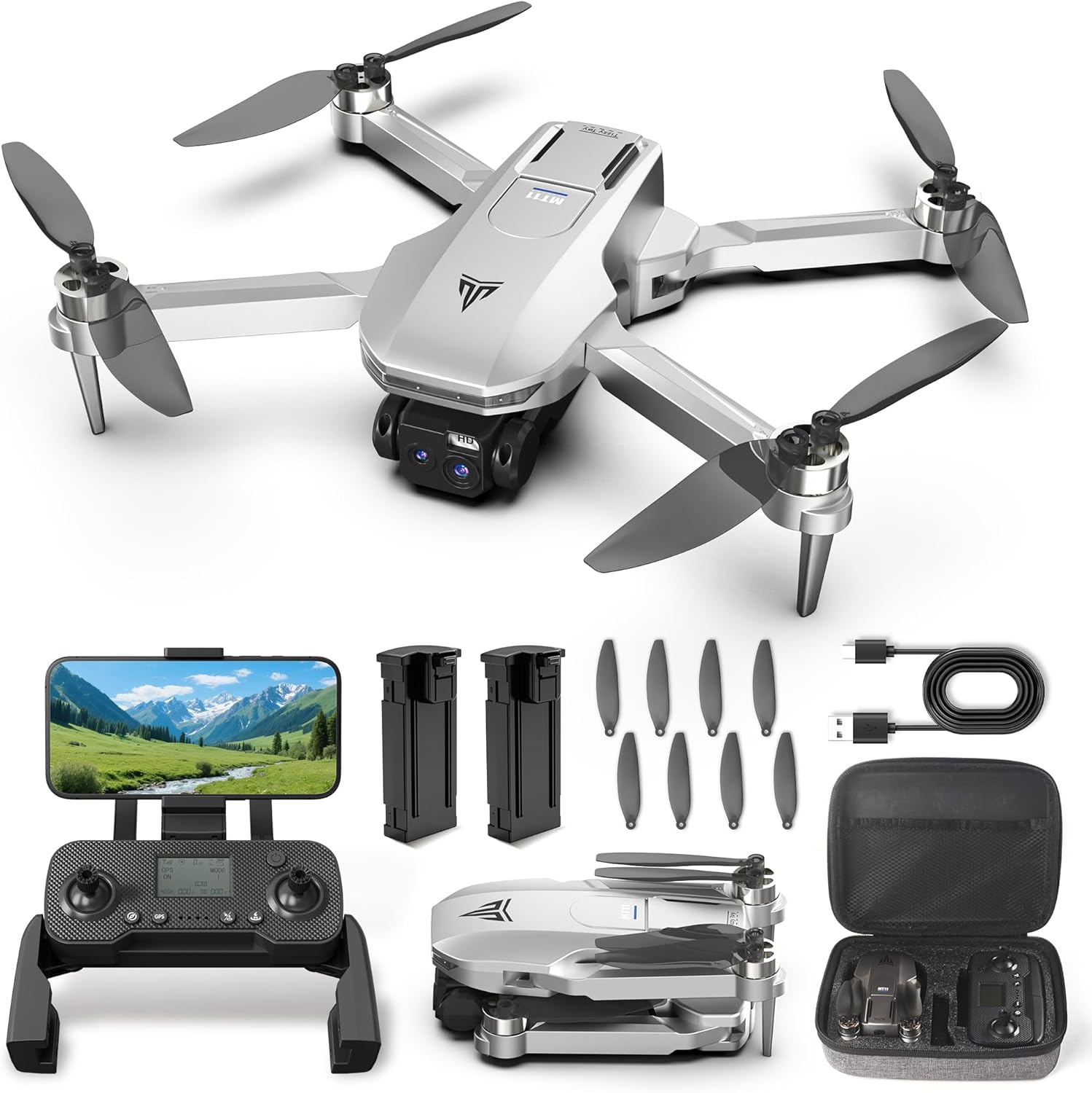
Figure 1: TizzyToy MT11-GPS Drone and included accessories.
የደህንነት መመሪያዎች
- No FAA Registration Needed: The drone weighs less than 249g, eliminating the need for FAA registration or Remote ID in most regions. Always check local regulations before flying.
- ጂኦ-አጥር፡ Utilize the geo-fencing feature to maintain safe flight boundaries, especially when flying in new or restricted areas.
- የቅድመ በረራ ፍተሻ፡- Always ensure all components are correctly assembled and batteries are fully charged before each flight.
- የአካባቢ ግንዛቤ; Avoid flying in strong winds (rated for Level 4 wind resistance, up to 17mph) or adverse weather conditions. Maintain visual line of sight with the drone.
የጥቅል ይዘቶች

Figure 2: All items included in the TizzyToy MT11-GPS Drone package.
- TizzyToy MT11-GPS Drone
- የርቀት መቆጣጠሪያ (1)
- Spare Propellers (12)
- ዳግም ሊሞሉ የሚችሉ ባትሪዎች (2)
- Type C Charging Cables (2)
- ዊልስ እና ዊንዳይቨር
- የተጠቃሚ መመሪያ
- መያዣ
ማዋቀር
1. የድሮን ስብስብ
The MT11-GPS drone features a foldable design for portability. Gently unfold the drone arms until they lock into place. Ensure all propellers are securely attached. If replacing propellers, use the provided screwdriver and spare propellers, matching the A and B labels.
2. የባትሪ ጭነት እና ባትሪ መሙላት
Insert a fully charged battery into the drone's battery compartment until it clicks. The drone comes with two rechargeable batteries, each providing up to 20 minutes of flight time (40 minutes total). Use the provided Type C charging cables to charge the batteries. The smart auto power-off feature protects battery life by stopping charging once full.
3. የርቀት መቆጣጠሪያ ማዋቀር
Unfold the phone holder on the remote control and securely place your smartphone. The remote control is also rechargeable via a Type C cable.
4. App Connection & Calibration
Download the dedicated drone application to your smartphone. Turn on both the drone and the remote control. Connect your smartphone to the drone's Wi-Fi network. Follow the in-app instructions for initial calibration (compass and gyroscope) before your first flight or in a new environment.
የአሠራር መመሪያዎች
1. መሰረታዊ በረራ
- መነሳት፡ Use the one-key takeoff function or manually push the joysticks to initiate flight.
- በማንዣበብ ላይ The drone's altitude hold feature ensures stable hovering, making it easy to control.
- ማረፊያ Use the one-key landing function or manually descend the drone.
- ጭንቅላት የሌለው ሁነታ: የበረራ መቆጣጠሪያውን ከአብራሪው ጋር በማነፃፀር የድሮኑን አቀማመጥ ማስተካከል አስፈላጊነትን በማስወገድ ቀላል ያደርገዋል።
2. Smart Flight Modes

Figure 3: Smart flight modes for enhanced aerial photography and videography.
- ተከተለኝ፡ The drone automatically follows your movements, capturing hands-free footage.
- የኦርቢት በረራ፡ Perform cinematic 360° shots around a subject with the touch of a button.
- የመንገድ ነጥብ በረራ፡- Draw a flight path on the app, and the drone will automatically follow the designated route.
- የእጅ ምልክት ቁጥጥር፡- Use specific hand gestures to command the drone for photos or videos.
3. የካሜራ አሠራር

Figure 4: Dual 2K QHD cameras with 90° adjustable lens for versatile shots.
- Dual 2K QHD Cameras: Capture sharp aerial photos and videos with the dual 2K cameras.
- 90° Adjustable Lens: The shock-absorbing lens can be adjusted by 90° to capture various angles, from wide landscapes to detailed close-ups.
- 5G WiFi FPV Transmission: Enjoy real-time, smooth, and lag-free video streaming directly to your smartphone.
4. Flight Range and Altitude

Figure 5: Extended flight capabilities of the MT11-GPS Drone.
The drone offers a stable 5G transmission range of up to 1640 feet and can reach an altitude of 394 feet, allowing for extensive exploration and capturing distant scenes.
5. Auto Return-to-Home (RTH)

Figure 6: GPS Auto Return-to-Home features for safe drone retrieval.
The built-in GPS ensures stable navigation. The drone will automatically return to its takeoff point in the event of low battery or signal loss, providing a worry-free flying experience.
ጥገና
- የባትሪ እንክብካቤ Always ensure batteries are fully charged before use. The smart auto power-off feature helps protect battery life during charging.
- የፕሮፔለር መተካት In case of damage, use the provided spare propellers and screwdriver to replace them. Ensure correct propeller (A or B) is installed on the corresponding motor.
- አጠቃላይ ጽዳት; Keep the drone clean from dust and debris to ensure optimal performance.
መላ መፈለግ
If you encounter any issues, please refer to the detailed user manual included in the package. Common issues can often be resolved by:
- Ensuring batteries are fully charged for both drone and remote.
- Re-calibrating the drone via the app.
- Checking for any obstructions to propellers or cameras.
- Verifying a stable Wi-Fi connection between the drone and your smartphone.
ዝርዝሮች
| ባህሪ | ዝርዝር |
|---|---|
| የምርት ስም | ቲዚቶይ |
| የሞዴል ስም | MT11-GPS |
| የእቃው ክብደት | 1.39 pounds (under 249g) |
| የቪዲዮ ቀረጻ ጥራት | 2.7K (QHD Dual Cameras) |
| የግንኙነት ቴክኖሎጂ | Wi-Fi (5G Transmission) |
| የመቆጣጠሪያ ዓይነት | የመተግበሪያ ቁጥጥር |
| ከፍተኛው ክልል | 1640 ጫማ |
| የባትሪ ሕዋስ ቅንብር | ሊቲየም አዮን |
| ባትሪዎች ተካትተዋል። | አዎ (2 የሊቲየም አዮን ባትሪዎች) |
| የጨረር ዳሳሽ ቴክኖሎጂ | Optical Flow |
ይፋዊ የምርት ቪዲዮዎች
GPS Drone with Dual 2K QHD Cameras for Beginners
Video demonstrating the TizzyToy MT11-GPS drone's features, including its dual 2K QHD cameras and ease of use for beginners.
Brushless Motor with WiFi FPV
የቪዲዮ ማሳያasing the drone's brushless motor for quiet and efficient flight, along with its WiFi FPV capabilities.
Drone review and demo
አንድ አጠቃላይ ድጋሚview and demonstration of the TizzyToy MT11-GPS drone's features and flight performance.


