መግቢያ
The KEF Coda W Wireless HiFi Speaker system offers high-fidelity audio in an accessible, all-in-one package. Designed to deliver detailed and immersive sound, it provides versatile connectivity options for various audio sources. The Coda W combines classic design principles with advanced acoustic technology.

ምስል፡ ፊት ለፊት view of the KEF Coda W Wireless HiFi Speakers in Moss Green.
የጥቅል ይዘቶች
ከዚህ በታች የተዘረዘሩት ሁሉም እቃዎች በጥቅልዎ ውስጥ መኖራቸውን ያረጋግጡ፡
- KEF Coda W Primary Speaker
- KEF Coda W Secondary Speaker
- የኃይል ገመድ
- ፈጣን ጅምር መመሪያ
- የርቀት መቆጣጠሪያ
- USB-C Inter-speaker Cable
የማዋቀር መመሪያ
- አቀማመጥ፡- Position your KEF Coda W speakers in your desired listening area. For optimal stereo imaging, place them equidistant from your listening position and at ear level. Ensure adequate space around the speakers for proper ventilation and sound dispersion.

Image: KEF Coda W speakers positioned on a desk, demonstrating typical placement.
- Connect Primary and Secondary Speakers: Use the provided USB-C inter-speaker cable to connect the Primary speaker to the Secondary speaker. Locate the "TO P/S" port on the Secondary speaker and the corresponding port on the Primary speaker.
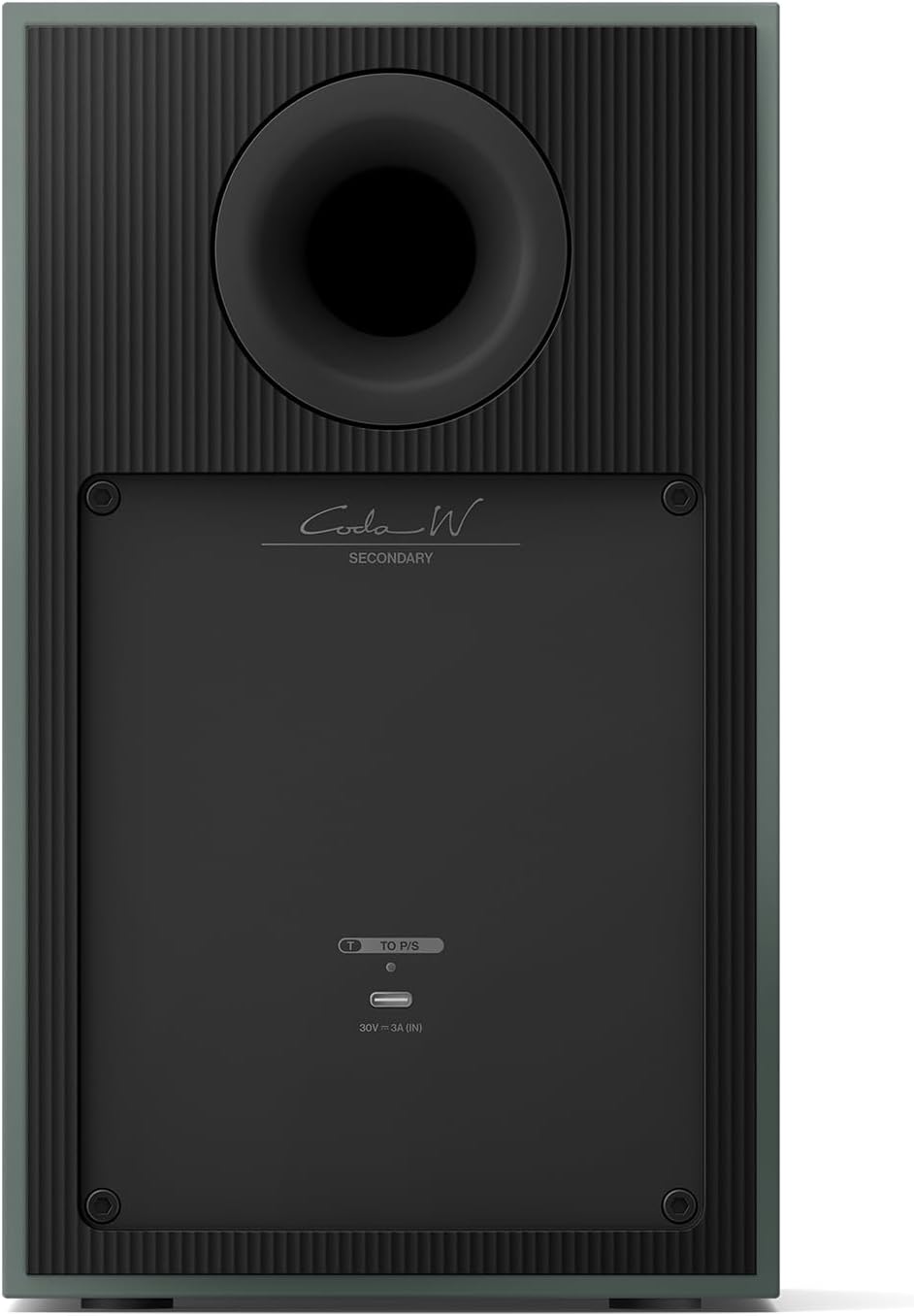
Image: Rear panel of the KEF Coda W Primary speaker, highlighting the connectivity options including the USB-C inter-speaker port.
- የኃይል ግንኙነት; Connect the power cable to the AC input on the Primary speaker, then plug the other end into a wall outlet.
- የመጀመሪያ ኃይል በርቷል፡ Press the power button on the Primary speaker or use the remote control to turn on the system. The indicator light will illuminate.
- የመተግበሪያ ማዋቀር (የሚመከር)፦ Download the KEF Connect app from your device's app store. Follow the in-app instructions to connect your Coda W speakers to your Wi-Fi network and configure settings. This enables advanced features and streaming options.
የአሠራር መመሪያዎች
የግንኙነት አማራጮች፡-
- Bluetooth 5.4 with aptX: For wireless streaming from compatible devices. Activate Bluetooth pairing mode on the speakers and select "KEF Coda W" from your device's Bluetooth settings.
- የኤችዲኤምአይ አርክ ፦ Connect your TV using an HDMI cable to the HDMI ARC port on the Primary speaker for high-fidelity TV audio.
- የዩኤስቢ-ሲ ኦዲዮ፡ For high-resolution audio playback from computers or other USB-C enabled devices. Supports up to 24-bit/192kHz.
- RCA (LINE) Input: Connect analog sources such as CD players or turntables with a built-in phono preamp.
- የፎኖ ግቤት፡- Directly connect turntables without a built-in phono preamp.
- የጨረር ግቤት፡ For digital audio sources like game consoles or older TVs.
የርቀት መቆጣጠሪያ፡-
Use the included remote control to adjust volume, switch input sources, and power the speakers on/off. Ensure batteries are correctly inserted.
ጥገና
- Keep the speakers clean by gently wiping them with a soft, dry cloth. Avoid using abrasive cleaners or solvents.
- ከመጠን በላይ ሙቀትን ለመከላከል በድምጽ ማጉያዎቹ ዙሪያ ትክክለኛውን አየር ማናፈሻን ያረጋግጡ።
- Protect the speakers from direct sunlight, excessive heat, moisture, and dust.
- Do not attempt to open the speaker enclosures, as this may void your warranty and expose you to electrical hazards.
መላ መፈለግ
| ችግር | ሊሆን የሚችል ምክንያት | መፍትሄ |
|---|---|---|
| ድምጽ የለም። | Power cable disconnected, incorrect input selected, volume too low. | Check power connection, verify input source, increase volume. |
| የብሉቱዝ ማጣመር ጉዳዮች | ድምጽ ማጉያዎች በማጣመር ሁነታ ላይ አይደሉም፣ መሳሪያው በጣም ሩቅ ነው፣ ጣልቃ ገብነት። | Ensure speakers are in BT pairing mode, move device closer, restart speakers and device. |
| የተዛባ ኦዲዮ | Source audio quality, cable issues, volume too high. | Check audio source, replace cables, reduce volume. |
| የርቀት መቆጣጠሪያ አይሰራም | የሞቱ ባትሪዎች፣ እንቅፋት፣ ከክልል ውጪ የርቀት መቆጣጠሪያ። | Replace batteries, remove obstructions, ensure line of sight to speakers. |
ዝርዝሮች
- የሞዴል ስም፡- Coda W
- የድምጽ ማጉያ አይነት፡ የመጽሐፍ መደርደሪያ
- የግንኙነት ቴክኖሎጂ; Bluetooth, HDMI, Optical, RCA, USB
- የድምጽ ማጉያ ከፍተኛ የውጤት ኃይል፡- 100 ዋት
- የምርት ስም፡ ኬኤፍ
- የምርት መጠኖች: 10.55" ዲ x 13.2" ዋ x 11.2" ኤች
- የእቃው ክብደት፡ 33.5 ፓውንድ
- ቀለም፡ Moss አረንጓዴ
- ልዩ ባህሪያት፡ Bass Boost, Hi Res Audio, USB Port
- የተካተቱ አካላት፡- Power Cable, Quick Start Guide, Remote
- ዩፒሲ፡ 637203051777
- አምራች፡ ኬኤፍ
ዋስትና እና ድጋፍ
For warranty information and technical support, please refer to the Quick Start Guide included in your package or visit the official KEF webጣቢያ. ለዋስትና ጥያቄዎች የግዢ ማረጋገጫዎን ያስቀምጡ።
Online resources and FAQs may also be available on the KEF support pages.


