1. መግቢያ
The Ulanzi C10 RGB LED Video Light is a compact, versatile lighting solution designed for photographers and videographers. It offers adjustable color temperature, full RGB color control, and various scene effects to enhance your creative projects. Its portable design and long-lasting battery make it suitable for both indoor and outdoor use.

Image: Ulanzi C10 RGB LED Video Light highlighting its features and compact design.
2. የጥቅል ይዘቶች
ሁሉም እቃዎች መኖራቸውን ለማረጋገጥ ሳጥኑ ላይ ምልክት ያድርጉበት፦
- C10 LED Video Light Unit x 1
- Magnetic Diffuser x 1
- Cold Shoe Adapter x 1
- Smartphone Clip x 1
- Type-C Power Cable x 1
- የመመሪያ መመሪያ x 1

Image: All included accessories for the Ulanzi C10 LED Video Light.
3. የምርት ባህሪዎች
3.1. Portability and Mounting
The C10 is designed to be compact and lightweight, easily fitting into pockets or small bags. It comes with a smartphone clip and a 1/4-inch cold shoe adapter, allowing for quick attachment to various devices such as smartphones, tablets, laptops, digital cameras, or tripods. This flexibility supports stable lighting for vlogging, food photography, and product shoots.

Image: Demonstrates the Ulanzi C10's versatility, showing it attached to a smartphone, laptop, camera, and tripod.
3.2. User-Focused Experience
Equipped with a 1.44-inch color screen, the C10 provides clear visibility of color temperature, brightness, and mode settings. Intuitive dials enable precise adjustments. The magnetic diffuser softens harsh light, creating natural skin tones and enhancing food appearance. A unique quick-release mount allows for flexible lighting angle adjustments without obstructing camera lenses.

ምስል፡ ዝርዝር view of the Ulanzi C10's display, magnetic diffuser, and quick-release mechanism.
3.3. High Brightness and Color Accuracy
The C10 delivers 10W of high output, achieving 1120 lux at 0.5m (at 9000K). Its high Color Rendering Index (CRI) of 93+ ensures faithful reproduction of natural colors, making it suitable for professional-grade lighting. The 120° beam angle provides even and three-dimensional illumination.

Image: Visual representation of the Ulanzi C10's high output and color accuracy specifications.
3.4. Lighting Modes and Effects
The light features three main modes: CCT, RGB, and Scene. CCT mode allows stepless adjustment of color temperature from 1800K to 9000K. RGB mode offers full color control (0° to 359° hue). The Scene mode includes 20 built-in effects such as police car, candlelight, lightning, and party modes, providing diverse creative options.

Image: Illustration of the CCT mode, showing adjustable color temperature from 1800K to 9000K and brightness from 0% to 100%.

ምስል፡ ቪዥዋል example of the RGB mode, showcasing hue adjustment from 0° to 359° and different color lighting effects.
ምስል፡ አልቋልview of the 20 scene effects available on the Ulanzi C10, such as emergency lights, fireworks, and party lights.
3.5. ባትሪ እና ባትሪ መሙላት
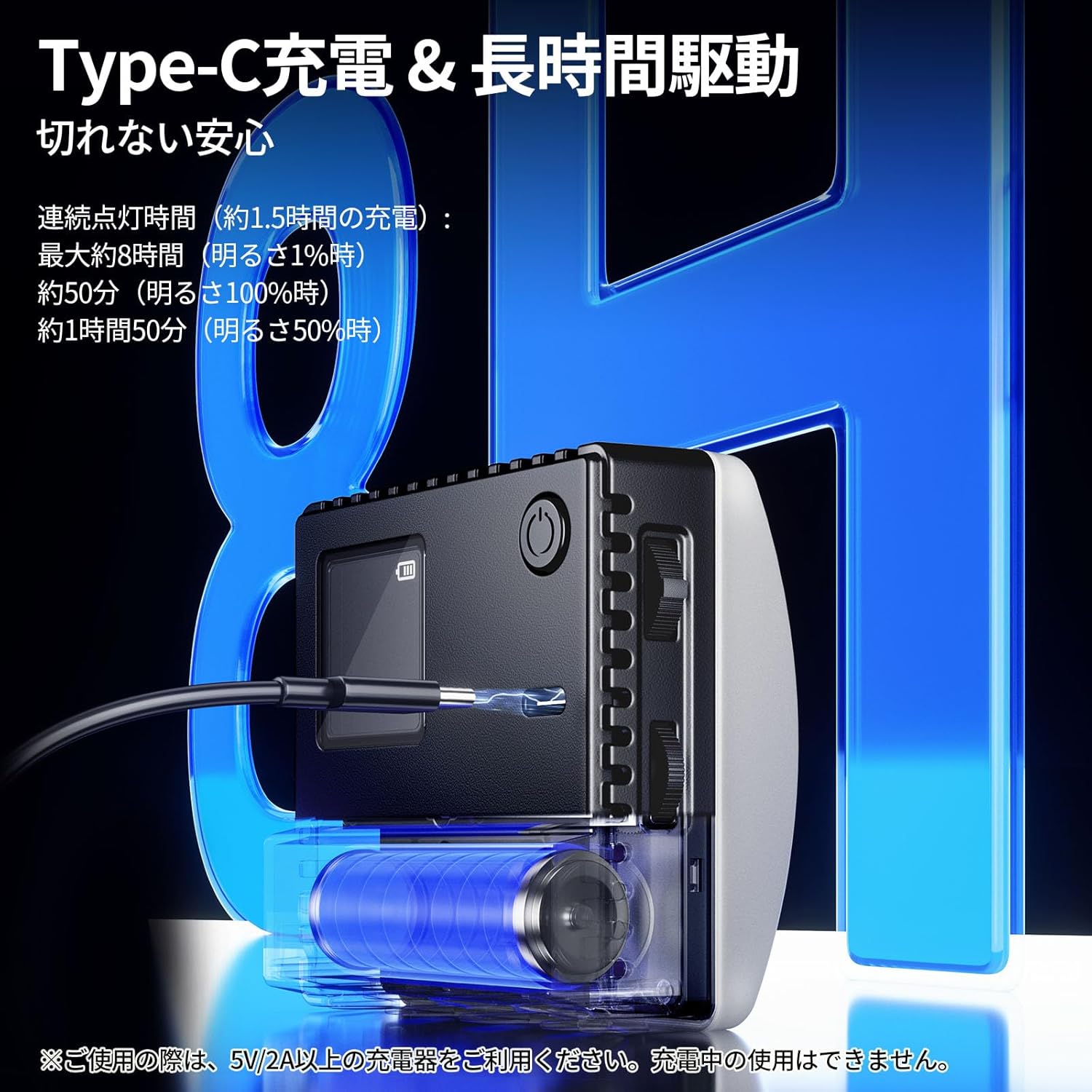
The C10 features a Type-C charging port and a 3300mAh large-capacity battery. A full charge takes approximately 1.5 hours (with a 5V/2A charger). It provides up to 8 hours of continuous use at 1% brightness, 50 minutes at 100% brightness, and 1 hour 50 minutes at 50% brightness. This ensures reliable power for extended shooting sessions.
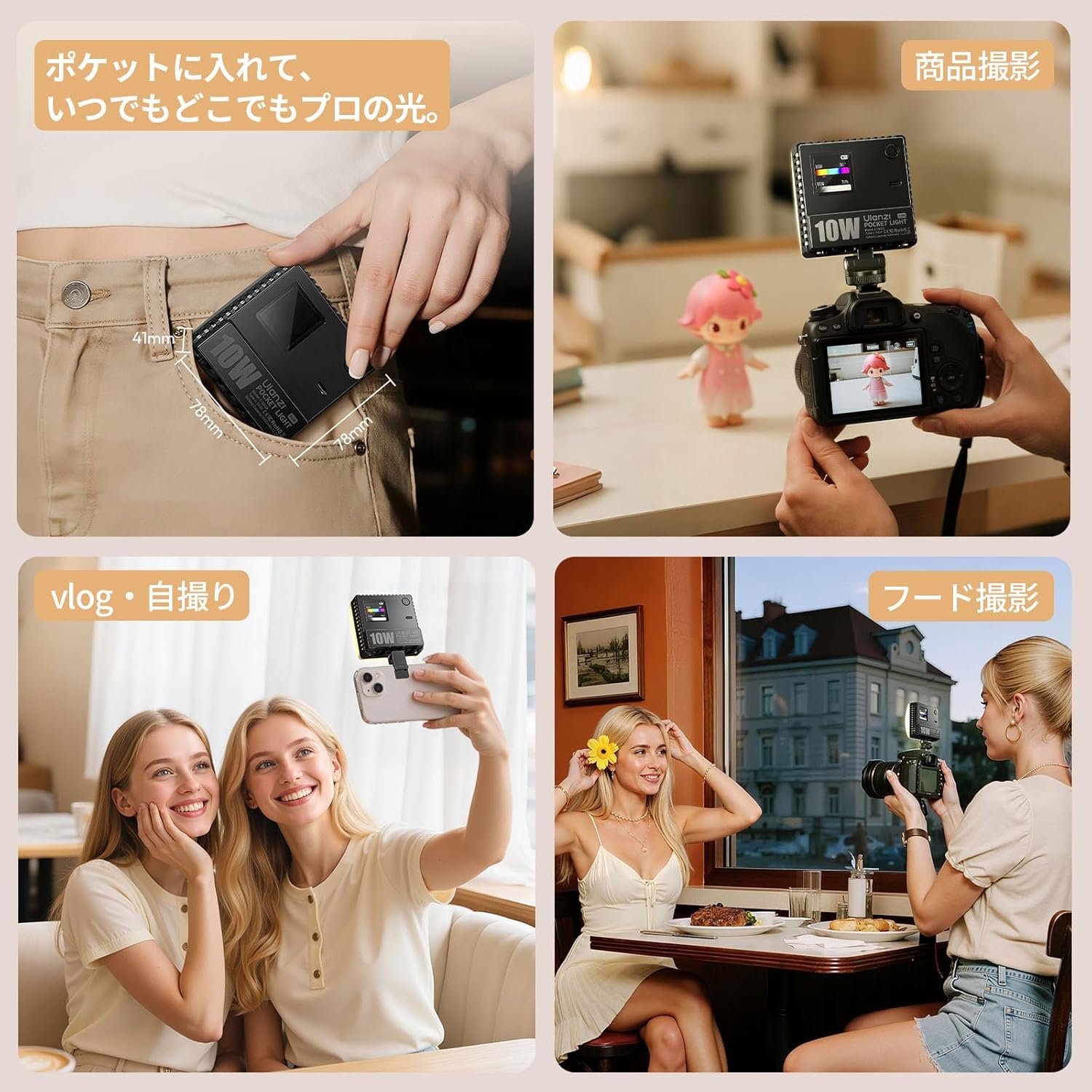
Image: Diagram illustrating the Type-C charging and estimated battery life at different brightness levels.
4. ማዋቀር
- ማሸግ ፦ ሁሉንም ንጥረ ነገሮች ከማሸጊያው ውስጥ በጥንቃቄ ያስወግዱ.
- ክፍያ፡ Before first use, fully charge the device using the provided Type-C cable and a 5V/2A or higher charger. The indicator light will show charging status.
- Attach Diffuser (Optional): For softer light, attach the magnetic diffuser to the front of the light panel.
- መጫን፡
- ዘመናዊ ስልክ፡ Use the smartphone clip to attach the light to your phone.
- Camera/Tripod: Attach the cold shoe adapter to the 1/4-inch screw hole on the light, then mount it onto your camera's hot shoe or a tripod.
5. የአሠራር መመሪያዎች
The Ulanzi C10 features intuitive controls for easy operation.
5.1. ማብራት / ማጥፋት
Press and hold the power button located on the side of the unit to turn the light on or off.
5.2. ሁነታ ምርጫ
Short press the power button to cycle through the main lighting modes: CCT Mode, RGB Mode, and Scene Mode. The current mode will be displayed on the 1.44-inch LCD screen.
5.3. ቅንብሮችን ማስተካከል
Use the two control dials on the side of the unit to adjust parameters within each mode:
- CCT ሁነታ፡-
- Rotate one dial to adjust የቀለም ሙቀት (1800K-9000K).
- Rotate the other dial to adjust ብሩህነት (0% -100%)
- RGB ሁነታ፡
- Rotate one dial to adjust ሁ (0°-359°).
- Rotate the other dial to adjust ብሩህነት (0% -100%)
- የትዕይንት ሁነታ ፦
- Rotate one dial to select from the 20 built-in scene effects.
- Rotate the other dial to adjust the ብሩህነት or other specific parameters for the selected effect.
6. ጥገና
- መሳሪያውን ደረቅ ያድርጉት. ለእርጥበት ወይም ለዝናብ አያጋልጡት.
- Clean the light panel and screen with a soft, dry cloth. Avoid using harsh chemicals or abrasive materials.
- መሳሪያውን በቀጥታ ከፀሀይ ብርሀን እና ከከፍተኛ ሙቀት ርቆ በቀዝቃዛና ደረቅ ቦታ ያከማቹ።
- መሳሪያውን ለጠንካራ ተጽእኖዎች ከመጣል ወይም ከማስገዛት ተቆጠብ።
7. መላ መፈለግ
| ችግር | ሊሆን የሚችል ምክንያት | መፍትሄ |
|---|---|---|
| መብራት አይበራም ፡፡ | ዝቅተኛ ባትሪ ወይም ኃይል የለም. | Charge the device using the Type-C cable. Ensure the charger is 5V/2A or higher. |
| Cannot adjust settings. | Incorrect mode selected or controls are locked. | Ensure you are in the correct mode. Refer to Section 5.3 for specific mode adjustments. Try restarting the device. |
| Light output is weak. | የብሩህነት ቅንብር ዝቅተኛ ነው ወይም ባትሪው ዝቅተኛ ነው። | Increase brightness using the control dial. Recharge the battery if low. |
| መሣሪያው ከመጠን በላይ ይሞቃል። | Prolonged use at high brightness. | Reduce brightness or turn off the device to allow it to cool down. Ensure proper ventilation. |
8. ዝርዝሮች
| ባህሪ | ዝርዝር |
|---|---|
| ሞዴል | C10 RGB |
| Dimensions (Light Unit) | 78 x 78 x 26 ሚ.ሜ |
| Dimensions (with Diffuser) | 78 x 78 x 41 ሚ.ሜ |
| ክብደት | በግምት. 120 ግ |
| የቀለም አቀራረብ መረጃ ጠቋሚ (ሲአርአይ) | ≥93 |
| የቀለም ሙቀት ክልል | 1800 ኪ - 9000 ኪ |
| የሂዩ ማስተካከያ | 0 ° - 359 ° |
| አብርሆት | ≈1120 Lux @ 9000K, 0.5m |
| የብሩህነት ማስተካከያ | 0% - 100% (ስቴፕለስ) |
| Continuous Lighting Time (Max Brightness) | በግምት. 50 ደቂቃዎች |
| Continuous Lighting Time (Min Brightness) | በግምት. 480 ደቂቃዎች |
| የጨረር አንግል | 120° |
| የኃይል ፍጆታ | 10 ዋ |
| ኦፕሬቲንግ ቁtage | 3.7 ቪ |
| የባትሪ አቅም | 3300mAh |
| የኃይል መሙያ ወደብ | ዓይነት-C |
| የኃይል መሙያ ጊዜ | በግምት 1.5 ሰዓታት (ከ5V/2A ቻርጀር ጋር) |
| ማሳያ | LCD ማያ |
| የመጫኛ አማራጮች | 1/4-inch screw hole, Cold Shoe, Smartphone Clip |
9. ዋስትና እና ድጋፍ
For warranty information and technical support, please refer to the official Ulanzi webጣቢያ ወይም የአካባቢዎን አከፋፋይ ያነጋግሩ። ለዋስትና ጥያቄዎች የግዢ ደረሰኝዎን ያስቀምጡ።


