መግቢያ
The Havit H2015PRO is a versatile gaming headset designed for multi-platform compatibility and immersive audio experiences. Featuring five distinct connection modes, this headset offers flexibility for various gaming setups and entertainment needs. It delivers high-fidelity sound with 360° spatial audio and low latency, ensuring a competitive edge in gaming. This manual provides essential information for setting up, operating, maintaining, and troubleshooting your Havit H2015PRO headset.
ምርት አልቋልview
The Havit H2015PRO headset includes the following components:
- Havit H2015PRO Gaming Headset
- ሊፈታ የሚችል ማይክሮፎን
- 2.4 GHz USB Wireless Dongle
- የዩኤስቢ-ሲ ኃይል መሙያ ገመድ
- 3.5 ሚሜ የድምጽ ገመድ
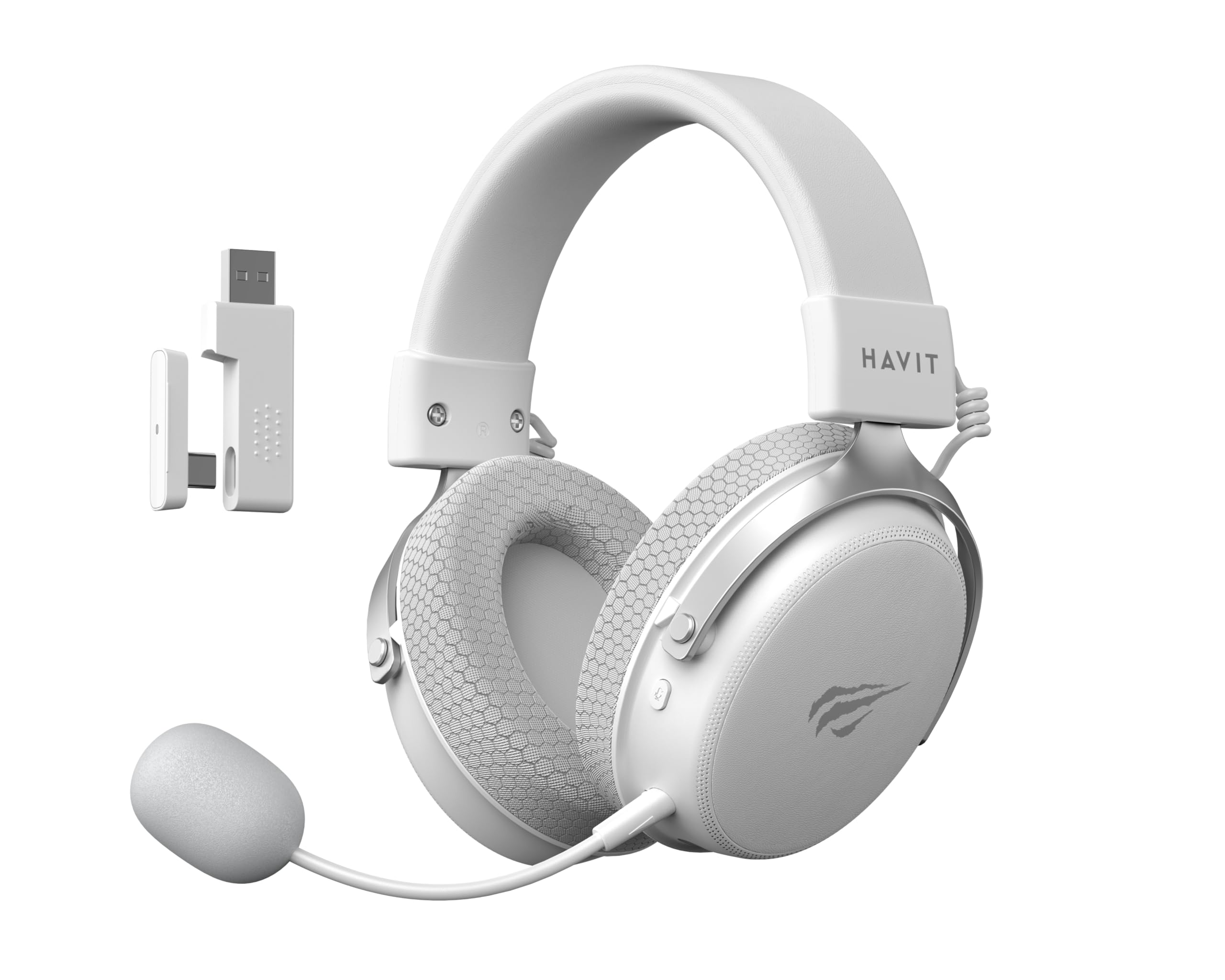
Image: The Havit H2015PRO headset in white, showcasing the main unit, detachable microphone, and the 2.4 GHz USB wireless dongle. This image provides a clear view of the primary components included with the product.
ማዋቀር
The Havit H2015PRO offers five connectivity options to suit various devices and preferences.
1. 2.4 GHz Wireless Connection (USB Dongle)
- Insert the 2.4 GHz USB wireless dongle into an available USB port on your PC, PlayStation, or Nintendo Switch (in docked mode).
- የጆሮ ማዳመጫውን ያብሩ። የጆሮ ማዳመጫው በራስ-ሰር ከዶንግል ጋር መገናኘት አለበት።
- በስርዓት ቅንብሮችዎ ውስጥ የጆሮ ማዳመጫው እንደ የድምጽ ውፅዓት እና የግቤት መሣሪያ መመረጡን ያረጋግጡ።
2. የብሉቱዝ ግንኙነት
- Power on the headset and switch it to Bluetooth mode (refer to the headset controls for mode selection).
- On your device (smartphone, tablet, PC with Bluetooth), go to Bluetooth settings and enable Bluetooth.
- Select "Havit H2015PRO" from the list of available devices to pair.
3. ባለገመድ ግንኙነት (3.5ሚሜ የድምጽ ገመድ)
- የ3.5ሚሜ የድምጽ ገመድ አንዱን ጫፍ ከጆሮ ማዳመጫው 3.5ሚሜ ወደብ ጋር ያገናኙ።
- Connect the other end to the 3.5mm audio jack on your PC, console controller, or mobile device.
- This mode does not require the headset to be powered on.
4. Wired Connection (USB-C Cable)
- Connect the USB-C cable to the headset's USB-C port.
- Connect the other end to a compatible USB-C port on your PC or device.
- This connection can be used for both audio and charging.

ምስል፡ አንግል view of the Havit H2015PRO headset, highlighting the earcups, headband, and visible controls on the side. This perspective helps in identifying connection ports and buttons.
የአሠራር መመሪያዎች
ኃይል አብራ/ አጥፋ
- ለማብራት ጠቋሚ መብራቱ እስኪበራ ድረስ የኃይል ቁልፉን ተጭነው ይያዙ።
- ኃይልን ለማጥፋት ጠቋሚው መብራቱ እስኪጠፋ ድረስ የኃይል ቁልፉን ተጭነው ይያዙ።
የድምጽ መቆጣጠሪያ
- Use the volume roller or buttons located on the earcup to adjust the audio level.
የማይክሮፎን አጠቃቀም
- ሊላቀቅ የሚችለውን ማይክሮፎን በጆሮ ማዳመጫው ላይ ከተጠቀሰው ወደብ ጋር ያያይዙት።
- Adjust the microphone's flexible arm for optimal voice pickup.
- Use the microphone mute button (if available) on the headset to toggle mute on/off.
የጆሮ ማዳመጫውን መሙላት
- Connect the USB-C charging cable to the headset's USB-C port and the other end to a USB power source.
- The indicator light will show charging status (e.g., red for charging, off or green for fully charged).
- ሙሉ ክፍያ በተለምዶ ከ2-3 ሰአታት ይወስዳል።
ጥገና
Proper care ensures the longevity and performance of your Havit H2015PRO headset.
- ማጽዳት፡ የጆሮ ማዳመጫውን ለመጥረግ ለስላሳ እና ደረቅ ጨርቅ ይጠቀሙ። የጆሮ ማዳመጫውን ለመጥረግ፣ ትንሽamp ለስላሳ ሳሙና ያለው ጨርቅ መጠቀም ይቻላል፣ ነገር ግን እርጥበት ወደ ድምጽ ማጉያው ፍርግርግ ውስጥ እንዳይገባ ያረጋግጡ።
- ማከማቻ፡ የጆሮ ማዳመጫውን በቀጥታ ከፀሀይ ብርሀን እና ከከፍተኛ ሙቀት ርቆ በቀዝቃዛና ደረቅ ቦታ ያከማቹ።
- የባትሪ እንክብካቤ የባትሪ ዕድሜን ለመጠበቅ የጆሮ ማዳመጫውን በተደጋጋሚ ሙሉ በሙሉ ከመሙላት ይቆጠቡ። ለረጅም ጊዜ ጥቅም ላይ ባይውልም እንኳ በመደበኛነት ኃይል ይሙሉት።
- ፈሳሾችን ያስወግዱ; Do not expose the headset to water or other liquids, as it is not water-resistant.
መላ መፈለግ
If you encounter issues with your Havit H2015PRO headset, refer to the following common solutions:
| ችግር | መፍትሄ |
|---|---|
| ከጆሮ ማዳመጫ ምንም ድምፅ የለም። |
|
| ማይክሮፎን አይሰራም |
|
| የጆሮ ማዳመጫው ገመድ አልባ በሆነ መንገድ እየተገናኘ አይደለም |
|
| የመሙላት ጉዳዮች |
|
ዝርዝሮች
Detailed technical specifications for the Havit H2015PRO headset:
- የሞዴል ስም፡- HAVIT H2015PRO
- የግንኙነት ቴክኖሎጂ; Hybrid (2.4 GHz Wireless, Bluetooth, 3.5mm Jack, USB-C)
- የአሽከርካሪ መጠን፡ 53 ሚ.ሜ
- ጫና፡ 64 ኦኤም
- የድግግሞሽ ምላሽ፡ 20.2 Hz (Specific value provided, typical range is 20Hz-20kHz)
- የባትሪ አቅም፡- 1500 ሚአሰ
- ዝቅተኛ መዘግየት፡ 24 ሚሴ
- የድምጽ ባህሪያት: 360° Spatial Audio, Virtual 7.1 Surround Sound
- ማይክሮፎን ሊወገድ የሚችል እና ሊስተካከል የሚችል
- የቁጥጥር አይነት፡ Integrated (Touch controls)
- ቁሳቁስ፡ ፕላስቲክ
- የምርት ክብደት: 500 ግራም
- ተኳኋኝነት Desktops, PC, PlayStation, Xbox, Nintendo Switch, Mobile Devices
- የውሃ መቋቋም ደረጃ; ውሃን የማይቋቋም

ምስል፡ የፊት ገጽታ view of the Havit H2015PRO headset, clearly showing the earcups, headband, and the attached microphone. This view emphasizes the ergonomic design and microphone placement.
ዋስትና እና ድጋፍ
የዋስትና መረጃ
The Havit H2015PRO headset comes with a የ 1 ዓመት የአምራች ዋስትና. ይህ ዋስትና በመደበኛ አጠቃቀም ላይ የቁሳቁሶች እና የአሠራር ጉድለቶችን ይሸፍናል ። ለዋስትና ጥያቄዎች እባክዎ የግዢ ማረጋገጫዎን ያቆዩ።
የደንበኛ ድጋፍ
For technical assistance, warranty claims, or further inquiries, please contact Havit customer support through their official website or the retailer where the product was purchased. Provide your product model number (H2015PRO) and proof of purchase when seeking support.


