
Logitech X Pro Superlight Mouse Setup መመሪያ
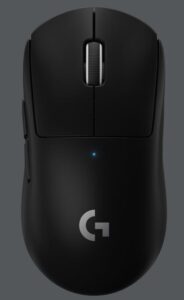
የጥቅል ይዘቶች
- አይጥ
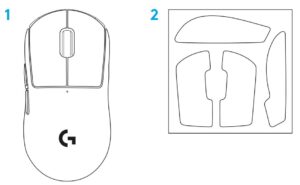
- አማራጭ የማጣበቂያ ቴፕ
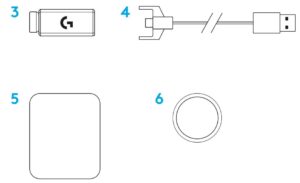
- ተቀባዩ (በቅጥያ አስማሚ ውስጥ ተጭኗል)
- የዩኤስቢ ኃይል መሙላት እና የውሂብ ገመድ
- የወለል ዝግጅት ጨርቅ
- አማራጭ POWERPLAY የመክፈቻ በር ከ PTFE እግር ጋር
የመዳፊት ባህሪያት
- ግራ ጠቅ ያድርጉ
- በቀኝ ጠቅ ያድርጉ
- መካከለኛ ጠቅታ / ሸብልል
- አሳሽን አስተላልፍ
- አሳሽ ተመለስ
- የኃይል LED
- የዩኤስቢ ኃይል መሙላት / የውሂብ ወደብ
- ማብራት / ማጥፋት
- OWERPLPLAY ™ የመክፈቻ በር


ማዋቀር
- የኃይል መሙያ / የመረጃ ገመድ በፒሲ ውስጥ ይሰኩ ፣ ከዚያ የኤክስቴንሽን አስማሚ እና ተቀባይን ወደ ባትሪ መሙያ / የውሂብ ገመድ ይሰኩ
- መዳፊትን ያብሩ


- እንደ ዲ ፒ አይ ያሉ የመዳፊት ቅንብሮችን ለማዋቀር የ G HUB ሶፍትዌርን ከ logitechG.com/GHUB ያውርዱ


ለተሻለ ገመድ አልባ አፈፃፀም ፣ ከተቀባዩ በ 20 ሴ.ሜ ውስጥ እና ከ 2 ጊኸር ጣልቃ ገብነት ምንጮች (እንደ wifi ራውተሮች ያሉ) ከ 2.4 ሜትር በላይ አይጤን ይጠቀሙ ፡፡

አማራጭ የማጣበቂያ ቴፕ ለመጫን በመጀመሪያ ማንኛውንም ዘይት ወይም አቧራ ለማስወገድ በቀረበው የወለል ዝግጅት ጨርቅ የመዳፊት ንፁህ ንጣፍ ፡፡ ከዚያ ፣ የሚይዙትን ቴፕ በመዳፊት ቦታዎች ላይ በጥንቃቄ ያስተካክሉ።

የዩኤስቢ መቀበያ የ POWERPLAY ቀዳዳ በር በማስወገድ በመዳፊት ውስጥ ሊቀመጥ ይችላል ፡፡ ይህ አይጤውን ከሎጊቴክ ጂ ፓውአርፓይ ገመድ አልባ የኃይል መሙያ ስርዓት ጋር ሲጠቀም እንዳይጠፋ ሊያደርግ ይችላል ፡፡
ይህንን በር ማንሳት እንዲሁ ከ PTFE እግር ጋር የተካተተውን አማራጭ የመክፈቻ በር ከነባሪ ክፍት በር ፋንታ እንዲጭን ያስችለዋል ፡፡


©2020 Logitech. ሎጌቴክ፣ ሎጊቴክ ጂ፣ ሎጊ እና የየራሳቸው አርማዎች የንግድ ምልክቶች ወይም የተመዘገቡ የንግድ ምልክቶች የሎጌቴክ አውሮፓ ኤስኤ እና/ወይም በአሜሪካ እና በሌሎች ሀገራት ያሉ ተባባሪዎቹ ናቸው። ሁሉም ሌሎች የንግድ ምልክቶች የየባለቤቶቻቸው ንብረት ናቸው። ሎጊቴክ በዚህ ማኑዋል ውስጥ ለሚታዩ ስህተቶች ምንም አይነት ሃላፊነት አይወስድም። በዚህ ውስጥ ያለው መረጃ ያለማሳወቂያ ሊለወጥ ይችላል.
ስለዚህ የተጠቃሚ መመሪያ የበለጠ ያንብቡ…
ሎጊቴች-ኤክስ-ፕሮ-ሱፐርላይት-አይጥ-ማዋቀር-መመሪያ-Optimized.pdf
Logitech-X-Pro-Superlight-Mouse-ማዋቀር-መመሪያ-ኦርጅናል.pdf
ስለ መመሪያዎ ጥያቄዎች? በአስተያየቶቹ ውስጥ ይለጥፉ!
ዋቢዎች
- የተጠቃሚ መመሪያmanual.tools
His last update bugged my mouse and it only works with wire now what do I do? help me porfv already sent to support no one responds
A ultima atualização dele bugou meu mouse e ele só funciona com fio agora oq eu faço? me ajudem porfv ja mandei no suporte ninguem responde
A ultima atualização dele bugou meu mouse e ele só funciona com fio agora oq eu faço? me ajudem porfv ja mandei no suporte ninguem responde
My Logitech G Pro X Superlight only works when wired after a firmware update. How can I fix the wireless connection?
If your Logitech G Pro X Superlight stopped working wirelessly after an update, it is likely that the mouse and the USB receiver have become unpaired. Follow these steps to restore the connection:
Read the full Q&A page
Добрый день, у это мыши есть подсветка?
Does this mouse have backlighting?
አይደለም፣ የ Logitech G Pro X Superlight does not have RGB backlighting. To achieve its ultra-lightweight design (under 63 grams), Logitech removed the illuminated "G" logo found on the standard Pro Wireless model.
The only light on the mouse is a small የኃይል LED indicator on the top, which is used to show battery status and DPI changes, but it does not function as decorative lighting.
Read the full Q&A page